Quick Answer: Is Rackspace Email Worth It?
Rackspace Email is worth it if you already use Rackspace or only need basic hosted business email with webmail, mobile access, and IMAP/SMTP setup. But if you are starting fresh in 2026, Google Workspace, Microsoft 365, Zoho Mail, or Fastmail may offer better value because Rackspace Email pricing has increased and collaboration features are more limited.
If you are comparing Rackspace Email with other mailbox providers, also read our Fastmail review, Proton Mail review, and Microsoft Outlook review before choosing a provider.
What Is Rackspace Email?
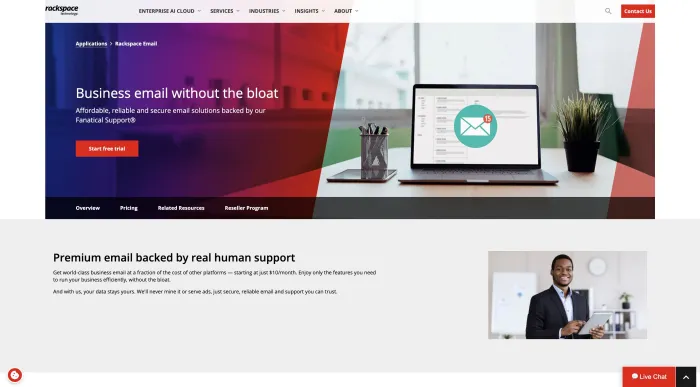
Rackspace Email is a hosted email service for businesses. It gives users business email mailboxes, webmail access, mobile access, and the ability to connect email clients like Outlook, Apple Mail, Thunderbird, iPhone Mail, or Android mail apps using server settings.
It is different from Microsoft 365 and Google Workspace because Rackspace Email is mainly focused on hosted email rather than a full office productivity suite. Google Workspace includes Gmail, Google Drive, Docs, Sheets, Meet, and Calendar. Microsoft 365 includes Outlook, Teams, OneDrive, Word, Excel, PowerPoint, and business collaboration tools.
Rackspace Email is usually more relevant for users who want business email hosting without needing the full productivity platform.
What Is Rackspace Email Used For?
Rackspace Email is used for business email hosting, custom domain email, webmail access, mobile email, and desktop email client setup.
| Use Case | How Rackspace Email Helps |
|---|---|
| Business email | Creates custom domain email addresses for teams and companies. |
| Webmail access | Lets users access email through a browser without Outlook or Apple Mail. |
| Mobile email | Can be configured on iPhone, Android, and mobile mail apps. |
| Desktop clients | Works with Outlook, Apple Mail, Thunderbird, and IMAP/SMTP clients. |
| Archiving | Optional add-on for retention, compliance, and mailbox history. |
| Reseller workflows | Useful for agencies or hosting providers already managing Rackspace email accounts. |
Rackspace Email Login and Webmail
The SERP clearly shows that login intent is very strong. Ranking results include Rackspace Email, Webmail Mobile, Webmail Login, Rackspace Login, and Log In & Support pages.
This means many searchers are not looking to buy Rackspace Email. They are trying to access their inbox.
The main login-related searches include Rackspace email login, Rackspace webmail, Rackspace webmail login, Rackspace webmail login mobile, email.rackspace.com login, apps.rackspace.com, Rackspace login, and Rackspace mobile webmail.
If your main goal is only to access a business email inbox, our Bizmail login guide may also help because it explains common business webmail login issues, password problems, and safe sign-in habits.
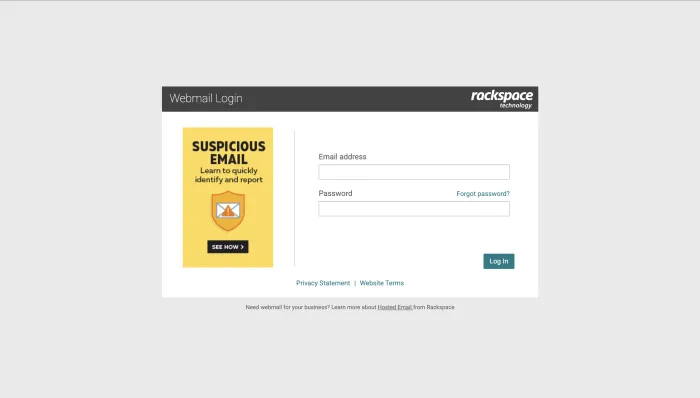
Rackspace Webmail Safety Tips
- Use only the official Rackspace login or webmail page.
- Do not click suspicious email links claiming to be Rackspace.
- Bookmark the official login page.
- Use a strong password.
- Enable two-factor authentication if available.
- Avoid logging in from shared or public devices.
- Confirm the domain before entering your password.
- Watch for fake “mailbox full,” “password expired,” or “upgrade required” emails.
Rackspace Email Login Problems and Common Fixes
Login issues are common with business webmail because users may be dealing with password resets, expired sessions, incorrect portals, DNS issues, mailbox suspension, or browser problems.
| Problem | Possible Fix |
|---|---|
| Username or password incorrect | Confirm the full email address is used as the username and reset the mailbox password if needed. |
| Wrong login page | Use the official Rackspace webmail or account login page provided by Rackspace or your admin. |
| Mailbox not loading | Clear browser cache, try another browser, check status/support updates, and test mobile access. |
| Email client works but webmail does not | Check browser, account status, password, and admin restrictions. |
| Webmail works but Outlook/iPhone does not | Review IMAP/SMTP settings, SSL/TLS, ports, and folder sync settings. |
Rackspace Email Server Settings for Outlook, iPhone and Android
Rackspace also has mobile webmail and mobile setup support in the SERP. Users may access email through a browser or configure Rackspace Email on iPhone, Android, Outlook, Apple Mail, Thunderbird, or another email client.
Common setup areas include incoming mail server, outgoing mail server, username, password, SSL/TLS settings, ports, device type, and folder sync behavior.
How to Add Rackspace Email to iPhone
A general iPhone setup flow looks like this:
- Open iPhone Settings.
- Go to Mail.
- Choose Accounts.
- Tap Add Account.
- Choose Other if Rackspace is not listed.
- Add your email address and password.
- Enter IMAP and SMTP details if required.
- Save the account.
- Test sending and receiving.
- Confirm Sent and Deleted folders sync properly.
Rackspace Email Pricing in 2026
Rackspace Email pricing is one of the most important parts of the article because the SERP includes “rackspace email hosting pricing” and questions like “how much does Rackspace Email cost?”
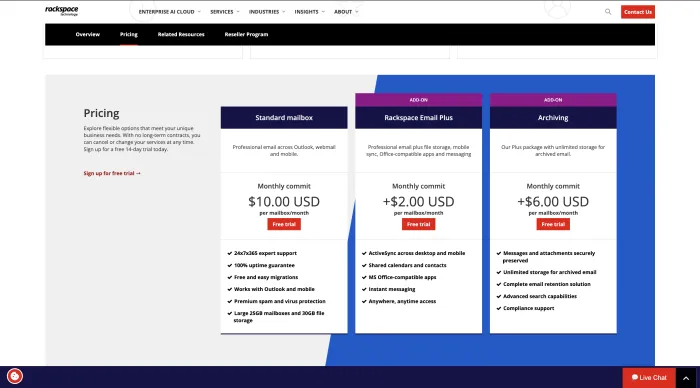
| Plan / Add-On | What It Is For | Buyer Note |
|---|---|---|
| Rackspace Email | Basic hosted business email with webmail, mobile, and email client access. | Compare carefully against Google Workspace, Microsoft 365, Zoho Mail, and Fastmail. |
| Email Plus | Adds more productivity-style features such as file storage and office-compatible tools. | Check whether the add-on cost makes Google or Microsoft a better value. |
| Archiving | Helps with retention, mailbox history, compliance, and discovery needs. | Useful for regulated businesses, but it increases total monthly cost. |
Rackspace Email Price Increase
The 2026 price increase is one of the biggest buyer concerns around Rackspace Email. Many users remember Rackspace Email as a lower-cost hosted mailbox option, so new pricing can feel very different from older expectations.
That matters because once Rackspace Email pricing gets close to larger productivity suites, the value question changes. Businesses are no longer comparing only mailbox cost. They are comparing Rackspace Email against Gmail, Outlook, cloud storage, document collaboration, meetings, calendars, admin controls, and security features.
Rackspace Email Pricing vs Google Workspace vs Microsoft 365
| Option | Best For | Main Advantage | Main Limitation |
|---|---|---|---|
| Rackspace Email | Basic hosted email | Simple business email hosting with webmail and IMAP/SMTP support. | Limited collaboration compared with Google and Microsoft. |
| Google Workspace | Gmail + collaboration | Gmail, Drive, Docs, Sheets, Meet, and strong team tools. | May not suit users avoiding Google ecosystem. |
| Microsoft 365 | Outlook + Office | Outlook, Exchange Online, Teams, OneDrive, Word, Excel, PowerPoint. | Can feel more complex for small teams. |
Rackspace Email Features
Rackspace Email is focused on business email hosting. Its feature set is more mailbox-centered than collaboration-centered.
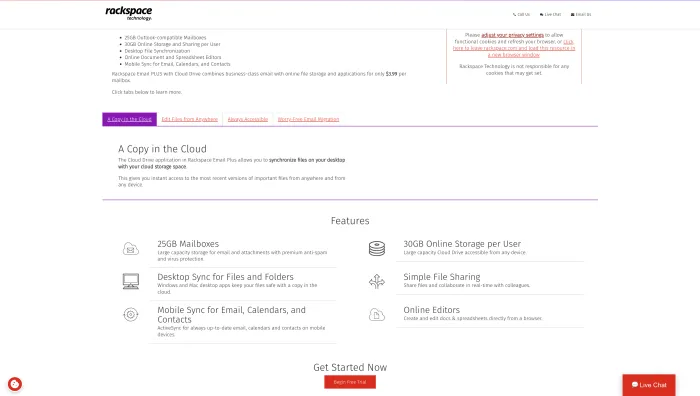
- Business email hosting
- Custom domain email
- Webmail access
- Mobile webmail
- Outlook support
- Apple Mail support
- IMAP/SMTP setup
- Spam and virus filtering
- Email Plus add-on
- Archiving add-on
- File storage add-on
- Setup assistant
- Email client configuration
If your main problem is not hosting but inbox overload, spam, newsletters, or mailbox cleanup, read our Clean Email review. It is more relevant for inbox management than email hosting.
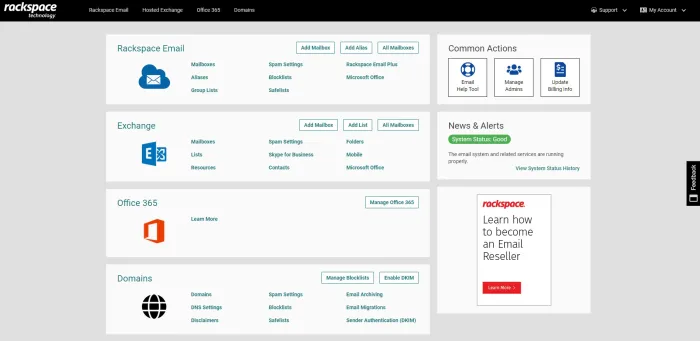
Rackspace Email Dashboard
The Rackspace dashboard is important for admins because this is where mailbox management, setup, billing, account support, and user-level configuration may happen depending on the account type.
Rackspace Email Inbox
The inbox experience matters because many users search for Rackspace webmail and Rackspace email login. If users rely on browser-based email daily, the webmail interface is as important as server reliability.
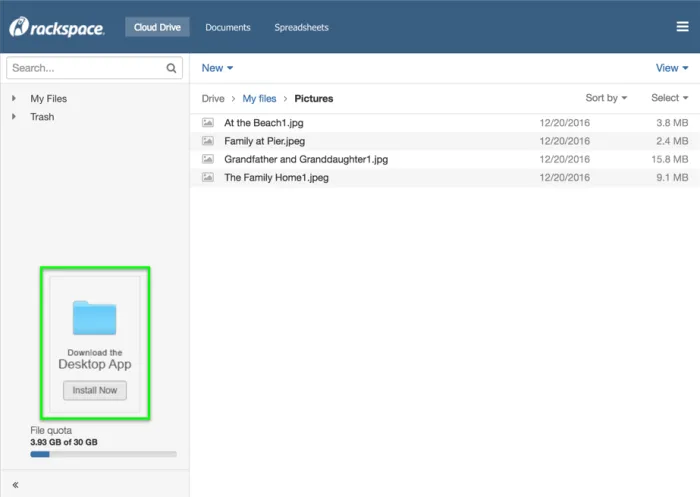
Rackspace Email Plus
Rackspace Email Plus is an add-on that expands Rackspace Email beyond a basic mailbox. It may be useful if you want additional productivity-style features but do not want to move to Microsoft 365 or Google Workspace.
Rackspace Email Archiving
Rackspace Email Archiving is an add-on for businesses that need retention, compliance, or mailbox history protection. Archiving may matter for legal compliance, regulated industries, internal audits, data retention, discovery requests, and business continuity.
Customer Review Patterns
Customer reviews make this article much stronger because official Rackspace pages mostly capture login and product intent, not buyer confidence.
Recent customer review patterns show a mixed but cautious picture. Some long-term users have historically liked Rackspace Email for basic hosted email, webmail access, familiar setup, and reseller workflows. However, recent complaints focus more on customer support, outages, interface quality, phishing references, and price increases.
Positive Review Themes
- Familiar hosted email service
- Webmail access
- Works with Outlook and mobile clients
- Longtime users may already understand the system
- Some users historically reported helpful support
- Useful for businesses that do not need full Google or Microsoft suites
- Resellers and agencies may already have Rackspace workflows
- Setup documentation is available
Negative Review Themes
- Customer service frustration
- Pricing increase concerns
- Webmail/interface complaints
- Outage concerns
- Phishing emails referencing Rackspace
- Migration discussions after pricing changes
- Hosted Exchange outage memory
- Less value compared with Google Workspace or Microsoft 365
- Confusion around login, setup, and support pages
Rackspace Hosted Exchange Outage: Why It Still Matters
Any Rackspace Email review should mention the 2022 Hosted Exchange incident carefully because it affected buyer trust.
In December 2022, Rackspace confirmed that a ransomware attack caused an ongoing Hosted Exchange outage, leaving some customers without access to email. This incident was specifically about Hosted Exchange, not necessarily every Rackspace Email mailbox product.
Still, from a buyer perspective, it matters because business email trust depends heavily on uptime, incident response, communication, and recovery planning.
Is Rackspace Email Down?
The question data includes “is Rackspace Email down,” which means users search for outage status.
If Rackspace Email is not loading, users should check:
- Official Rackspace status updates
- Rackspace support pages
- Webmail login page
- DNS records
- Email client settings
- Password/authentication status
- Domain expiration
- MX records
- Local internet connection
- Email client sync errors
- Mobile mail app configuration
Rackspace Email Pros and Cons
Rackspace Email Pros
- Simple hosted business email
- Webmail and mobile access
- Works with Outlook, Apple Mail, iPhone, Android, and IMAP clients
- Setup documentation is available
- Email Plus and Archiving add-ons are available
- Familiar option for Rackspace users and resellers
- Good for basic mailbox hosting
- Can work for small businesses with simple needs
Rackspace Email Cons
- 2026 pricing is much higher than older expectations
- Less feature-rich than Google Workspace or Microsoft 365
- Customer review snippets show support and outage complaints
- Hosted Exchange ransomware outage hurt trust
- Add-ons increase total cost quickly
- Interface may feel dated compared with Gmail or Outlook
- Not ideal for teams needing collaboration tools
- Pricing value is weaker for new buyers
Rackspace Email Comparisons
Rackspace Email vs Google Workspace
| Feature | Rackspace Email | Google Workspace |
|---|---|---|
| Best for | Basic hosted business email | Full business productivity suite |
| Email interface | Rackspace webmail | Gmail |
| Collaboration | Limited | Docs, Sheets, Drive, Meet, Chat |
| Best user | Basic mailbox user | Teams needing productivity tools |
Rackspace Email vs Microsoft 365
Rackspace Email is simpler, but Microsoft 365 is better for Outlook, Exchange Online, Teams, OneDrive, Word, Excel, PowerPoint, SharePoint, and business productivity.
If your team is already using Outlook or Microsoft accounts, our Microsoft Outlook review explains the strengths and weaknesses of Outlook from an email reliability and automation perspective.
Rackspace Email vs Zoho Mail
Zoho Mail may be a better fit for small businesses looking for affordable hosted email with business features. Zoho also offers a larger business app ecosystem.
Rackspace Email vs Fastmail
Fastmail is a polished paid email provider known for speed, custom domains, and a clean email experience. It may be a better option for users who want paid email without Google or Microsoft.
For a deeper comparison of Fastmail as a modern paid mailbox provider, see our full Fastmail review.
Best Rackspace Email Alternatives
Rackspace Email is mainly a hosted mailbox provider. If you need privacy-first email, compare it with our Proton Mail review and Mailfence review. If you need transactional email infrastructure instead of normal mailbox hosting, compare Mailgun and Forward Email.
Google Workspace
Best for businesses that want Gmail, Google Drive, Docs, Sheets, Calendar, Meet, and strong team collaboration.
Microsoft 365
Best for businesses that want Outlook, Exchange Online, Teams, OneDrive, Word, Excel, and PowerPoint.
Zoho Mail
Best for small businesses looking for affordable custom domain email and business apps.
Fastmail
Best for users who want a polished paid email service with custom domains and strong mailbox experience.
Greatmail
Best for businesses looking for hosted email and Rackspace-style email alternatives.
Proton Mail Business
Best for privacy-focused businesses that want encrypted email and stronger privacy positioning.
Namecheap Private Email
Best for budget-friendly email hosting tied to domain management.
MXroute
Best for technically comfortable users who want affordable email hosting and understand DNS setup.
Should You Stay With Rackspace Email or Migrate?
You should stay with Rackspace Email if your current setup works, your team is comfortable with the webmail and client configuration, and the new pricing still makes sense for your business.
You should consider migrating if the price increase makes Rackspace Email too close to Google Workspace or Microsoft 365, or if you want better collaboration tools, better interface quality, stronger productivity features, or more modern admin controls.
Rackspace Email Migration Checklist
| Migration Step | Why It Matters |
|---|---|
| Export mailbox data | Preserve old emails before switching. |
| Check DNS access | You need DNS access to update MX, SPF, DKIM, and DMARC. |
| Choose replacement provider | Compare Google Workspace, Microsoft 365, Zoho, Fastmail, and others. |
| Plan mailbox mapping | Match old addresses to new accounts. |
| Move contacts and calendars | Avoid losing business data. |
| Update devices | Reconfigure iPhone, Outlook, Apple Mail, and Android. |
| Test sending and receiving | Confirm mail flow before cancelling Rackspace. |
| Keep overlap period | Run both systems briefly to avoid missed mail. |
Final Score
| Category | Score | Reason |
|---|---|---|
| Webmail Access | 7.4/10 | Easy branded login intent, but interface complaints exist. |
| Basic Email Hosting | 7.2/10 | Good for business mailboxes, IMAP/SMTP, and mobile access. |
| Mobile Setup | 7.1/10 | Supported, but manual setup may confuse non-technical users. |
| Pricing Value | 5.2/10 | Less attractive after 2026 pricing changes. |
| Customer Support Sentiment | 4.8/10 | Recent review patterns show support and service frustration. |
| Reliability Confidence | 5.3/10 | Outage history still affects trust. |
| Overall | 6.3/10 | Usable hosted email, but weaker value for new buyers. |
Final Verdict
Rackspace Email is still a usable hosted email service, especially for businesses that already rely on Rackspace or only need basic custom domain mailboxes with webmail, mobile access, and IMAP/SMTP setup.
But for new buyers, the case is weaker in 2026. Rackspace’s pricing is now much higher than the older low-cost mailbox expectation, while Google Workspace and Microsoft 365 offer stronger productivity ecosystems.
Choose Rackspace Email only if you specifically want Rackspace-hosted business email or already have a Rackspace or reseller setup that works for you. If you are starting fresh, compare Google Workspace, Microsoft 365, Zoho Mail, Fastmail, Greatmail, Proton Mail Business, and Namecheap Private Email before committing.
Rackspace Email FAQs
Rackspace Email is a hosted business email service that provides custom domain mailboxes, webmail, mobile access, and email client setup through IMAP/SMTP.
Rackspace Email is used for business email hosting, custom domain email, webmail access, mobile email, Outlook setup, Apple Mail setup, and small business mailbox management.
Users should log in through the official Rackspace webmail or Rackspace login pages. Avoid suspicious links in emails because business webmail pages are common phishing targets.
Rackspace Webmail is the browser-based interface for accessing Rackspace Email without using Outlook, Apple Mail, or a mobile mail app.
Rackspace Email pricing depends on plan, add-ons, archiving, reseller terms, and account setup. Always check the current pricing page before buying or renewing.
In general, add Rackspace Email through iPhone Settings, Mail, Accounts, Add Account, Other, then enter your email address, password, and IMAP/SMTP settings if needed.
If Rackspace Email is not working, check official status or support pages, webmail login, DNS records, email client settings, password status, MX records, and local internet connection.
Rackspace Email is good for basic hosted business email, but its value is weaker in 2026 because pricing has increased and competitors offer stronger productivity tools.
Rackspace Email may be enough for basic mailbox hosting, but Google Workspace is better for Gmail, Drive, Docs, Meet, Calendar, and team collaboration.
Rackspace Email is simpler, but Microsoft 365 is better for Outlook, Exchange Online, Teams, OneDrive, Word, Excel, and business productivity.
The best Rackspace Email alternatives include Google Workspace, Microsoft 365, Zoho Mail, Fastmail, Greatmail, Proton Mail Business, Namecheap Private Email, and MXroute.
Rackspace Email is worth it if you already use Rackspace or need basic hosted email. It is less worth it if you are starting fresh, need collaboration tools, or want the best mailbox value for the price.