What Is Mailgun?
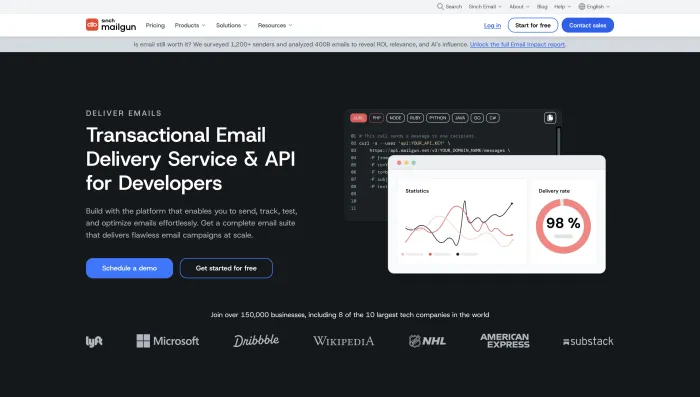
Mailgun is a transactional email API and SMTP service used by developers, SaaS companies, ecommerce platforms, apps, and automation teams to send, receive, track, and manage email programmatically.
Unlike beginner email marketing tools such as Mailchimp, Mailgun is mainly built for technical email infrastructure. It is commonly used for password reset emails, login codes, app notifications, order confirmations, webhook-based workflows, inbound email parsing, and automated system messages.
If you are researching broader email tools, you may also want to compare Mailgun with our best email providers guide, Mailchimp review, and Automatic Email Manager review.
What Is Mailgun Used For?
Mailgun is mostly used for transactional and developer-led email workflows. That means it is not mainly a newsletter design platform. It is better understood as the email engine behind an application or automation system.
| Use Case | How Mailgun Helps |
|---|---|
| Transactional emails | Sends password resets, 2FA codes, account alerts, receipts, and app notifications. |
| SMTP relay | Lets apps and websites send email through Mailgun instead of a standard mailbox provider. |
| Email API | Allows developers to send, track, and manage email using code. |
| Inbound routing | Receives incoming emails and sends parsed data to a webhook, app, or storage workflow. |
| Webhooks | Sends near-real-time event data to your app for opens, clicks, bounces, complaints, unsubscribes, and delivery events. |
| Email automation | Supports AI agents, CRM workflows, helpdesk automation, and backend email routing. |
Mailgun Review 2026: Quick Verdict
Mailgun is a strong tool if your team knows what it is doing. The API is powerful, SMTP setup is flexible, inbound routing is useful, and webhook support makes it practical for automated workflows.
However, Mailgun is not the best choice for every user. If you are a non-technical founder, small business owner, or marketer who only wants to send newsletters, Mailgun may feel too technical. If your business depends on uninterrupted transactional email, you also need to consider support access, dedicated IP needs, compliance review risk, and deliverability monitoring before relying on Mailgun as your only email infrastructure.
| Category | Inboxaly Verdict |
|---|---|
| Best use case | Developer-led transactional email, SMTP relay, inbound routing, and webhook-based automation. |
| Not ideal for | Non-technical users, simple newsletters, or businesses needing guaranteed urgent support on low-tier plans. |
| Biggest strength | Powerful API, flexible SMTP, inbound processing, webhook events, and developer documentation. |
| Biggest weakness | Real-life users report support delays, verification friction, billing concerns, and deliverability issues on shared infrastructure. |
| Best alternative for reliability | Postmark. |
| Best alternative for low-cost scale | Amazon SES. |
Mailgun Pricing in 2026
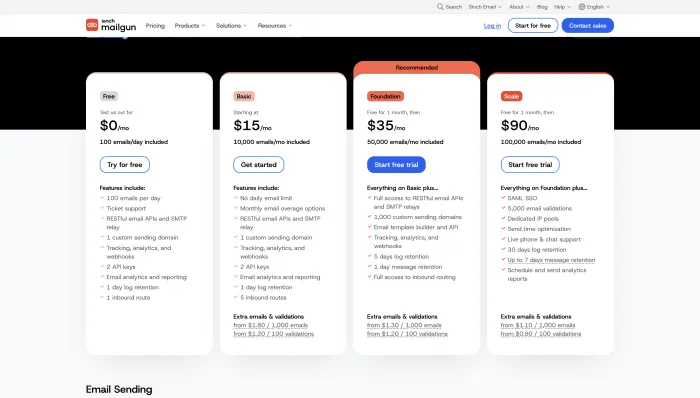
Mailgun pricing matters because the platform is not just a monthly software subscription. Cost can depend on monthly email volume, plan level, validations, inbox placement tools, support level, dedicated IPs, and add-ons.
The SERP for “mailgun” includes strong interest in “mailgun pricing,” so any helpful review needs to explain that Mailgun’s true cost depends on how production-ready your setup needs to be.
| Cost Area | What to Check Before Buying |
|---|---|
| Monthly send volume | Check how many emails are included and what happens when you exceed the included volume. |
| Dedicated IP | Check whether it is included in your plan or whether you need to pay extra. |
| Inbound routing | Check whether your plan includes the inbound email features your workflow needs. |
| Message retention | Check how long event data, logs, and message details are available. |
| Support level | Check whether you get ticket support only or faster support through higher-tier plans. |
| Deliverability tools | Inbox placement, monitoring, validation, and reputation tools may sit under additional Mailgun products or plans. |
Mailgun pricing warning
The main issue is not that Mailgun is expensive for every user. The issue is that real production email infrastructure can require more than the entry-level plan. If you need a dedicated IP, strong support, deliverability monitoring, or higher message retention, the real cost may be higher than the starting price suggests.
In real-life experience patterns, users also report billing frustration around account cancellation, blocked accounts, payment after onboarding problems, and unclear refund experiences. Not every user will face these problems, but it is smart to keep screenshots of plan changes, invoices, cancellation confirmations, and support tickets.
Mailgun Features
Mailgun is feature-rich, but its strongest features are technical. It is built for developers and infrastructure teams, not for users who want a simple visual newsletter editor.
1. Email API
Mailgun’s Email API lets developers send email from applications, CRMs, SaaS platforms, AI agents, ecommerce systems, and internal tools. This is the core reason developers choose Mailgun.
2. SMTP relay
Mailgun can work as an SMTP relay for apps and websites that need to send reliable transactional emails. This is useful when you do not want to manage your own mail server.
3. Inbound email routing
Mailgun’s inbound routing can receive emails and forward parsed message data to an endpoint. This is especially useful for AI inbox managers, ticketing systems, lead routing, support automation, and workflow tools that need to process replies.
4. Webhooks
Mailgun webhooks allow your application to receive event data when something happens to an email, such as delivery, bounce, complaint, unsubscribe, click, or open. This makes Mailgun useful for automation and reporting.
5. Email validation and deliverability tools
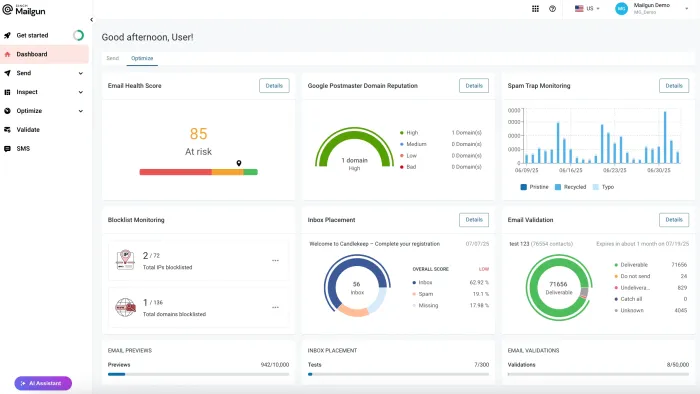
Mailgun offers tools and related products for email validation, inbox placement, spam trap monitoring, reputation monitoring, and deliverability improvement. These tools matter more when email directly affects revenue, onboarding, or login flows.
6. Logs and analytics
Mailgun provides logs and event tracking so technical teams can debug delivery issues, bounces, complaints, and failed sends. The logs are useful, but some users find the dashboard dense and harder to use than simpler competitors.
7. Developer documentation
Mailgun’s documentation is one of its better strengths. It supports common programming languages and gives developers the resources needed to connect email sending, inbound routing, and webhook flows.
Mailgun API and SMTP Review
Mailgun performs best when judged as a developer email infrastructure tool. API key setup, SMTP credentials, domain authentication, webhooks, and inbound routing are the areas where the platform makes the most sense.
For AI email automation, this matters because an AI workflow often needs more than outgoing email. It may need to receive replies, parse inbound messages, trigger CRM updates, detect bounces, handle complaints, and send follow-up events into another system.
Where Mailgun works well for developers
- API-based transactional sending.
- SMTP relay for apps and websites.
- Inbound parsing for reply workflows.
- Webhook events for automation triggers.
- SPF, DKIM, and DMARC setup documentation.
- Event logs for debugging delivery issues.
- Integration with custom backend systems.
Where Mailgun can feel difficult
- Non-technical users may find the dashboard confusing.
- DNS setup requires attention and patience.
- Sandbox and production behavior may confuse beginners.
- Deliverability troubleshooting can require technical knowledge.
- Support speed may matter more than docs during urgent production issues.
Real User Experience Patterns We Found
To make this review more useful, Inboxaly reviewed real-life user experience patterns around Mailgun. We looked for repeated themes rather than isolated complaints.
The result is balanced. Many technical users like Mailgun because it is powerful, flexible, and developer-friendly. At the same time, negative experiences are serious when they involve failed onboarding, blocked accounts, shared IP deliverability problems, billing disputes, or slow support during production outages.
| Experience Pattern | What Users Commonly Report | Inboxaly Takeaway |
|---|---|---|
| API setup | Many developers find API and SMTP setup fast once DNS is configured correctly. | Strong fit for technical teams. |
| Documentation | Users often praise clear docs for authentication, SMTP, API, SPF, DKIM, and DMARC. | Good developer education value. |
| Support quality | Some users report excellent individual support agents; others report long waits and unresolved production issues. | Support is inconsistent and plan-dependent. |
| Verification and onboarding | Some users report phone verification failures, activation loops, and account approval delays. | Onboarding can be frustrating for some new accounts. |
| Deliverability | Some users report stable sending; others mention shared IP reputation and inbox placement problems. | Dedicated IP and monitoring may be necessary for serious senders. |
| Compliance reviews | Some users report account limits, suspensions, or slow manual reviews after triggering risk checks. | Have a backup provider if email is mission-critical. |
| Billing | Some users report unexpected charges, refund delays, or billing after cancellation attempts. | Document billing actions carefully. |
Positive experience themes
The positive side of Mailgun is clear. Technical users often value the API, SMTP flexibility, documentation, webhook architecture, and inbound routing. When support works well, users describe fast and precise help for technical errors, configuration problems, and deliverability questions.
Negative experience themes
The negative experiences are mainly operational. Users complain less about the existence of features and more about what happens when things go wrong: blocked accounts, slow support, unclear verification, shared IP problems, billing friction, and production disruption.
Mailgun Deliverability Review
Deliverability is the most important part of any transactional email service. If a password reset, 2FA code, order confirmation, or customer notification lands in spam or gets delayed, the API may be technically working but the business workflow still fails.
Mailgun offers deliverability tools, dedicated IP options, inbox placement testing, validation, and monitoring options. For serious senders, these can be valuable.
The risk is shared infrastructure. If your account is sending from a shared IP pool, your deliverability can be affected by the reputation of other senders. This is not unique to Mailgun, but it is a major concern for any transactional email platform. Users running login codes, legal notices, app notifications, or revenue-critical workflows should test inbox placement before scaling.
Mailgun deliverability is stronger when:
- Your domain is properly authenticated.
- You separate transactional and promotional traffic.
- Your bounce and complaint rates are low.
- You warm up sending volume carefully.
- You monitor reputation and inbox placement.
- You use a dedicated IP when your volume and use case justify it.
Mailgun deliverability becomes risky when:
- You rely only on shared IP reputation.
- You send mixed promotional and transactional emails from the same setup.
- You ignore DNS authentication.
- You operate in a sensitive or high-risk category.
- You do not monitor bounces, complaints, and inbox placement.
- Your business cannot tolerate delayed or missing transactional emails.
Mailgun Customer Support Review
Mailgun support is mixed. Some users report excellent technical support, fast troubleshooting, and helpful agents who understand logs, DNS, SMTP, and API problems. Others report slow replies, unresolved tickets, poor escalation, and frustration when a production issue affects sending.
This matters because Mailgun is not just a marketing tool. For many companies, it handles password resets, account alerts, payment emails, onboarding messages, legal notices, or customer-critical notifications. In those cases, delayed support can become a business problem.
| Support Scenario | Likely Experience | Risk Level |
|---|---|---|
| Basic setup question | Docs and ticket support may be enough. | Low |
| DNS/authentication issue | Support can help, but resolution depends on user-side DNS access too. | Medium |
| Deliverability issue | May require reputation analysis, delisting, monitoring, or IP strategy. | Medium-High |
| Account review or suspension | Can be slow and stressful if production sending is affected. | High |
| Mission-critical outage | Low-tier support may not be enough for urgent production needs. | High |
Mailgun Pros and Cons
Mailgun Pros
- Strong email API for developers.
- SMTP relay works well for apps and websites.
- Useful inbound routing for reply processing.
- Webhook events support automation and reporting.
- Good documentation for technical setup.
- Helpful for SaaS, ecommerce, and app notifications.
- Deliverability tools available for serious senders.
- Some users report excellent technical support experiences.
Mailgun Cons
- Not beginner-friendly for non-technical users.
- Dashboard can feel dense and technical.
- Shared IP deliverability can be risky.
- Dedicated IP and deliverability tools may increase real cost.
- Support experience appears inconsistent.
- Some users report billing and cancellation frustration.
- Compliance reviews can disrupt production workflows.
- Not ideal as a single provider without a backup plan for mission-critical email.
Who Should Use Mailgun?
Mailgun is best for users who understand that email infrastructure is technical. It is not the best fit for everyone, but it can be very useful in the right environment.
Use Mailgun if:
- You are a developer or technical operator.
- You need transactional email API access.
- You need SMTP relay for an app or website.
- You need inbound routing and webhooks.
- You understand DNS, SPF, DKIM, and DMARC.
- You can monitor deliverability and logs.
- You have budget for higher-tier support or dedicated infrastructure if needed.
Do not use Mailgun if:
- You only need a simple newsletter builder.
- You are not comfortable with technical setup.
- You need instant human support on a low-tier plan.
- Your business cannot tolerate account review delays.
- You do not have a backup sender for critical emails.
- You want the simplest email marketing tool for a small business.
Best Mailgun Alternatives in 2026
The best Mailgun alternative depends on why you are comparing it. Some users want better transactional deliverability, some want lower cost, some want easier setup, and some want a full marketing platform.
| Alternative | Best For | Why Choose It Over Mailgun? |
|---|---|---|
| Postmark | Reliable transactional email | Often preferred for clean transactional sending, strong deliverability, and simpler reliability expectations. |
| Amazon SES | Low-cost high-volume sending | Very cost-effective for teams comfortable with AWS and technical setup. |
| SendGrid | API email plus broader ecosystem | Good for teams that want transactional email, API tools, and marketing features in one ecosystem. |
| Brevo | Email marketing plus transactional email | Better if you want a simpler business-facing platform with marketing and transactional tools. |
| SMTP2GO | SMTP relay simplicity | Good for businesses that want easier SMTP sending and clearer deliverability monitoring. |
| Resend | Modern developer email | Good for developer teams wanting a modern API-first email experience. |
| Mailchimp | Email marketing campaigns | Better for newsletters, campaign design, landing pages, and non-technical marketing teams. |
Best reliability alternative: Postmark
Choose Postmark if transactional email reliability matters more than having a broad feature suite.
Best low-cost alternative: Amazon SES
Choose Amazon SES if you have AWS skills and want cost-efficient high-volume sending.
Best broader API alternative: SendGrid
Choose SendGrid if you want API sending, templates, analytics, and a larger email platform ecosystem.
Best marketing alternative: Brevo
Choose Brevo if you need marketing campaigns and transactional email in a more business-friendly interface.
Mailgun Login: How Users Access the Platform
Mailgun users usually access the platform through the Mailgun login page to manage domains, API keys, sending logs, billing, support tickets, webhooks, and inbound routes.
This matters because “mailgun login” is a major related search. For security, users should always access Mailgun through the official login page, enable secure authentication, and keep backup admin access where possible. If one person controls the account and loses access, production email workflows can be affected.
Is Mailgun Worth It in 2026?
Mailgun is worth it if you are a developer, SaaS team, agency, or technical business that needs transactional email infrastructure with API, SMTP, inbound routing, and webhooks.
Mailgun is less worth it if you are a non-technical business owner, simple newsletter sender, or team that needs urgent human support without paying for a higher plan. It is also not the safest single-provider setup for mission-critical transactional emails unless you have monitoring, backups, and a support plan that matches your risk level.
For most users, the decision is simple:
- Choose Mailgun if you need developer email infrastructure.
- Choose Postmark if transactional reliability is the top priority.
- Choose Amazon SES if cost is the top priority and you have AWS skills.
- Choose SendGrid if you want API email with a broader ecosystem.
- Choose Brevo or Mailchimp if you need email marketing more than API infrastructure.
Mailgun Final Score
| Category | Score | Reason |
|---|---|---|
| Email API | 8.8/10 | Strong API-first email sending for developers and SaaS teams. |
| SMTP Relay | 8.2/10 | Useful for apps, websites, and transactional workflows. |
| Inbound Routing | 8.4/10 | Useful for reply parsing, AI workflows, and automated routing. |
| Developer Documentation | 8.4/10 | Strong technical documentation and setup resources. |
| Deliverability | 6.6/10 | Can be strong with proper setup, but shared IP and monitoring concerns reduce confidence. |
| Pricing Value | 6.2/10 | Good for some use cases, but real production cost may rise with dedicated IPs and deliverability tools. |
| Support Experience | 5.6/10 | Mixed user experience: some excellent support, but serious complaints during urgent or complex issues. |
| Overall | 7.1/10 | Strong developer email infrastructure, but not the safest fit for every mission-critical business without careful setup and backup planning. |
Mailgun is a strong transactional email platform for developers. Its API, SMTP relay, inbound routing, webhook architecture, and documentation make it a serious option for SaaS products, apps, AI email workflows, and custom automation systems.
However, Mailgun is not a simple plug-and-play email marketing tool. Real-life user patterns show repeated friction around onboarding, shared IP deliverability, support delays, compliance reviews, billing disputes, and production disruptions. These issues do not affect every account, but they matter when email is business-critical.
Our recommendation is balanced: use Mailgun if you have technical skills and need developer-grade email infrastructure. Avoid relying on it as your only provider if your business cannot tolerate downtime, account review delays, or delayed support. For mission-critical transactional email, compare Postmark, Amazon SES, SendGrid, SMTP2GO, and Resend before committing.
Mailgun FAQs
Mailgun is a transactional email API and SMTP service used by developers to send, receive, track, and automate email from apps, websites, SaaS platforms, and backend systems.
Mailgun is used for password resets, login codes, order confirmations, account alerts, app notifications, SMTP relay, inbound email routing, webhooks, and transactional email automation.
Yes. Mailgun supports SMTP relay as well as API-based sending. Developers can use either method depending on their application setup.
Yes. Mailgun is best suited for developers and technical teams because it offers API sending, SMTP relay, webhooks, inbound routing, logs, and documentation for email infrastructure workflows.
Mailgun is better for transactional and developer-led email than simple newsletter marketing. If you need a visual campaign builder, Mailchimp, Brevo, or MailerLite may be easier.
Mailgun pricing depends on email volume, plan type, support level, deliverability tools, validations, and dedicated IP needs. Always check the official pricing page before choosing a plan.
Mailgun offers dedicated IP options. Some higher-volume plans may include dedicated IP access, while additional dedicated IPs may cost extra.
Mailgun can be reliable with proper domain authentication, clean sending practices, monitoring, and the right plan. However, businesses should test deliverability and keep a backup provider if email is mission-critical.
The best Mailgun alternatives include Postmark, Amazon SES, SendGrid, Brevo, SMTP2GO, Resend, and Mailchimp. The best option depends on whether you need reliability, low cost, marketing features, or developer control.
Mailgun is worth it for developers and technical teams that need API-based transactional email, SMTP relay, inbound routing, and webhooks. It may not be worth it for non-technical users or teams that need simple newsletters and fast support without technical setup.