What Is Mailchimp?
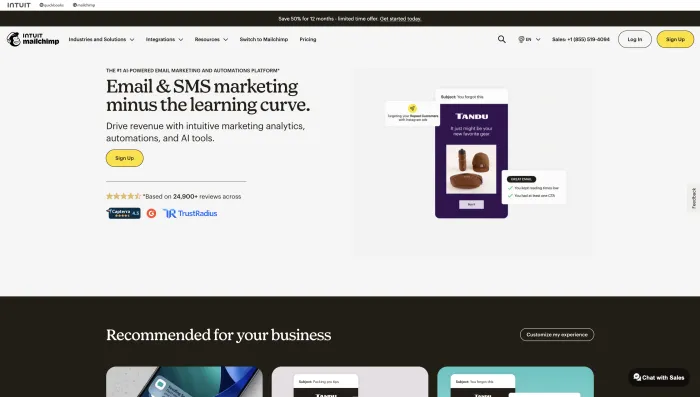
Mailchimp is an email marketing and marketing automation platform owned by Intuit. It helps businesses create email campaigns, build signup forms, design landing pages, manage audiences, send newsletters, automate customer journeys, run SMS campaigns in supported regions, and track marketing performance. If you are comparing it with other email tools, you can also check our guide on best email providers and our review of Mailgun for email automation.
For years, Mailchimp has been one of the default choices for small business email marketing. A lot of users still choose it because the name is familiar, the dashboard is approachable, the template builder is easy to understand, and integrations are widely available.
But Mailchimp in 2026 is not the same simple low-cost newsletter tool many older users remember. The free plan is smaller, pricing depends heavily on contact count, advanced features sit behind paid tiers, and user experience records show mixed satisfaction around support, billing, account recovery, compliance reviews, and reliability.
Mailchimp Review 2026: Quick Verdict
Mailchimp is still good if your needs are simple. If you want to send newsletters, build a landing page, collect subscribers, create basic automations, and check campaign analytics, Mailchimp can do that well.
The problem is scale. Once Mailchimp becomes part of a business-critical workflow — ecommerce notifications, customer onboarding, recurring sales campaigns, advanced automations, paid SMS, or large contact lists — the risks become more visible. In the user experience records we reviewed, the most serious complaints were not about missing features. They were about access, support, billing, account reviews, and trust. For users focused on automation-heavy workflows, our Automatic Email Manager review is also useful for comparing how email automation tools behave outside traditional newsletter platforms.
| Category | Inboxaly Verdict |
|---|---|
| Best use case | Simple newsletters, small business campaigns, forms, landing pages, and basic automation. |
| Not ideal for | Mission-critical transactional-style workflows, complex automations, regulated use cases, or users who need fast support access. |
| Biggest strength | Beginner-friendly campaign builder, templates, integrations, and all-in-one marketing tools. |
| Biggest weakness | Mixed real-world experience around billing, support, account reviews, lockouts, and reliability. |
| Best plan for most users | Standard, because it gives better automation and segmentation than Essentials. |
| Overall rating | 6.8/10 |
Mailchimp Pricing in 2026
Mailchimp pricing is one of the most important parts of this review because many user complaints are connected to cost, upgrades, downgrades, contact limits, unexpected charges, and refund frustration. If you are mainly choosing a platform for business email rather than marketing campaigns, read our Bizmail login guide and best email providers comparison before deciding.
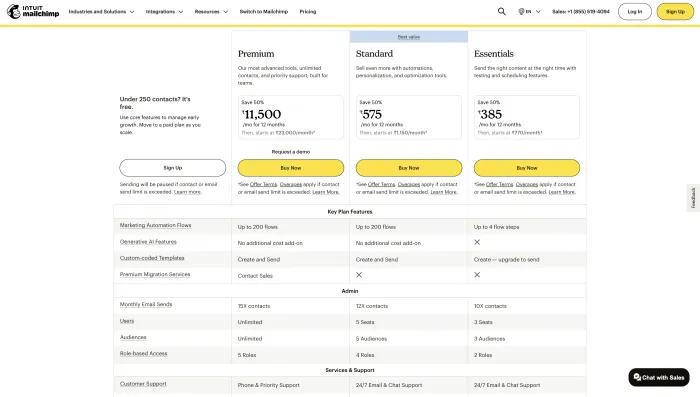
Mailchimp’s main marketing plans are Free, Essentials, Standard, and Premium. There is also a Pay As You Go option for occasional senders. Pricing depends on your plan and contact count, so the starting price is not the full story.
| Plan | Typical Starting Point | Best For | Watch Out For |
|---|---|---|---|
| Free | $0/month | Testing Mailchimp with a very small list. | Limited contacts, limited sends, limited support, and limited features. |
| Essentials | Entry-level paid plan | Basic senders who need more templates, A/B testing, and support than the Free plan. | Not the best plan if you need deeper automation. |
| Standard | Most balanced paid plan | Growing businesses that need better automation, segmentation, and optimization tools. | Cost rises as contacts grow. |
| Premium | Higher-tier plan | Larger teams that need advanced support, more controls, and bigger sending operations. | Expensive for many small businesses. |
| Pay As You Go | Credit-based | Occasional senders who do not need a monthly subscription. | Not ideal for frequent campaigns or growing lists. |
Pricing issue seen in user experience records
The most repeated pricing concern is not simply “Mailchimp is expensive.” The real issue is that some users feel surprised by billing behavior after imports, upgrades, downgrades, cancellations, pauses, or contact-count changes.
In the 100 user experience records we reviewed, users described situations involving plan confusion, charges after cancellation attempts, high charges after contact imports, downgrade frustration, and refund delays. Some company replies explained that charges may occur when contact or send limits exceed the selected plan, which makes it even more important to understand billing rules before importing or changing your audience.
Mailchimp Features
Mailchimp has a strong feature set for small business marketing. It includes email campaigns, templates, forms, landing pages, audience tools, automation, segmentation, analytics, integrations, SMS add-ons in supported regions, and AI-assisted features depending on plan and availability.
1. Email campaign builder
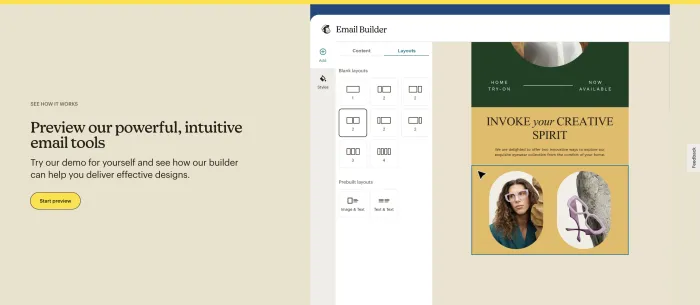
Mailchimp’s drag-and-drop builder remains one of its biggest strengths. It is easy enough for beginners and flexible enough for simple brand campaigns. Many positive user records mention that Mailchimp is easy to use, especially for newsletters, template building, and small-list email blasts.
2. Templates
Mailchimp offers templates for newsletters, announcements, ecommerce promotions, events, welcome messages, and business updates. This is useful for small businesses that do not have a designer.
3. Audience and contact management
Mailchimp lets users manage contacts through audiences, tags, segments, imports, subscriber status, engagement signals, and signup sources. This is powerful, but it can also become confusing. Several negative user records mention list management, contact counting, imports, bounces, or audience separation as sources of frustration.
4. Segmentation
Segmentation is useful for sending different campaigns to different groups. Mailchimp supports segmentation based on subscriber data, activity, engagement, purchase behavior, tags, and more. Advanced segmentation depth depends on plan.
5. Marketing automation
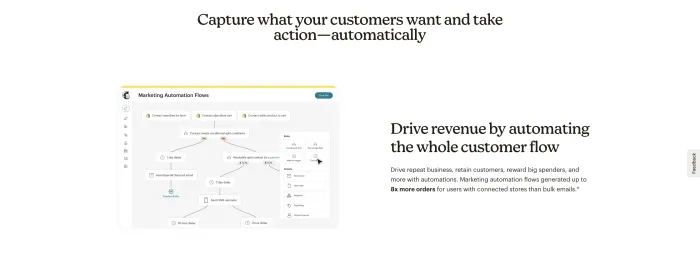
Mailchimp supports customer journeys and automated emails. Common workflows include welcome emails, abandoned cart reminders, product follow-ups, birthday messages, re-engagement sequences, and onboarding flows.
However, the user records show a repeated split: simple automation is fine, but complex workflows can become frustrating. Some users described unsuccessful automations, problems with tag-combination logic, campaigns sending unexpectedly, or workflows becoming unreliable after platform changes.
6. Landing pages and forms
Mailchimp includes landing pages and signup forms, which makes it useful for small businesses that want to collect leads without adding another tool. Some users like this all-in-one approach, while others find form setup and website verification harder than expected.
7. Analytics and reporting
Mailchimp provides campaign reports for opens, clicks, bounces, unsubscribes, revenue tracking, and audience engagement. For basic campaigns, this is enough.
But some user records mention reporting inconsistencies, including differences between dashboard figures, reports, mobile app numbers, revenue data, or subscriber counts. If reporting accuracy is critical to your business, test exports and analytics before fully committing.
8. Integrations
Mailchimp integrates with ecommerce platforms, website builders, forms, CRMs, automation tools, and social platforms. This is one of its strongest advantages. In one user experience pattern, a workaround through Zapier solved an advanced tag-combination problem faster than native support did, which shows both the value of integrations and the limits of native workflows. If your main focus is automated email handling rather than newsletter marketing, compare this with our Clean Email review and Automatic Email Manager review.
9. SMS marketing
Mailchimp offers SMS marketing as an add-on in supported countries and paid plans. SMS can be useful for promotions, alerts, and customer engagement, but it adds compliance, approval, and cost considerations.
Some user records mention SMS-related frustration, including policy restrictions, blocked SMS use, or AI-assisted SMS content concerns. If SMS is central to your marketing, check Mailchimp’s SMS availability, acceptable use rules, and approval process before building your strategy around it.
10. AI-assisted features
Mailchimp has added AI-assisted features for marketing tasks. These can be helpful for content suggestions and campaign planning, but users should review AI-generated or AI-altered content carefully. One user experience record specifically mentioned an AI/SMS feature altering message text incorrectly, which is a reminder not to send automated content without human review.
What 100 User Experience Records Show
For this review, Inboxaly analyzed 100 recent user experience records. The goal was not to count only star ratings, but to identify patterns that matter to businesses choosing an email marketing platform.
The result is mixed but clear: Mailchimp gets praise when the task is simple and the account is working normally. It gets strong criticism when billing, support, account access, compliance review, or automation reliability becomes important.
| Experience Pattern | What Users Reported | What It Means for Buyers |
|---|---|---|
| Ease of use | Positive users often mention easy campaigns, helpful templates, good newsletter tools, and beginner-friendly setup. | Mailchimp is still strong for simple campaigns and small teams. |
| Support quality | Some users praise helpful human support and screen sharing. Others report slow replies, loops, locked-account barriers, or ineffective escalation. | Support experience is inconsistent and depends on plan, issue type, and access status. |
| Billing | Multiple users mention unexpected charges, downgrade frustration, refund delays, cancellation confusion, or paid accounts being blocked. | Billing requires careful monitoring, especially when importing, upgrading, downgrading, or pausing. |
| Account access | Several users describe 2FA problems, account lockouts, phone number changes, recovery delays, and account review issues. | Mailchimp may not be ideal if you cannot tolerate access disruption. |
| Compliance reviews | Some users say accounts or campaigns were blocked with vague explanations or slow resolution. | Regulated industries and unusual sending patterns should check acceptable use rules carefully. |
| Automation reliability | Users mention failed automations, difficult tag logic, campaign copy errors, unintended sends, and integrations breaking during account review. | Good for simple automation, but not the strongest choice for mission-critical automation. |
| Reporting/data | Some users report inconsistent reporting, subscriber count differences, survey data loss after downgrading, and bounce/contact issues. | Export important data and verify reports if analytics matter to your business. |
Positive user experience themes
The strongest positive theme is ease of use. Several users describe Mailchimp as user-friendly, useful for newsletters, good for small-list blasts, and helpful for creating campaigns without a steep learning curve.
Some users also describe excellent support experiences. They mention patient agents, screen sharing, live help, billing help, campaign rescue, and support that stayed with them until the issue was resolved.
Beginner setup
Positive records often describe Mailchimp as easy to use once the campaign flow is understood. This supports Mailchimp’s fit for beginners and small business owners.
Human support wins
Some users had very good support experiences, especially when screen sharing or live expert help solved a specific campaign or billing issue.
Negative user experience themes
The negative records are more serious. They frequently describe business disruption rather than simple annoyance. Examples include accounts locked for days or weeks, compliance reviews blocking campaigns, billing issues after cancellation or downgrade, and difficulty reaching a support path that can actually resolve the issue.
The most concerning pattern is support access during account problems. Several users describe situations where support is hard to reach precisely when they cannot log in, authenticate, recover an account, or use the platform.
Mailchimp Pros and Cons
Mailchimp Pros
- Beginner-friendly campaign builder.
- Useful templates for newsletters and promotions.
- Good for small businesses and simple email blasts.
- Forms, landing pages, campaigns, automation, and analytics in one place.
- Strong integration ecosystem.
- Some users report excellent support experiences.
- Helpful for basic newsletters, retargeting, and small-list communication.
- Free plan available for very small lists and testing.
Mailchimp Cons
- Free plan is limited.
- Pricing can rise quickly as contacts grow.
- Several users report billing and cancellation frustration.
- Support experience is inconsistent.
- Account reviews or lockouts can disrupt business workflows.
- Advanced automation can feel limited or confusing.
- Some users report data, reporting, or list management issues.
- Not ideal for mission-critical email infrastructure.
Where Mailchimp Works Well
Mailchimp works best when the job is clear and simple: build a list, design a campaign, send a newsletter, track basic results, and repeat.
1. Beginner email marketing
Mailchimp is still one of the easiest entry points for email marketing. Users who are new to campaigns often like that they can start without technical skills.
2. Newsletter sending
For basic newsletters, Mailchimp is still solid. It gives you templates, lists, subject lines, previews, scheduling, reports, and reusable campaign structures.
3. Small business promotions
Small businesses that send promotions, updates, event announcements, nonprofit messages, or simple product emails can get value from Mailchimp without building a complicated marketing stack.
4. Template-based campaigns
If you want a visual builder and do not want to code emails, Mailchimp remains useful. Positive user records repeatedly mention ease of use and campaign creation as strengths.
5. Basic automation
Welcome emails, abandoned cart reminders, simple re-engagement sequences, and small onboarding flows are realistic Mailchimp use cases.
Where Mailchimp Falls Short
Mailchimp’s biggest weaknesses appear when users need reliability, support access, billing clarity, or advanced automation depth.
1. Account lockouts and recovery friction
Several user records mention being locked out after phone changes, 2FA issues, suspicious login flags, or account recovery problems. Some users felt the recovery process was circular, especially when support resources required account access.
This matters because a locked email marketing account can freeze campaigns, audiences, reports, automations, and customer communication.
2. Compliance reviews and vague restrictions
Some users describe accounts being blocked or reviewed with limited explanation. This is especially risky for ecommerce, regulated industries, political campaigns, cannabis-related businesses, referral promotions, or unusual sending patterns.
Mailchimp has compliance rules to protect its sending network, but from the user side, the experience can feel opaque if a paid account is blocked before campaigns are allowed to send.
3. Billing and downgrade issues
User records include complaints about charges after cancellation attempts, charges after downgrades, plan confusion, account credit instead of refunds, and contact imports raising costs.
This does not mean every user will have billing issues. But it does mean users should document plan changes carefully and understand how contact limits and extra charges work.
4. Support inconsistency
Mailchimp support is not always bad. Some users described excellent help. The issue is inconsistency. When support works, users are happy. When it fails, the consequences can be serious because email marketing is often tied to revenue and operations.
5. Data and reporting concerns
Some user records mention reporting discrepancies, survey data loss after downgrade, subscriber count differences, and list management problems. If you store important survey responses, audience data, or campaign history inside Mailchimp, export backups regularly.
Mailchimp Automation Review
Mailchimp automation is useful for basic and moderate workflows. It can handle welcome sequences, abandoned cart messages, post-purchase follow-ups, re-engagement campaigns, and simple audience journeys. However, if your main requirement is inbox automation, routing, attachment handling, or rules-based email processing, you may want to compare Mailchimp with tools covered in our Automatic Email Manager review.
Where Mailchimp becomes weaker is advanced logic. In the user experience records, some users struggled with tag combinations, automation failures, messages not reaching some recipients, and campaigns behaving unexpectedly.
Mailchimp automation is good for:
- Welcome emails.
- Newsletter onboarding.
- Basic lead nurturing.
- Abandoned cart reminders.
- Simple ecommerce follow-ups.
- Re-engagement campaigns.
Mailchimp automation may disappoint if you need:
- Advanced branching logic.
- Complex tag combinations.
- CRM-style lead scoring.
- Deep ecommerce segmentation.
- Mission-critical transactional workflows.
- Automation that cannot afford downtime or account-review interruptions.
Mailchimp Customer Support Review
Support is the most mixed part of Mailchimp. Some users describe support as patient, helpful, human, efficient, and even like free training. Others describe long delays, chat loops, unhelpful escalation, account recovery problems, and unresolved billing or compliance issues.
That split is important. Mailchimp can be a good experience when the issue is simple and support is reachable. But if the issue involves account access, compliance, billing, authentication, or campaign disruption, the experience may become frustrating.
| Support Experience | What Users Reported | Inboxaly Takeaway |
|---|---|---|
| Positive support | Helpful agents, screen sharing, patient explanations, campaign rescue, and billing guidance. | Mailchimp support can be very good when the right agent handles a clear issue. |
| Negative support | Slow replies, generic responses, unresolved tickets, account recovery loops, and unclear escalation. | Support is less dependable for urgent or complex problems. |
| Locked account support | Users describe difficulty getting support when account access itself is blocked. | This is the highest-risk support scenario. |
| Billing support | Some users received help; others reported refund delays, credit offers, or repeated follow-ups. | Keep documentation of all plan and billing changes. |
Who Should Use Mailchimp?
Mailchimp is still a good choice for users who want a familiar, polished, beginner-friendly email marketing tool and do not need the deepest automation or the lowest pricing.
Use Mailchimp if:
- You are new to email marketing.
- You need a simple campaign builder.
- You send occasional newsletters.
- You run a small business with basic marketing needs.
- You want forms, landing pages, templates, and analytics in one place.
- You do not need advanced automation logic.
- You can tolerate contact-based pricing as your list grows.
Do not use Mailchimp if:
- Your business cannot afford account access disruption.
- You rely on marketing automation for critical customer communication.
- You need the cheapest platform for a growing list.
- You operate in a regulated or policy-sensitive industry.
- You need advanced CRM-style automation.
- You want a creator-first newsletter monetization platform.
- You need fast, dependable support without a high-tier plan.
Best Mailchimp Alternatives in 2026
The best Mailchimp alternative depends on why you are considering leaving. Some users need lower pricing, some need better support, some need stronger automation, and some need ecommerce-specific workflows. You can also compare broader options in our best email providers guide, especially if you are deciding between email marketing software, business email hosting, and inbox management tools.
| Alternative | Best For | Why Choose It Over Mailchimp? |
|---|---|---|
| Brevo | Budget email and SMS marketing | Better fit if you want pricing that may feel easier to manage for larger contact lists. |
| MailerLite | Creators and simple newsletters | Cleaner, simpler, and often better value for newsletters and small creator businesses. |
| ActiveCampaign | Advanced automation | Stronger for complex workflows, CRM-style logic, and automation-heavy businesses. |
| Klaviyo | Ecommerce brands | Better for Shopify stores, purchase behavior, ecommerce segmentation, and revenue flows. |
| Constant Contact | Local businesses and event marketing | Good for simple campaigns, events, and small business onboarding. |
| Kit | Creators and newsletters | Better for audience building, creator workflows, and newsletter-style businesses. |
| HubSpot | CRM-led marketing | Better if email must connect deeply with sales, CRM, and customer lifecycle tracking. |
| GetResponse | Funnels and webinar marketing | Good if you want email, automation, landing pages, funnels, and webinar-style campaigns. |
| Omnisend | Ecommerce email and SMS | Better fit for ecommerce stores needing email and SMS workflows tied to purchase behavior. |
Best cheaper alternative: Brevo
Choose Brevo if your main issue with Mailchimp is contact-based pricing and rising monthly costs.
Best simple alternative: MailerLite
Choose MailerLite if you want a cleaner newsletter tool for creators, small teams, and simple campaigns.
Best automation alternative: ActiveCampaign
Choose ActiveCampaign if advanced workflows, tagging, lead nurturing, and automation depth matter most.
Best ecommerce alternative: Klaviyo
Choose Klaviyo if your store depends on purchase behavior, abandoned carts, segmentation, and revenue analytics.
Is Mailchimp Worth It in 2026?
Mailchimp is worth it if your needs are simple and you value ease of use over maximum flexibility. It is still a strong option for beginners, small businesses, nonprofits, and basic newsletter senders. But if you are researching email tools more broadly, our best email providers comparison can help you separate regular email providers from marketing platforms like Mailchimp.
Mailchimp is less worth it if you are choosing it because you assume it is the cheapest or safest option. Based on the user experience records we reviewed, the platform can become frustrating when your business needs fast support, predictable billing, account stability, complex automation, or advanced ecommerce workflows.
For most readers, the decision is simple:
- Choose Mailchimp if you want easy email marketing.
- Choose Brevo if you want stronger price flexibility.
- Choose MailerLite if you want simple newsletter value.
- Choose ActiveCampaign if automation matters most.
- Choose Klaviyo or Omnisend if ecommerce revenue workflows matter most.
- Choose HubSpot if CRM and sales alignment matter most.
Mailchimp Final Score
| Category | Score | Reason |
|---|---|---|
| Ease of Use | 8.4/10 | Still beginner-friendly and good for simple campaigns. |
| Email Builder | 8.2/10 | Good templates and drag-and-drop editing for basic email design. |
| Features | 8.0/10 | Broad feature set including forms, landing pages, automation, analytics, and integrations. |
| Automation | 6.8/10 | Good for simple workflows, but advanced users may hit limits or friction. |
| Pricing Value | 5.8/10 | Free plan is limited and costs can rise sharply with contact count. |
| Support Experience | 4.8/10 | User records are highly mixed, with both strong praise and serious complaints. |
| Reliability at Scale | 5.6/10 | Concerns around lockouts, compliance reviews, billing, reporting, and automation reliability lower confidence. |
| Overall | 6.8/10 | Good for basic email marketing, but not the safest fit for every growing or mission-critical business. |
Mailchimp is not a bad platform. It is still easy to use, familiar, and useful for basic email marketing. If you are a beginner, nonprofit, small business, or occasional newsletter sender, it can still work well.
But this review is more cautious than a standard feature-by-feature comparison because the real-world user experience records show repeated friction around billing, support, account access, compliance reviews, data handling, and automation reliability.
Our final recommendation is simple: use Mailchimp for simple campaigns, but be careful before making it your mission-critical email infrastructure. If email directly affects revenue, bookings, account activation, customer onboarding, or ecommerce workflows, compare alternatives before committing long-term.
Best for: beginners and simple newsletters. Not best for: advanced automation, budget scaling, regulated businesses, or teams that need dependable urgent support.
Mailchimp FAQs
Mailchimp is an email marketing and marketing automation platform owned by Intuit. It helps businesses send newsletters, build campaigns, manage audiences, create landing pages, run automations, and track campaign performance.
Mailchimp is used for email newsletters, promotional campaigns, signup forms, landing pages, audience management, customer journeys, ecommerce emails, SMS marketing in supported regions, and basic marketing analytics.
Yes, Mailchimp has a free plan, but it is limited. It is best for testing the platform or managing a very small list. Most serious users eventually need a paid plan.
Mailchimp pricing depends on your plan and contact count. The platform offers Free, Essentials, Standard, Premium, and Pay As You Go options. Your total cost increases as your contact list grows or you add paid features.
Yes. Mailchimp is still good for beginners because the editor is approachable, templates are available, and simple campaigns are easy to create.
Mailchimp is good for basic automation such as welcome emails, abandoned cart reminders, and simple customer journeys. For advanced automation, ActiveCampaign, Klaviyo, HubSpot, GetResponse, or Omnisend may be better.
Common complaints include pricing increases, billing confusion, account lockouts, compliance reviews, inconsistent support, automation limits, reporting issues, and difficulty resolving urgent problems.
Mailchimp can work for basic ecommerce marketing, but Klaviyo or Omnisend may be stronger for advanced ecommerce segmentation, purchase behavior workflows, and revenue-focused automation.
The best Mailchimp alternatives include Brevo, MailerLite, ActiveCampaign, Klaviyo, Constant Contact, Kit, HubSpot, Omnisend, and GetResponse. The best option depends on your budget, automation needs, ecommerce setup, and support expectations.
Mailchimp is worth it for beginners, simple newsletters, and small business campaigns. It may not be worth it if you need low-cost scaling, advanced automation, dependable urgent support, or mission-critical email reliability.