Automatic Email Manager Review 2026: Is Namtuk Worth $99/Year?
After 30 days of continuous operation — four live rule chains, one O365 mailbox, and a Windows 11 server running unattended — Automatic Email Manager by Namtuk produced zero software-caused failures. Here is everything we found.
Automatic Email Manager has been running since 2005. Version 9 is live now, the 20-year badge is on the homepage, and the user base includes restaurants printing WooCommerce orders, enterprise ECM teams converting inbound mail to PDF, and IT managers routing cloud fax to unmanned remote-site printers. That range is not coincidence — it reflects a tool that solves one problem extremely well and has spent two decades making sure that doesn't change.
The 30-day trial requires no credit card. Installation on Windows 11 with an O365 mailbox took under an hour from download to first rule firing. What follows is what the Inboxaly team found after a month of daily operation across four distinct workflows.
What Is Automatic Email Manager?
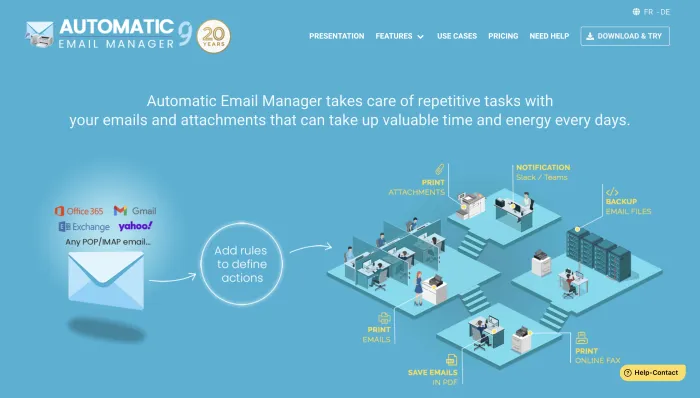
Automatic Email Manager (AEM) is a Windows application made by Namtuk that monitors one or more email accounts and acts on incoming messages based on rules you define. It connects to Office 365, Gmail, Exchange, Yahoo, and any POP/IMAP mailbox, polls for new mail on a configurable interval (default: 30 seconds), and executes action chains — printing, saving, converting, forwarding, notifying — without any ongoing manual input. It runs as a background service. Once configured, it disappears.
It is not an AI tool, not a cloud service, and not an outbound platform. It is rule-based inbound email automation, locally installed, built for Windows infrastructure that stays online.
Who Is Automatic Email Manager Best For?
- Operations teams with physical print workflows — restaurants printing order emails automatically, logistics teams routing delivery confirmations to printers, any business where "email arrives, paper comes out" is a real requirement.
- Document workflow and ECM teams who need inbound emails and attachments converted to PDF and routed to document management systems without manual handling steps.
- IT administrators managing multi-site Windows server infrastructure who need email-triggered automation that runs locally without cloud dependency or per-operation pricing.
- Small businesses running on Windows that need a set-it-and-forget-it solution for repetitive email tasks — saving attachments, alerting on urgent mail, auto-forwarding from specific senders — without hiring a developer.
- Anyone replacing a legacy print-agent tool on Exchange or O365 who needs a direct equivalent that works with modern authentication.
Automatic Email Manager Pricing: Annual vs Perpetual
Two options, one computer per license, no feature gating between tiers.
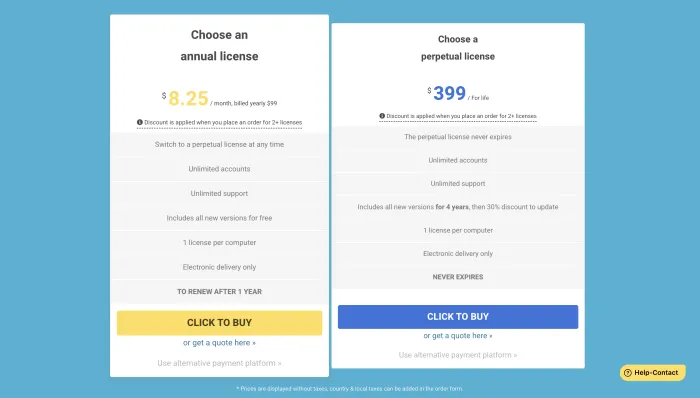
| License Type | Price | Version Updates | Support | Accounts |
|---|---|---|---|---|
| Annual | $99/year ($8.25/mo) | Free while active | Unlimited | Unlimited |
| Perpetual | $399 one-time | Free for 4 years, then 30% off | Unlimited | Unlimited |
Both licenses cover one computer. Multi-seat discounts apply at two or more licenses. Annual subscribers can switch to the perpetual license at any time. The 30-day trial is fully featured — every action type, every rule condition, no limitations.
Multiple verified buyers outside the EU and US report annual gateway failures at renewal — declined cards, unclear surplus handling when double-payments occur, and checkout friction that Namtuk attributes to the buyer's bank rather than their platform. If you are purchasing from South Asia, the Caribbean, or other non-EU/US regions, budget for a potential second transaction attempt and use the "alternative payment platform" link on the checkout page as a fallback.
What We Tested: 30 Days, 4 Rule Chains
When we set this up on a clean Windows 11 install connected to an O365 mailbox, the rule builder opened to a tree-structured GUI — trigger layer, filter conditions, action chain. No scripting, no YAML, no command line. Pre-built templates for common scenarios are included. Full setup across four rule chains took under two hours.
Rule 1 — Auto-print by sender domain. Emails from a specific vendor domain printed automatically to a network printer. The 30-second polling interval held without drift across the full 30-day window.
Rule 2 — Attachment save to NAS path. PDF and Word attachments from flagged senders routed to a structured folder on a NAS drive. Zero missed files over the test period.
Rule 3 — HTML body to PDF conversion. Incoming order emails with complex HTML layouts converted to PDF and archived locally. WooCommerce-style nested tables rendered without formatting collapse.
Rule 4 — Teams alert on subject-line keyword. A notification fired to a Microsoft Teams channel when an email matched a specific subject pattern. Average latency from email arrival to Teams notification: under 45 seconds at the 30-second polling interval.
AEM processes rules top-to-bottom in the list. A broader rule sitting above a more specific one will consume the email before the specific rule fires. The interface provides no conflict warning and no visual priority indicator. Set your most specific rules at the top. This is the most common source of configuration confusion on first setup.
What Automatic Email Manager Can Do
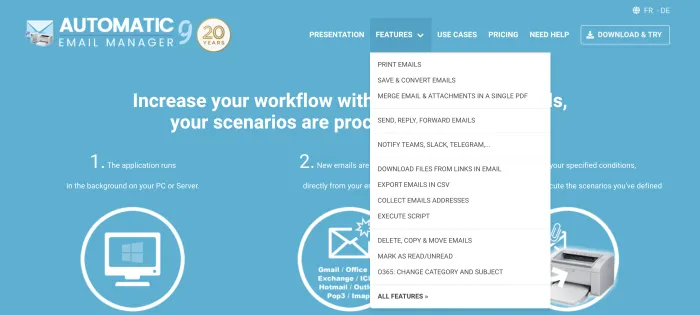
The features dropdown in the navigation surfaces more than most buyers discover on a first pass. The full action set available in version 9:
- Print emails — body, attachments, or both, to any network printer including dot matrix and multifunction devices
- Save and convert emails — to PDF, images, EML, MSG, or plain text, to local or NAS paths
- Merge email and attachments into a single PDF — body plus all attachments combined into one document
- Send, reply, and forward emails — conditional auto-response and routing
- Notify via Teams, Slack, or Telegram — with message subject, body content, and attachments included
- Download files from links in email — automatically retrieve linked attachments or documents
- Export emails to CSV — real-time database logging of email metadata
- Collect email addresses — harvest sender addresses from incoming mail automatically
- Execute custom scripts — trigger any script or executable as a rule action
- Delete, copy, and move emails — folder management automation
- Mark as read or unread — status management based on rule conditions
- O365: change category and subject — modify email metadata directly in Office 365
Strengths
Unattended Operation — Verified Over Years, Not Days
In practice, the "set it and forget it" description is operationally accurate. Verified deployments in the user base span 10-plus years, run across multiple servers simultaneously, and in one documented case processed over one million inbound emails without intervention beyond routine maintenance. The 30-day test window produced zero software-caused failures — interruptions came only from external events: a printer going offline, a brief network drop.
Support Response Times Are a Genuine Differentiator
A pre-sales question during our evaluation returned in under 15 minutes. Namtuk's primary engineer — referred to as Ernest across dozens of independent user reviews — is cited by name for same-day bug fixes, feature requests implemented within 24 hours on at least three documented occasions, and hands-on guidance through major infrastructure changes including O365 Modern Auth migrations. For a small vendor, that support posture removes meaningful purchase risk in a way that documentation and tutorials cannot.
The Feature Set Is Deeper Than the Interface Suggests
Most buyers come for auto-print or PDF conversion and discover Execute Script, Download Files from Links, and Teams notifications later. An enterprise document workflow integrator with a verified purchase called it the best ECM email import tool on the market. After mapping the full feature set against real deployment patterns in the user base, that claim holds up for document-heavy workflows.
Perpetual Licensing at a Competitive Price Point
$399 one-time with four years of free version updates is genuinely competitive for server-based automation software. The annual-to-perpetual upgrade path — with paid fees credited toward the switch — is an uncommon buyer-friendly policy in a market that has moved almost entirely to subscription-only models.
Weaknesses
Windows-Only Architecture With a Single Point of Failure
AEM runs as a background service on a Windows host. If that machine reboots without planned recovery, processing stops until the service restarts. The documented workaround among long-term users is pairing AEM with RemotePC or similar remote access software for out-of-hours intervention — practical, but an additional dependency that cloud-native tools don't require. For any workflow where processing latency has direct operational cost, host uptime planning is not optional.
Several long-term users report that version updates occasionally break active configurations, requiring mailbox reconnection or rule recreation. One verified user reported database corruption after an update that required restoring from backup. Namtuk confirmed this is a known edge case with a support-assisted resolution path. If AEM is running a workflow where unplanned downtime has a direct business cost — restaurant order printing, time-sensitive document routing — schedule updates during off-hours and maintain a current configuration backup.
Regional Settings Inherited From Windows
UI language and date/time formatting follow the Windows user profile rather than an internal AEM setting. For deployments where the host OS is configured for one locale and the operator works in another, there is no fix inside the application. Namtuk acknowledged this as a planned improvement in a direct user reply — it hasn't shipped in version 9.
Checkout and Activation Experience
The "Name" field during license activation requires the account email address, not a personal name. This caused a failed first activation during our setup and is a recurring source of confusion in the verified user base. EU buyers attempting to enter a VAT number at checkout encounter a non-obvious path. These are fixable problems that create a first impression that doesn't match the quality of the software behind them.
How Automatic Email Manager Compares
| Factor | AEM (Namtuk) | Make.com | n8n (self-hosted) |
|---|---|---|---|
| Deployment | Local Windows install | Cloud SaaS | Self-hosted (any OS) |
| Pricing model | $99/yr or $399 perpetual | Per-operation (scales up) | Free (infra costs apply) |
| Local printer output | ✓ Native | ✗ Needs extra infra | ✗ Requires custom scripting |
| NAS / local file delivery | ✓ Native | ✗ Not without bridge | Possible with scripting |
| PDF conversion built-in | ✓ Yes | ✗ Needs third-party module | ✗ Custom node required |
| Teams / Slack / Telegram | ✓ Native actions | ✓ Native modules | ✓ Nodes available |
| Setup complexity | GUI, under 1 hour | Visual canvas, moderate | Technical, higher overhead |
| Internet dependency | Mail server only | Full cloud dependency | Self-hosted, configurable |
| Support | Human team, <15 min response | Tiered, community-heavy | Community / self-serve |
Download and System Requirements
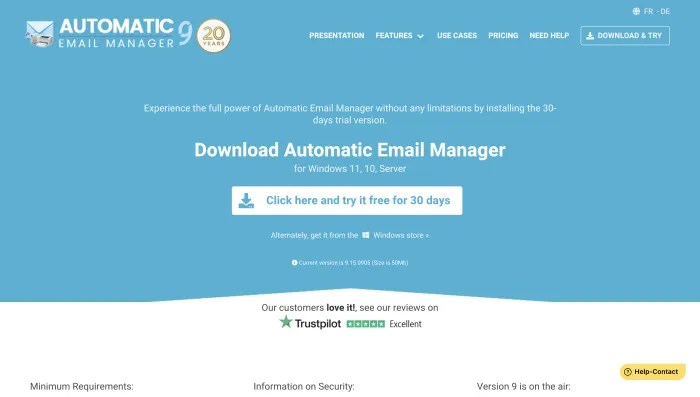
AEM is currently on version 9.15.0905 — a 50MB install available directly from the Namtuk website or via the Microsoft Windows Store. Supported platforms are Windows 11, Windows 10, and Windows Server. The Windows Store option is useful for enterprise environments with managed deployment policies. The 30-day trial carries no feature limitations — every rule type and action available in the paid version is accessible during the evaluation period.
Pros and Cons
| Pros | Cons |
|---|---|
| Zero software-caused failures across 30-day test and multi-year user deployments | Windows-only — no Mac, Linux, web, or mobile access |
| Support responds in under 15 minutes during business hours | Post-update instability is a documented, recurring pattern |
| Native Teams, Slack, and Telegram notifications without third-party modules | International payment gateway failures at renewal are a known issue |
| $399 perpetual license with 4 years of free version updates | Rule execution order has no UI warning or conflict detection |
| Annual subscribers can upgrade to perpetual at any time | Regional settings tied to Windows, not configurable inside AEM |
| Full-featured 30-day trial, no credit card required | "Name" activation field requires email address — labelled incorrectly |
| 20-year operating history, actively developed (Version 9 current) | No cloud deployment option; requires a persistent Windows host |
Automatic Email Manager FAQ
AEM monitors one or more email accounts on a configurable polling interval and applies rule-based actions to incoming messages. Actions include auto-printing (body, attachments, or both), saving and converting to PDF or other formats, merging email and attachments into a single PDF, conditional forwarding, Teams/Slack/Telegram notifications, CSV export, file download from email links, and custom script execution. Once rules are set, the software runs unattended as a Windows background service.
Yes. AEM connects to O365 via IMAP and supports Modern Authentication (OAuth). Multiple enterprise customers run it in production O365 environments. The Namtuk support team assists with OAuth configuration directly — this was the most common advanced setup question in the verified user base, and responses came back the same day in documented cases.
No. AEM is Windows-only software — Windows 11, Windows 10, and Windows Server. There is no Mac build, Linux version, browser interface, or mobile client. The processing engine requires a persistent Windows host.
The annual license is $99/year per computer ($8.25/month billed yearly). The perpetual license is $399 per computer — a one-time payment covering all new versions free for the first four years, then a 30% discount on future major updates. Multi-seat discounts apply at two or more licenses. A fully featured 30-day trial is available with no credit card required, via direct download or the Microsoft Windows Store.
Yes. Annual subscribers can upgrade to the perpetual license at any time. The upgrade path is available directly from the checkout page. This makes the annual license a low-commitment entry point for buyers who want to evaluate long-term value before committing to the one-time fee.
Emails remain in the mailbox and are processed at the next polling cycle after the service restarts. For time-sensitive workflows — restaurant order fulfilment, real-time alerts — host uptime planning is required. The most common workaround among long-term users is pairing AEM with remote access software such as RemotePC to handle unplanned reboots without physical access to the host machine.
No. AEM is locally installed software. It connects to cloud mailboxes including O365, Gmail, Exchange, Yahoo, and any POP/IMAP provider, but the processing engine runs on your own Windows infrastructure. There is no cloud-hosted deployment option currently available.
Verdict — 7.8 / 10
Automatic Email Manager earns its rating by doing one thing — rule-based inbound email processing on Windows — better than anything else currently available for that use case. The 20-year operating history is not heritage marketing. It is evidence of a product that works, a company that keeps it updated, and a support model that treats paying customers like people with real problems.
The deductions are earned honestly: Windows-only architecture with no cloud fallback, post-update fragility that requires active management for mission-critical workflows, a payment experience that repeatedly fails international buyers, and a rule execution model that quietly misfires if you don't set order correctly on first setup.
At $99/year with a no-restriction 30-day trial and support that responds in under 15 minutes, the evaluation costs nothing and the risk is low. If your workflow needs emails acted on the moment they arrive — printed, converted, routed, or flagged — and Windows infrastructure is already in place, this is the tool.