What Is Proton Mail?
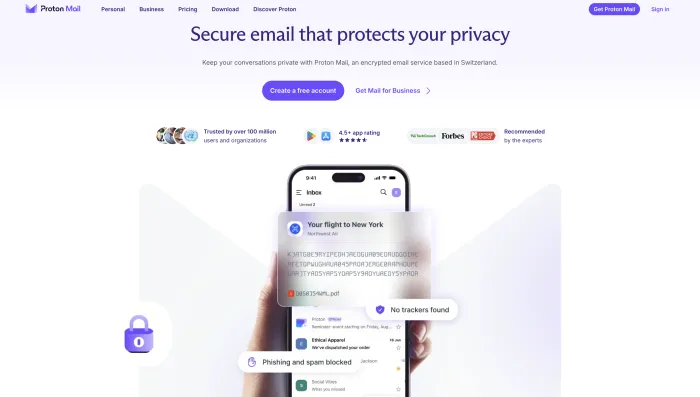
Proton Mail is an encrypted email service from Proton, a privacy-focused company based in Switzerland. It is designed for users who want a more private email account than standard free email providers.
The main idea behind Proton Mail is simple: your inbox should not be treated like an advertising data source. Proton Mail focuses on encrypted email, privacy-first account features, tracker protection, aliases, and a wider privacy ecosystem that includes Proton VPN, Proton Drive, Proton Calendar, Proton Pass, and other Proton services.
Emails between Proton Mail users are end-to-end encrypted by default. Stored mailbox content is protected with zero-access encryption, which means Proton says it cannot read your stored email content. This is one of the biggest reasons people compare Proton Mail with Gmail, Outlook, Yahoo, Tuta, Fastmail, and other email services.
If you are comparing email services more broadly, you can also read our best email providers guide, Mailchimp review, and Mailgun review.
What Is Proton Mail Used For?
Proton Mail is used for private personal email, secure communication, custom domain email, alias-based signups, business email, journalist communication, professional client communication, and reducing dependence on Gmail or Outlook.
| Use Case | How Proton Mail Helps |
|---|---|
| Private personal email | Gives users a cleaner inbox with strong privacy controls and no ad-based inbox scanning model. |
| Secure communication | Supports encrypted messages between Proton users and password-protected messages to non-Proton users. |
| Gmail alternative | Helps users reduce dependence on Google while keeping a modern email experience. |
| Custom domain email | Paid plans allow users and teams to use professional email addresses with their own domain. |
| Online signup protection | Aliases help users avoid exposing their real email address to every app, store, or newsletter. |
| Privacy ecosystem | Works with Proton VPN, Proton Drive, Proton Calendar, and Proton Pass for a broader privacy setup. |
Proton Mail Login and Account Safety
“Proton Mail login” is one of the biggest related searches around this brand. That means many users are not only researching the product; they are also trying to access their account safely.
The safest way to sign in is through the official Proton login page. Users should avoid random links in emails, ads, pop-ups, or unofficial websites because secure email accounts are high-value targets for phishing.
Proton Mail login safety tips
- Use only the official Proton login page.
- Enable two-factor authentication.
- Use a strong, unique password.
- Save backup recovery codes safely.
- Do not reuse your Proton password on other websites.
- Watch for fake Proton login pages and phishing emails.
- Use a trusted password manager such as Proton Pass or another reliable option.
Is Proton Mail Secure and Safe?
Yes, Proton Mail is secure compared with most mainstream free email services. Its main security strengths are end-to-end encryption between Proton users, zero-access encryption for stored mailbox content, password-protected emails for non-Proton users, tracker protection, phishing protection, and a privacy-first business model.
However, “secure” does not mean “impossible to compromise.” Users still need safe login habits, strong passwords, two-factor authentication, secure devices, and careful handling of phishing emails. If your device is infected or you enter your password on a fake login page, encryption alone cannot protect everything.
What Proton Mail protects well
- Email content between Proton users.
- Stored email body content and attachments protected by zero-access encryption.
- Messages sent with password protection to non-Proton users.
- Many tracking pixels and remote content risks.
- Exposure of your real email address when aliases are used properly.
What Proton Mail cannot fully protect
- A compromised device.
- A weak or reused password.
- Phishing pages that trick you into logging in.
- Recipients forwarding, copying, or screenshotting your messages.
- Emails sent normally to non-Proton users without password protection.
- Some metadata that may exist around email communication.
Proton Mail Pricing in 2026
Proton Mail has a free plan and paid plans. The free plan is useful for testing Proton Mail and using a private mailbox for light email. Paid plans are better if you want more storage, more email addresses, custom domains, more aliases, and access to the wider Proton ecosystem.
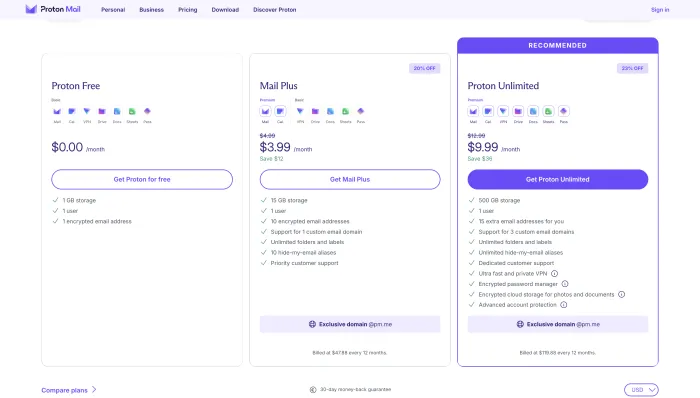
| Plan Type | Best For | What to Check |
|---|---|---|
| Free | Testing Proton Mail and using a light private mailbox. | Storage limit, daily email needs, labels, addresses, and long-term mailbox size. |
| Mail Plus | Daily email users who want more storage, custom domain support, and more flexibility. | Storage, number of email addresses, custom domain needs, and alias support. |
| Proton Unlimited | Users who want Proton Mail, VPN, Drive, Pass, Calendar, and wider privacy tools together. | Whether you will actually use the full Proton ecosystem. |
| Family | Households that want multiple Proton accounts under one subscription. | Number of users, storage, domain needs, and shared privacy tools. |
| Business | Teams and companies that need custom domains, admin controls, and privacy-focused email. | Migration, user management, support, storage, and collaboration requirements. |
Is Proton Mail free plan enough?
The free plan is enough if you only need a light private email account. It is good for testing Proton Mail, creating a secure backup address, reducing Gmail dependence, and trying encrypted communication.
The free plan is not ideal if you receive many attachments, store years of emails, need a custom domain, want multiple addresses, or plan to fully move away from Gmail or Outlook.
When paid Proton Mail makes sense
Paid Proton Mail makes sense if you want to use it as your main inbox. The paid plans are more practical for storage, custom domains, aliases, professional use, and daily email management.
Proton Unlimited makes the most sense if you also want Proton VPN, Proton Drive, Proton Pass, and Proton Calendar. If you only want email, a Mail-focused paid plan may be enough.
Proton Mail Features
Proton Mail has grown from a secure email service into a broader privacy platform. Its most important features are encryption, privacy controls, aliases, tracker protection, custom domains, mobile apps, and the wider Proton ecosystem.
1. End-to-end encryption
Emails between Proton Mail users are end-to-end encrypted by default. This means the message is encrypted so that only the sender and recipient can read it.
2. Zero-access encryption
Proton Mail stores mailbox content with zero-access encryption. In simple terms, Proton says it cannot read the content of stored encrypted emails.
3. Password-protected emails
Proton Mail lets users send password-protected messages to people who do not use Proton Mail. This is useful when sending sensitive information to Gmail, Outlook, Yahoo, or business email addresses.
4. Hide-my-email aliases
Aliases help users protect their real email address when signing up for websites, apps, stores, newsletters, and online services. This is one of Proton’s most practical privacy features for everyday users.
5. Tracker protection
Proton Mail blocks many email trackers that marketers use to detect when you open emails, what device you use, and sometimes where you are located.
6. Custom domains
Paid Proton Mail plans support custom domains. This is useful for freelancers, founders, professionals, and businesses that want a private email service with addresses like [email protected].
7. Proton Mail apps
Proton Mail has web, Android, and iOS apps. The apps are clean and modern enough for daily use, though Gmail can still feel faster for search-heavy users.
8. Proton ecosystem
Proton Mail becomes more valuable when used with Proton VPN, Proton Pass, Proton Drive, and Proton Calendar. For users trying to reduce dependence on Google or Microsoft, this ecosystem is a major benefit.
Real User Experience Patterns
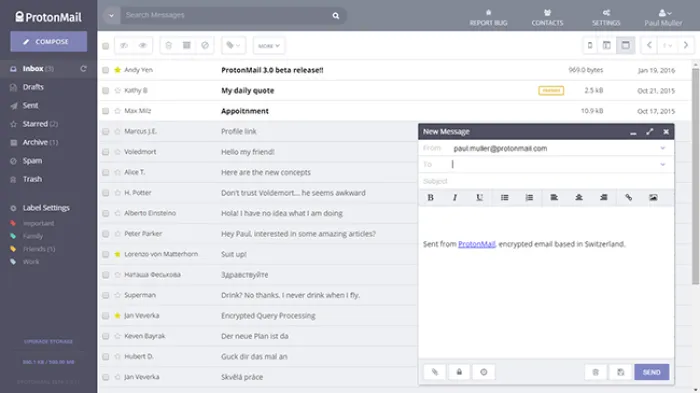
The Proton Mail SERP includes Reddit discussions, app listings, review articles, video reviews, and security-focused comparisons. This shows that users want more than official privacy claims. They want to know what Proton Mail feels like in daily use.
The real user experience is mostly positive, but the trade-offs are clear. Proton Mail wins on privacy and inbox control, while Gmail and Outlook still win on convenience, search, free storage, and workplace collaboration.
| Experience Pattern | What Users Usually Report | Inboxaly Takeaway |
|---|---|---|
| Privacy trust | Users like Proton Mail because it feels more private and less ad-driven than mainstream email. | Strong trust signal for privacy-focused users. |
| Ease of use | Most users find the interface clean, but some privacy-first features require learning. | Good for daily use, but not as familiar as Gmail. |
| Free plan | Users like having a free secure mailbox, but storage limits are a common concern. | Good for testing, limited for long-term heavy use. |
| Search | Some users find search weaker or less convenient than Gmail. | Privacy-first design creates some productivity trade-offs. |
| Mobile apps | Users generally like the mobile apps, though Gmail still feels faster for some workflows. | Strong enough for daily personal use. |
| Business use | Privacy-focused teams like Proton, but collaboration-heavy teams may prefer Google or Microsoft. | Good for privacy-first teams, not always best for productivity-first teams. |
| Ecosystem value | Users who use VPN, Drive, Pass, and aliases see better value from paid plans. | Proton Unlimited is strongest when users want the full suite. |
What users usually like
- Strong privacy reputation.
- Encrypted Proton-to-Proton email.
- Clean inbox design.
- No ad-based inbox scanning model.
- Useful aliases for signups.
- Good mobile apps.
- Proton VPN and Proton Pass bundle value.
- Good option for de-Googling.
What users usually dislike
- Free storage is limited compared with Gmail.
- Search can feel weaker than Gmail.
- Some features require paid plans.
- Migration from Gmail or Outlook takes planning.
- Custom domain setup may require patience.
- Google Workspace and Microsoft 365 are stronger for collaboration.
Proton Mail Pros and Cons
Proton Mail Pros
- Strong privacy-first email model.
- End-to-end encryption between Proton users.
- Zero-access encrypted mailbox storage.
- Password-protected emails for non-Proton users.
- No ad-based inbox scanning model.
- Useful aliases for online signups.
- Good web, Android, and iOS apps.
- Strong wider Proton ecosystem.
Proton Mail Cons
- Free plan storage is limited.
- Search is not as strong as Gmail.
- Some important features require paid plans.
- Not a full Google Workspace replacement.
- Business migration requires planning.
- Third-party email client use can require extra setup.
- Paid plans may feel expensive if you only need email.
- Convenience trade-offs compared with Gmail and Outlook.
Where Proton Mail Works Well
1. Privacy-focused personal email
Proton Mail is excellent for people who want a personal email account that is more private than a standard ad-supported inbox.
2. Gmail alternative
If you want to reduce dependence on Google, Proton Mail is one of the strongest Gmail alternatives.
3. Secure communication
Proton Mail is useful for secure communication, especially when both sender and recipient use Proton Mail or when password-protected email is used.
4. Identity protection
Aliases help users avoid sharing their real email address with every website or app.
5. Privacy ecosystem
Proton Mail works especially well if you also use Proton VPN, Proton Drive, Proton Calendar, or Proton Pass.
Where Proton Mail Falls Short
1. Free storage is limited
Gmail gives more free storage than Proton Mail. Proton’s free plan is useful, but not ideal for heavy email users.
2. Search is not Gmail-level
Because Proton Mail is privacy-focused and encrypted, search can feel less powerful or less instant than Gmail for some users.
3. Not a full office suite replacement
Proton has Mail, Calendar, Drive, VPN, and Pass, but Google Workspace and Microsoft 365 are still stronger for document collaboration, spreadsheets, meetings, and enterprise workflows.
4. Paid plans matter more
Proton Mail becomes much more practical on paid plans. If you only use the free plan, storage and feature limits may become noticeable.
5. Migration takes planning
Moving from Gmail or Outlook to Proton Mail is possible, but users should carefully move contacts, filters, labels, calendars, account logins, and important emails.
Proton Mail Comparisons
Proton Mail vs Gmail
| Feature | Proton Mail | Gmail |
|---|---|---|
| Best for | Privacy and encrypted email. | Productivity and convenience. |
| Free storage | More limited. | More generous. |
| Search | Good, but privacy-first limitations exist. | Excellent. |
| Ads/data model | Privacy-first positioning. | Google ecosystem and advertising model. |
| Best user | Privacy-focused user. | Productivity-focused user. |
Proton Mail vs Outlook
Proton Mail is better for privacy-first users. Outlook is better for Microsoft 365 users, enterprise workflows, Office apps, Teams, and traditional business productivity.
Proton Mail vs Tuta
Tuta is another strong encrypted email provider. Proton Mail is better if you want a larger privacy ecosystem with VPN, Drive, Pass, Calendar, and aliases. Tuta may be better if you want a simpler encrypted mailbox and prefer its interface or pricing.
Is Proton Mail Good for Business?
Proton Mail can be good for privacy-focused businesses, especially teams that handle sensitive communication, legal documents, client information, research, consulting, security-focused work, or confidential communication.
Business users get more value when they use custom domains, admin controls, Proton Calendar, Proton Drive, and Proton’s wider privacy ecosystem.
| User Type | Proton Mail Fit | Reason |
|---|---|---|
| Personal user | Excellent | Strong privacy, aliases, and secure personal communication. |
| Freelancer | Very good | Custom domain email and privacy-focused communication are useful. |
| Small business | Good | Works well if privacy matters more than Google-style collaboration. |
| Large team | Mixed | May need more migration planning and collaboration comparison. |
| Enterprise | Depends | Microsoft 365 and Google Workspace may still be stronger for enterprise workflows. |
Best Proton Mail Alternatives
The best Proton Mail alternative depends on why you are comparing. Some users want more privacy, some want better free storage, some want stronger productivity, and some want business email with custom domains.
| Alternative | Best For | Why Choose It Over Proton Mail? |
|---|---|---|
| Gmail | Free storage and productivity | Better search, storage, Google Docs, Drive, and everyday convenience. |
| Outlook | Microsoft users and businesses | Better for Microsoft 365, Office apps, enterprise workflows, and Outlook users. |
| Tuta | Encrypted email alternative | Good if you want another privacy-first encrypted email service. |
| Fastmail | Paid productivity email | Good for clean paid email, custom domains, and productivity without Proton’s encryption-first focus. |
| Zoho Mail | Affordable business email | Good for small businesses that need budget-friendly custom domain email. |
| StartMail | Private email and aliases | Good for users who want private email with alias features. |
| Mailbox.org | European privacy email | Good for users who want private email with productivity features and custom domains. |
Best free alternative: Gmail
Choose Gmail if free storage, search, and Google Workspace tools matter more than privacy.
Best business alternative: Outlook
Choose Outlook if your team already depends on Microsoft 365 and Office apps.
Best encrypted alternative: Tuta
Choose Tuta if you want another encrypted mailbox and want to compare privacy-first options.
Best paid email alternative: Fastmail
Choose Fastmail if you want a polished paid email provider with strong custom domain support.
Is Proton Mail Worth It in 2026?
Proton Mail is worth it if privacy is a real priority for you. It gives you stronger inbox privacy, encrypted communication, aliases, password-protected messages, and a serious alternative to ad-driven email platforms.
It is less worth it if you only want maximum free storage, the best inbox search, or deep office collaboration. Gmail and Outlook are still stronger for mainstream productivity.
For most users, the decision is simple:
- Choose Proton Mail if you want privacy-first email.
- Choose Gmail if you want free storage and the best search.
- Choose Outlook if you live inside Microsoft 365.
- Choose Tuta if you want another encrypted email option.
- Choose Fastmail if you want polished paid email without Proton’s full privacy suite.
Proton Mail Final Score
| Category | Score | Reason |
|---|---|---|
| Privacy | 9.4/10 | Strong privacy-first positioning, aliases, and encrypted mailbox model. |
| Security | 9.2/10 | End-to-end encryption, zero-access encryption, and password-protected messages. |
| Ease of Use | 8.4/10 | Clean interface, but some privacy-first features require learning. |
| Free Plan | 7.8/10 | Good for testing and light use, but storage is limited. |
| Paid Value | 8.6/10 | Strong if you use Proton Mail with VPN, Drive, Pass, Calendar, and aliases. |
| Business Use | 7.8/10 | Good for privacy-first teams, but not always better than Google Workspace or Microsoft 365. |
| Productivity | 7.2/10 | Good email experience, but Gmail and Outlook still win on search and collaboration. |
| Overall | 8.5/10 | One of the best secure email services for privacy-focused users in 2026. |
Proton Mail is one of the best secure email providers in 2026. It is especially strong for users who care about privacy, encryption, aliases, secure communication, and reducing dependence on ad-driven email platforms.
Proton Mail operates in the privacy-first secure email space, while tools like Gator Mail and AOS Mail belong more to structured internal communication ecosystems. This difference is important when choosing between privacy, marketing automation, or institutional communication needs.
It is not perfect. Gmail still wins on free storage and search. Outlook still wins for Microsoft business users. Google Workspace and Microsoft 365 still offer stronger collaboration suites. But Proton Mail wins where it matters most for privacy-conscious users: encrypted email, zero-access storage, cleaner inbox control, and a business model that is not centered on inbox-based advertising.
Our final recommendation is clear: Proton Mail is worth it if privacy is a real priority. Start with the free plan if you are curious, upgrade if you want to use it daily, and consider Proton Unlimited if you also need VPN, cloud storage, password management, calendar, and aliases in one privacy-focused ecosystem.
Proton Mail FAQs
Proton Mail is an encrypted email service from Proton. It is designed for private email communication using end-to-end encryption, zero-access encryption, and privacy-focused account features.
Proton Mail is used for secure personal email, private communication, business email, custom domains, aliases, password-protected messages, and replacing Gmail or Outlook with a privacy-focused inbox.
Yes. Proton Mail is secure compared with most mainstream email providers. It uses end-to-end encryption between Proton users and zero-access encryption for stored emails.
Yes. Proton Mail is generally safe for personal, professional, and privacy-focused use. However, users still need strong passwords, two-factor authentication, and safe login habits.
Yes. Proton Mail has a free plan. It is useful for basic private email, but paid plans are better for storage, custom domains, aliases, and daily heavy use.
Proton Mail has free and paid plans. Pricing depends on storage, features, custom domain needs, and whether you choose Mail-only plans or Proton Unlimited.
Proton Mail is better for privacy and encryption. Gmail is better for free storage, search, Google Docs, Google Drive, and Google Workspace productivity.
Yes. Proton Mail can be used for business, especially by privacy-focused teams. However, Google Workspace and Microsoft 365 may still be better for document collaboration and enterprise workflows.
Yes. Proton Mail has web, Android, iOS, and desktop app options, making it practical for daily personal and professional email use.
The best Proton Mail alternatives include Gmail, Outlook, Tuta, Fastmail, Zoho Mail, StartMail, and Mailbox.org. The best choice depends on whether you need privacy, free storage, business tools, or productivity features.
Yes, Proton Mail is worth it if privacy is a serious priority. It may not be worth it if you only need maximum free storage, the fastest search, or Google Workspace-style collaboration.