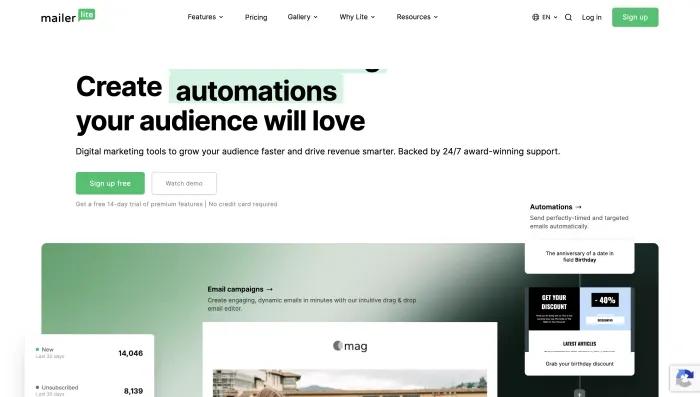
Quick Verdict: Is MailerLite Worth It?
MailerLite is still worth it for beginners, creators, nonprofits, bloggers, coaches, and small businesses that want a clean interface, landing pages, signup forms, newsletters, and basic-to-mid-level automation.
However, MailerLite is not a risk-free choice for every business. After analyzing 100 customer review records, the strongest positive themes were ease of use, clean interface, helpful human support, fast chat help, nonprofit onboarding, and strong value for simple email marketing. The strongest negative themes were free-plan limit reductions, sudden account suspensions, vague compliance explanations, refund frustration, and limited appeal options after termination.
MailerLite Rating
| Category | Rating | Reason |
|---|---|---|
| Ease of use | 8.8/10 | Many users praise the clean and intuitive interface. |
| Email editor | 8.2/10 | Good editor overall, but some users mention bugs, lags, and footer issues. |
| Landing pages and forms | 8.4/10 | Strong for creators, nonprofits, and small businesses. |
| Automation | 7.8/10 | Good for welcome flows and basic funnels, but not as deep as ActiveCampaign. |
| Pricing value | 7.2/10 | Still affordable, but free-plan changes damaged trust with some users. |
| Free plan | 5.8/10 | Review records show frustration around reduced free-plan limits. |
| Customer support | 7.0/10 | Very mixed: many users praise support, but suspended users report poor access. |
| Compliance transparency | 3.8/10 | Repeated complaints about vague suspension and termination explanations. |
| Overall | 7.1/10 | Strong tool with real support praise, but serious account-risk concerns. |
What Is MailerLite?
MailerLite is an email marketing platform that helps users create newsletters, signup forms, landing pages, websites, automations, and email campaigns.
It is commonly used by bloggers, coaches, creators, authors, nonprofits, small businesses, ecommerce stores, course sellers, newsletter writers, freelancers, agencies, and solo business owners.
MailerLite is popular because it is easier to use than many advanced email marketing platforms. It gives users the core tools they need to collect subscribers, send newsletters, build simple automations, and create landing pages without needing heavy technical skills.
What Is MailerLite Used For?
MailerLite is used for email marketing, newsletter publishing, lead generation, automation, landing pages, audience building, ecommerce follow-ups, and subscriber management.
- Sending newsletters
- Building email lists
- Creating signup forms
- Creating landing pages
- Sending welcome emails
- Running lead magnet funnels
- Sending nonprofit updates
- Promoting digital products
- Sending ecommerce follow-ups
- Building basic automations
- Managing subscriber groups
- Tracking opens and clicks
- Creating websites
- Running simple email campaigns
MailerLite SERP Intent: What Google Searchers Want
The SERP for “MailerLite” is mixed. The top result is the official MailerLite website, but other results show review, social, video tutorial, customer experience, and community discussion intent.
| Keyword Intent | Example Search | How This Article Covers It |
|---|---|---|
| Brand | mailerlite | Explains what MailerLite is and who it is best for. |
| Login | mailerlite login | Includes safe login and account access guidance. |
| Review | mailerlite review | Gives a full rating, pros, cons, user patterns, and verdict. |
| Pricing | mailerlite pricing | Covers pricing value and free-plan changes. |
| Alternatives | mailerlite alternative | Compares Brevo, Mailchimp, ActiveCampaign, Kit, and others. |
| Beginner help | how to use mailerlite | Includes a basic setup workflow. |
| Account help | how to delete mailerlite account | Includes account deletion guidance and backup steps. |
| Status | is mailerlite down | Includes troubleshooting steps for platform or login issues. |
MailerLite Free Plan Changes: Why Users Are Upset
The strongest complaint pattern in the 100 customer review records is the free-plan change.
Several users said they originally joined MailerLite because the free plan was generous. Some reviewers mentioned older limits such as 1,000 subscribers or 500 subscribers and higher monthly send allowances. Then they complained that the free plan was reduced further, with some users saying the limit dropped to 250 subscribers and monthly email sends were reduced sharply.
The emotion behind these reviews is important. Users did not only complain about limits. They complained about dependency.
Many small creators, hobby businesses, nonprofits, and micro-businesses said they had already built forms, funnels, newsletters, and subscriber systems around MailerLite. When limits changed, they felt forced either to pay or migrate.
This does not mean MailerLite is wrong to limit free plans. Free plans are expensive to maintain. But from a buyer-trust perspective, the issue is communication, timing, and whether very small users still feel welcome.
MailerLite Pricing: Is It Still Good Value?
MailerLite can still be good value compared with tools like Mailchimp, ActiveCampaign, HubSpot, and Klaviyo, especially for users who need simple newsletters, landing pages, forms, and basic automations.
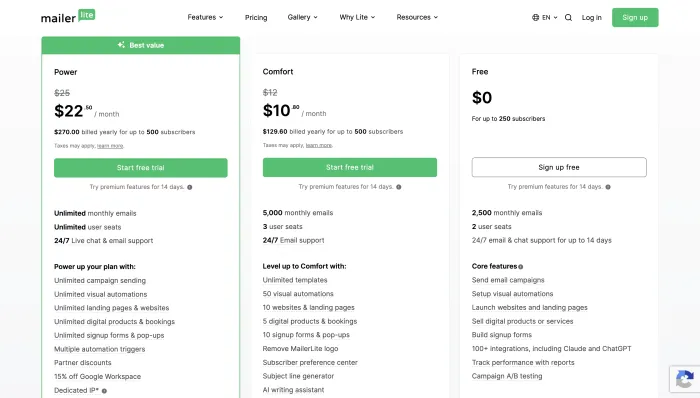
However, the value depends on your list size and your risk tolerance.
| MailerLite May Feel Worth It If... | MailerLite May Feel Less Worth It If... |
|---|---|
| You have a small list | You joined mainly for the free plan |
| You send newsletters regularly | Your list is slightly above the free limit |
| You need simple automation | You only send one or two emails per year |
| You need landing pages | You are a hobbyist with no revenue |
| You want a clean interface | You need advanced automation or CRM |
| Your list is fully permission-based | You cannot risk account review interruptions |
Customer Review Analysis: 100 Records Reviewed
We analyzed 100 customer review records provided for this MailerLite review. The pattern is unusually split.
On one side, many users praise MailerLite strongly. They describe fast support, helpful human agents, easy interface, smooth onboarding, good nonprofit support, useful landing pages, and a clean email marketing experience.
On the other side, many users describe severe frustration. Their complaints are not minor feature requests. They include account suspensions, paid accounts terminated before sending, vague policy explanations, refund disputes, free-plan reductions, and lack of appeal.
This creates a very clear conclusion: MailerLite is a good platform when everything goes smoothly, but it can feel very harsh when compliance systems flag your account.
Positive Customer Review Themes
The positive reviews are strong and detailed. Many users describe MailerLite support as fast, patient, human, friendly, and effective.
- Easy to use
- Clean and intuitive layout
- Helpful support team
- Fast response times
- Human support after chatbot handoff
- Good nonprofit onboarding
- Useful for landing pages
- Good for newsletters
- Strong value for solo businesses
- Helpful with DNS and authentication
- Helpful with integrations
- Support resolved deleted data or account access issues
- Good for simple ecommerce follow-ups
- Good alternative to more expensive platforms
Several users specifically praised support agents by name, saying they were patient, knowledgeable, and fast. Others said MailerLite helped them recover data, solve landing page issues, reconnect accounts, fix DNS/authentication problems, and complete setup steps.
This shows MailerLite’s support experience can be excellent for active users who are not locked out or suspended.
Negative Customer Review Themes
The negative reviews are also strong and repeated. The main complaint is not simply that a feature was missing. The main complaint is that users felt their business was disrupted without enough explanation.
- Account terminated without warning
- Paid account suspended before first campaign
- Vague “Terms of Use” or compliance explanations
- No clear appeal process
- No specific reason given for account closure
- Refund concerns after termination
- Time wasted setting up campaigns and domains
- Free-plan subscriber limit reductions
- Sudden loss of forms, segments, and launch setup
- Support access disappearing after suspension
- Bugs, lags, and editor issues
- Footer changes not applying
- Deliverability disappointment
- Account flagged even with small or test lists
- Users feeling treated like spammers despite claiming permission-based lists
The most serious buyer risk is this: some users said they paid, authenticated domains, imported lists, created campaigns, or prepared launches, only to have the account suspended or terminated before sending.
For a business owner, that is not a small inconvenience. It can interrupt launches, sales campaigns, newsletters, nonprofit updates, and customer communication.
MailerLite Account Suspension Complaints
Account suspension is the biggest risk area in the review data.
Many users said they were using opt-in lists, existing customer lists, nonprofit lists, buyer lists, or small private groups. Still, they reported being flagged for spam, cold emailing, or policy violations.
MailerLite’s replies, where available, usually said decisions were based on compliance reviews, Terms of Use, platform integrity, permission-based email requirements, or cold-emailing patterns.
The problem is that many users felt the explanations were too vague.
For buyers, the practical lesson is simple: MailerLite is strict about compliance. That may help protect deliverability for the platform overall, but it can feel unfair if a legitimate user gets flagged and cannot get a clear explanation.
Who Is Most at Risk of MailerLite Suspension?
- Users importing a large list from another platform
- Users uploading customer lists from ecommerce or digital product platforms
- Users sending outreach-style campaigns
- Users with old lists
- Users with unclear consent records
- Users sending cold email
- Users sending affiliate or high-risk promotional content
- Users setting up a launch under time pressure
- Users paying before account review is fully clear
- Users depending on MailerLite for one major campaign
MailerLite Support: Excellent or Frustrating?
MailerLite support is one of the most mixed parts of the review.
Many happy users praise the support team heavily. They mention fast replies, helpful screenshots, human agents, quick DNS help, account access recovery, landing page fixes, ecommerce integration help, and patient onboarding.
But suspended users often describe the opposite. They say they could not reach a human, received vague responses, lost chat access, or were told the decision was final.
So the support rating depends heavily on the situation.
If you are an active user with a normal setup question, support may be excellent. If your account is flagged, suspended, or terminated, support may feel limited and frustrating.
MailerLite Features
MailerLite includes the core features most small businesses and creators need.
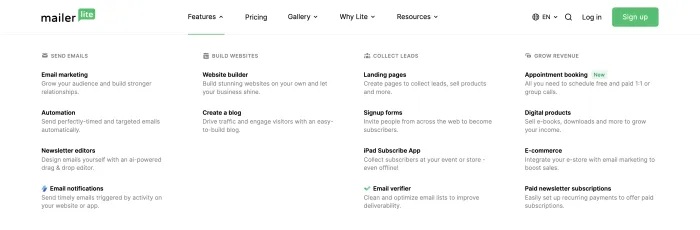
- Email campaigns
- Drag-and-drop editor
- Landing pages
- Signup forms
- Popups
- Automation workflows
- Subscriber groups
- Segmentation
- Email templates
- Websites
- Ecommerce integrations
- Analytics
- A/B testing
- Unsubscribe management
- GDPR-friendly tools
- Domain authentication
- Click and open tracking
- Nonprofit discount support
- Live chat and email support depending on plan/status
If your main problem is inbox cleanup rather than email marketing software, our Clean Email review may be more useful because it focuses on organizing and cleaning inboxes rather than sending campaigns.
MailerLite Integrations
MailerLite integrations matter because most businesses do not use email marketing alone. They need their email platform to connect with websites, forms, ecommerce stores, payment tools, CRM systems, landing pages, and analytics tools.
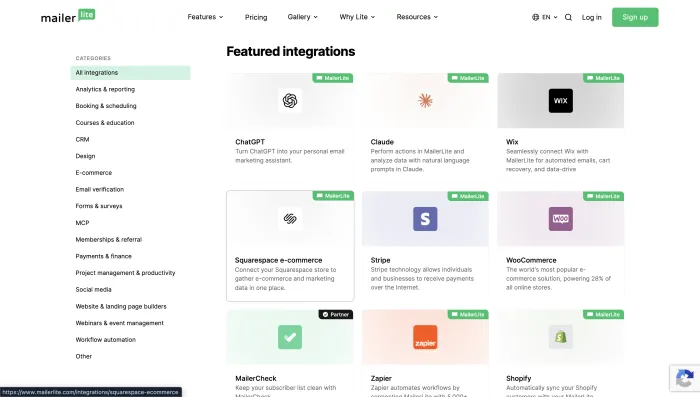
For small businesses, integrations are especially important for lead capture and ecommerce follow-ups. Before choosing MailerLite, check whether it connects properly with your website builder, store platform, payment system, CRM, webinar tool, and lead forms.
MailerLite Automation
MailerLite automation is good for simple and medium-level workflows.
You can build welcome sequences, lead magnet delivery emails, subscriber onboarding, newsletter follow-ups, basic ecommerce flows, tag or group-based automations, re-engagement campaigns, simple sales funnels, and form-based sequences.
MailerLite is not as advanced as ActiveCampaign or HubSpot for deep CRM automation, lead scoring, behavioral branching, sales pipeline triggers, and complex B2B journeys.
But for most small businesses, creators, and nonprofits, MailerLite automation is enough.
MailerLite Email Editor
MailerLite’s email editor gets mostly positive feedback. Users often say the platform is clean, simple, and easy to understand.
However, some review records mention bugs, lags, clunky edit functions, and footer changes not applying properly. One user said support told them an issue would be fixed, but it remained unresolved for weeks.
So the editor is good overall, but not perfect.
MailerLite Deliverability
MailerLite positions itself around permission-based email marketing, and its strict account review process appears designed to protect sender reputation and platform deliverability.
That strictness can be positive for the wider user base, because email marketing platforms must fight spam aggressively.
But the same strictness creates risk for users who are wrongly flagged or who do not understand compliance requirements.
One user said they had reasonable open rates but low engagement and suspected emails may have landed in spam or promotions folders. MailerLite’s reply noted that engagement and deliverability can depend on audience quality, email content, sender reputation, and mailbox filtering.
This is fair. No email platform can guarantee inbox placement. Your list quality, authentication, domain reputation, content, frequency, and engagement all matter.
MailerLite Login: How to Access Your Account Safely
MailerLite login intent is strong in the SERP. Many users search for “MailerLite login” because they simply want to access their dashboard.
For account safety:
- Use the official MailerLite login page
- Bookmark the correct login URL
- Enable two-factor authentication if available
- Save recovery codes
- Keep account email updated
- Avoid sharing admin credentials
- Keep billing details current
- Export subscriber data regularly
- Keep backups of landing page copy and automations
One positive review mentioned account access help, where a support agent helped the user regain access. That is a good sign for normal access issues. But users who are suspended may have a harder time getting help, based on review patterns.
How to Use MailerLite: Basic Setup Steps
MailerLite is beginner-friendly, but users should still set it up carefully to avoid deliverability and compliance issues.
- Create your MailerLite account.
- Add your business and sender information.
- Authenticate your domain before serious sending.
- Create a signup form or landing page.
- Collect permission-based subscribers.
- Organize subscribers into groups or segments.
- Create your first newsletter or welcome email.
- Build a simple welcome automation.
- Send a small test campaign first.
- Monitor opens, clicks, unsubscribes, bounces, and complaints.
- Keep backups of your contacts, forms, automations, and copy.
How to Delete a MailerLite Account
Some users search for how to delete a MailerLite account, especially after pricing changes, migration, suspension concerns, or switching platforms.
Before deleting your account, take these steps:
- Export your subscriber list
- Download important reports
- Save landing page copy
- Save email templates
- Save automation logic
- Cancel paid billing if applicable
- Remove embedded forms from your website
- Update DNS records if needed
- Move active forms to your new platform
- Test your new provider before shutting MailerLite fully
Account deletion steps can change, so users should always check the current MailerLite dashboard or support documentation before deleting anything permanently.
Is MailerLite Down?
Some users search “is MailerLite down” when they cannot log in, send campaigns, access automations, or load the dashboard.
If MailerLite is not working, check:
- Your internet connection
- The official MailerLite login page
- Your browser cache and cookies
- Another browser or device
- Whether your account is paused or under review
- Billing or payment status
- Domain authentication status
- Campaign approval status
- Any platform status or support updates
Because several review records mention account pauses or terminations, do not assume every access issue is a platform outage. It may also be an account-specific issue.
MailerLite Pros and Cons
MailerLite Pros
- Clean and beginner-friendly interface
- Good for newsletters and small businesses
- Useful landing pages and signup forms
- Good basic and mid-level automation
- Many users praise fast support
- Good for nonprofits and creators
- Affordable compared with some competitors
- Good for permission-based email marketing
MailerLite Cons
- Many complaints about sudden account suspension
- Vague compliance explanations frustrate users
- Free-plan reductions upset small users and hobbyists
- Not as advanced as ActiveCampaign or HubSpot
- Suspended users report limited support access
- Refund disputes appear in customer complaints
- Some users report bugs, lags, and editor issues
- Risky for cold outreach or imported lists
MailerLite Comparisons
MailerLite vs Mailchimp
MailerLite is often compared with Mailchimp because both tools target beginners and small businesses.
For a deeper look at Mailchimp’s pricing, features, pros, cons, and reliability issues, read our Mailchimp review.
| Feature | MailerLite | Mailchimp |
|---|---|---|
| Ease of use | Very good | Very good |
| Free plan trust | Weakened by recent complaints | Also limited compared with older days |
| Templates | Good | Strong |
| Automation | Good | Good |
| Pricing value | Usually better | Can become expensive |
| Best for | Simple newsletters and landing pages | Familiar templates and broad integrations |
Choose MailerLite if you want a cleaner, more affordable tool. Choose Mailchimp if you prefer a more established brand with more template familiarity and integrations.
MailerLite vs ActiveCampaign
ActiveCampaign is stronger for automation. MailerLite is simpler and easier.
| Feature | MailerLite | ActiveCampaign |
|---|---|---|
| Ease of use | Easier | More complex |
| Automation | Good | Excellent |
| CRM | Basic | Stronger |
| Pricing | More affordable for many users | Higher |
| Best for | Beginners and creators | Advanced automation and sales workflows |
Choose MailerLite for simplicity. Choose ActiveCampaign for serious automation.
MailerLite vs Brevo
Brevo is a strong alternative if you want email marketing plus CRM-style tools, SMS, and transactional email.
| Feature | MailerLite | Brevo |
|---|---|---|
| Ease of use | Cleaner | Good |
| Pricing model | Contact/list based | Often send-volume oriented |
| Automation | Good | Good |
| SMS | Limited compared with Brevo | Stronger |
| Transactional email | Not main focus | Stronger |
| Best for | Creators and newsletters | Budget business communication |
Choose MailerLite for clean newsletter workflows. Choose Brevo for broader business communication.
MailerLite vs Kit
Kit is built more specifically for creators.
| Feature | MailerLite | Kit |
|---|---|---|
| Best for | Small businesses and creators | Creators and newsletter businesses |
| Forms and landing pages | Strong | Strong |
| Automation | Good | Good |
| Creator monetization | Moderate | Stronger |
| Pricing | Often competitive | Can rise with list size |
Choose MailerLite for general small business email marketing. Choose Kit if your business is creator-led and newsletter-first.
Best MailerLite Alternatives
If you need transactional email infrastructure instead of newsletter marketing, compare MailerLite with our Mailgun review, because Mailgun is built more for SMTP, API sending, and transactional email use cases.
Brevo
Best for budget-conscious businesses that want email marketing, SMS, CRM-style tools, and transactional email.
Mailchimp
Best for beginners who want a familiar platform with polished templates and many integrations.
ActiveCampaign
Best for advanced automation, CRM workflows, lead scoring, and behavior-based campaigns.
Kit
Best for creators, coaches, authors, newsletter writers, and digital product sellers.
Constant Contact
Best for local businesses, nonprofits, and users who want more traditional support-focused email marketing.
Omnisend
Best for ecommerce brands that want email, SMS, and push notifications together.
Klaviyo
Best for Shopify, WooCommerce, and revenue-focused ecommerce email marketing.
Moosend
Best for affordable automation features.
GetResponse
Best for funnels, landing pages, webinars, and online selling.
AWeber
Best for classic newsletters and simple email marketing campaigns.
Who Should Use MailerLite?
Use MailerLite if:
- You are a beginner
- You want a clean email marketing tool
- You need newsletters
- You need landing pages
- You need signup forms
- You need basic automation
- You run a nonprofit
- You are a creator or blogger
- You are building a permission-based list
- You want something simpler than ActiveCampaign
- You want better value than some larger platforms
Who Should Avoid MailerLite?
Avoid MailerLite if:
- You need cold outreach
- You are importing a large old list
- You cannot risk sudden account review
- You need advanced CRM
- You need complex automation
- You rely on one major launch campaign
- You need guaranteed appeal access
- You are uncomfortable with strict compliance checks
- You need full transparency before account closure
- You only joined for the free plan and are close to its limit
MailerLite Safety Checklist Before You Sign Up
Before using MailerLite seriously, follow this checklist:
| Checklist Item | Why It Matters |
|---|---|
| Use only permission-based contacts | Reduces suspension and deliverability risk. |
| Keep proof of subscriber consent | Helps if your account is reviewed. |
| Avoid cold email | MailerLite is not a cold outreach platform. |
| Authenticate your domain | Improves trust and deliverability. |
| Start with a small test campaign | Avoids sudden high-risk sending behavior. |
| Export backups regularly | Protects your list if access changes. |
| Do not wait until launch day | Setup and compliance checks can take time. |
| Read Terms of Use carefully | Important before importing contacts. |
| Keep billing and account info updated | Prevents access and payment issues. |
| Have a backup platform plan | Useful if your account is paused. |
Final Verdict
MailerLite is still one of the best email marketing platforms for beginners, creators, nonprofits, and small businesses that want a clean, affordable, and practical way to send newsletters, build landing pages, collect subscribers, and run basic automations.
The positive review records show that many customers genuinely love the platform. They praise the support team, clean interface, easy setup, nonprofit onboarding, account help, DNS support, ecommerce integration help, and simple newsletter workflows.
But the negative review records cannot be ignored. Too many users describe sudden account termination, vague compliance explanations, lost setup time, refund concerns, and frustration after paying or importing lists.
Choose MailerLite if your email marketing is permission-based, simple, low-risk, and list-building focused.
Avoid MailerLite if you need cold outreach, high-risk promotional sending, large imported lists, guaranteed approval, or absolute protection against account review disruption.
For most clean newsletter use cases, MailerLite is still a strong platform. For businesses that cannot afford account review risk, Brevo, Mailchimp, ActiveCampaign, Kit, Constant Contact, or another alternative may be safer.
MailerLite FAQs
MailerLite is an email marketing platform used for newsletters, landing pages, signup forms, automations, websites, and subscriber management.
MailerLite is used for email campaigns, lead generation, newsletters, signup forms, landing pages, automation workflows, ecommerce follow-ups, and audience building.
MailerLite is good for beginners, creators, nonprofits, and small businesses with permission-based email lists. However, account suspension complaints and free-plan changes make it a more cautious recommendation.
MailerLite has offered a free plan, but customer review records show frustration around reduced free-plan limits. Always check current plan limits before building your setup around the free version.
Many users say MailerLite reduced free-plan subscriber and sending limits after they had already built forms, funnels, newsletters, and subscriber workflows on the platform.
Customer review records show many complaints about account suspensions or terminations. MailerLite replies often refer to compliance checks, Terms of Use, permission-based sending, and platform deliverability protection.
Yes, MailerLite is one of the easier email marketing platforms for beginners. The interface is clean, and many users say it is simple to set up campaigns, landing pages, and automations.
MailerLite can be good for nonprofits. Several positive review records mention nonprofit onboarding, helpful support, and discounts.
MailerLite can work for basic ecommerce emails and abandoned cart follow-ups, but Klaviyo and Omnisend are stronger for advanced ecommerce segmentation and revenue tracking.
MailerLite is often simpler and more affordable than Mailchimp. Mailchimp may be better for users who want a more familiar brand, broader integrations, and polished templates.
MailerLite is easier and cheaper for simple newsletters and basic automation. ActiveCampaign is better for advanced automation, lead scoring, and CRM workflows.
The best MailerLite alternatives are Brevo, Mailchimp, ActiveCampaign, Kit, Constant Contact, Omnisend, Klaviyo, Moosend, and GetResponse.
MailerLite is safe for permission-based email marketing, but users should understand its strict compliance approach. Keep proof of subscriber consent, avoid cold outreach, and export backups regularly.
No. MailerLite is not a cold email platform. Using it for cold outreach may increase the risk of account suspension.
MailerLite is worth it for clean, permission-based newsletters, landing pages, forms, and simple automations. It may not be worth it if you need advanced automation, cold outreach, or guaranteed account approval.