Fyxer AI Review (2026): Honest Test, Pricing, and Verdict
Written by Sanya Goyal
We build an autonomous email agent at Inboxaly, which means we test the tools in our category closely, and Fyxer is the one readers ask us about most. It has raised about $40M, reached roughly 180,000 users, and counts Marc Benioff among its investors, so it is a serious product, not a weekend project.
We connected it to live Gmail and Outlook inboxes and put it through real client threads, sales follow-ups, and meetings. This review is the honest version: what Fyxer does well, what it costs, where it stops, and who should actually buy it. One finding matters more than any other, and we get to it below: Fyxer drafts your replies, but it does not send them.
Our verdict at a glance
Rating: 3.5 out of 5. Fyxer is a capable, low-friction assistant with genuinely good tone-matching and a solid meeting notetaker, held back by a narrow scope, rigid categories, and a pricing model that catches people out.
- Best for: solo executives, salespeople, and consultants who live in Gmail or Outlook and want faster drafting plus meeting notes with almost no setup.
- Not ideal for: teams sharing an inbox, high-volume inboxes where you want mail handled rather than just drafted, or anyone who needs tasks and automation beyond email.
- Price: from $30 per user per month. No free tier, 7-day trial, card required.
- The catch: it drafts rather than sends, its categories are fixed, and volume-based overage fees plus post-trial charges surprise a lot of users.
Setup and how Fyxer works
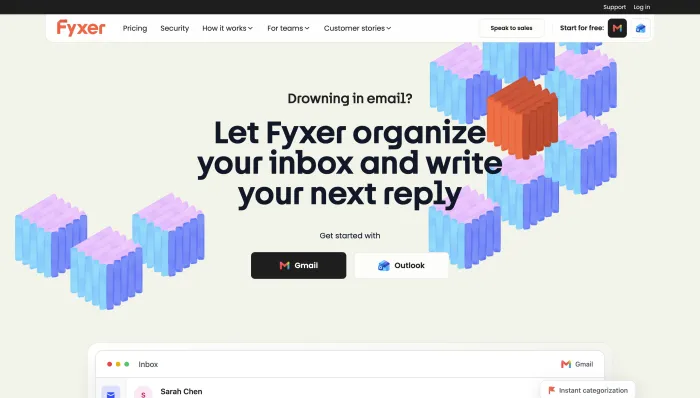
Fyxer connects to Gmail or Outlook through a standard Google or Microsoft login, so there is no migration and nothing technical to configure. Once connected, it reads your past emails to learn two things: how you write, and what kinds of mail you tend to receive.
From there it runs continuously in the background. It drafts replies in your style, sorts incoming mail into categories, joins your meetings to take notes, and proposes times when a message needs scheduling. You keep working in your normal inbox; Fyxer adds a sidebar and labels rather than a new interface. First useful output takes about a day, and the drafting improves noticeably over the first week as it calibrates to your voice.
Inside Fyxer AI: the four things it does
Fyxer is an assistant layer on top of Gmail or Outlook, not a replacement inbox. Founded in 2023 by brothers Richard and Archie Hollingsworth, its whole pitch is a near-zero learning curve. It does four things.
Inbox categorization. Fyxer sorts incoming mail into groups like To Respond, FYI, and Notification, so the messages that need a human float to the top. It works, but the categories are fixed. You cannot create or rename them, and in our testing, echoing a recurring theme in user reviews, the labeling is not always right. Important items like invoices sometimes land in the wrong bucket.
Drafted replies in your tone. This is Fyxer's strongest feature. It studies roughly your last 300 emails and drafts replies that mirror your phrasing, so a quick edit replaces writing from scratch. Tone-matching is the thing reviewers praise most, and it is genuinely good on routine, repetitive mail. Two caveats: that learning window is relatively short, so if your sent history is thin or highly varied you will edit more early on, and it learns a single general voice rather than a different register for your investor versus a new client.
An AI meeting notetaker. Fyxer's notetaker is more capable than most email tools bother to build. It joins calls on Google Meet, Zoom, and Teams as an AI participant, records them, and produces a summary with action items afterward, delivered to your inbox labeled FYI and stored in a dashboard. There is a Notepad for your own manual notes during a call, and Snippets that let you share a clip of video and transcript for a key moment. A separate Notetaker desktop app for Mac and Windows records from your computer without appearing in the participant list, useful for in-person meetings, though it currently captures audio only, and it asks you to confirm attendees were notified before recording. Two honest caveats: summary depth is the common complaint, with some reviewers finding an hour-long meeting reduced to a couple of thin bullets, and the notetaker does not coexist well with other meeting bots, so running it alongside Otter, Fireflies, or Gong can cause join or recording failures.
Scheduling and search. Replies can propose meeting times, and on the Professional plan, Fyxer Chat lets you search across email, meetings, and uploaded files, with a HubSpot integration syncing activity to your CRM. As of early 2026 it also integrates with ChatGPT for drafting. Worth noting: on scheduling, Fyxer suggests times but often leaves you to create the actual calendar invite.
Fyxer AI pricing
Fyxer is priced per user, per month, and it sits at the higher end of the category.
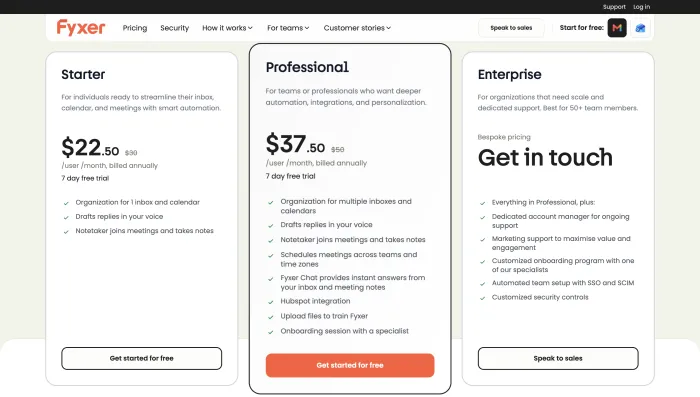
- Starter: $30 per user per month ($22.50 billed annually). One inbox and one calendar, plus categorization, drafting, and the notetaker.
- Professional: $50 per user per month ($37.50 billed annually). Adds multiple inboxes and calendars, Fyxer Chat, HubSpot, file uploads for custom training, and meeting scheduling.
- Enterprise: custom pricing, with a 50-seat minimum, for SSO and SCIM.
Every plan comes with a 7-day free trial, cut down from 14 days as of mid-2026, and it requires a card up front. There is no permanent free tier.
Two pricing details deserve attention because they are the most common complaint we found. First, Fyxer charges overage fees when your incoming email volume exceeds your plan's monthly allotment, which effectively penalizes you for getting more mail, an unpredictable cost for a growing business. Second, multiple users report being charged unexpectedly after the trial, with figures as high as $450 and €900 mentioned in reviews. If you trial Fyxer, set a hard reminder before day seven.
Where Fyxer AI shines
Credit where it is due. Fyxer gets several things right.
Setup is genuinely painless. You connect your inbox, pick your categories, and it starts working within a day, with none of the configuration heavier tools demand. The tone-matching is the best part of the product and the reason most fans stick around; on high-volume, repetitive correspondence it meaningfully cuts drafting time. Combining inbox help and a capable meeting notetaker in one tool is convenient if you need both. And on the Professional plan, the ability to upload documents and style guides so the AI drafts with your context is a real step up over generic writing tools.
For a busy solo professional whose main pain is spending an hour a day writing similar replies and recapping meetings, Fyxer earns its place.
Where Fyxer AI falls short
The limitations are just as real, and they cluster around scope.
It drafts, it does not send. This is the big one. Fyxer prepares replies and waits for you to review and hit send on every message. If you pictured a hands-off assistant that clears routine mail on its own, that is not what Fyxer is. It speeds up each reply without reducing how many you personally handle.
Fixed categories. You cannot build your own organizational logic. For anyone with a workflow that does not fit To Respond, FYI, and Notification, that rigidity is a wall, and the occasional mislabeling makes it worse.
Email-only scope. Tasks that come out of an email are not extracted or pushed to a task manager. Fyxer is aware of your calendar but does not manage it, and there is no unified daily briefing. If your work spans team chat as well as email, it does not reach there either.
No shared inbox, no Apple Mail, no mobile app. It is built for an individual on Gmail or Outlook. Teams sharing support@ or sales@ are out, Apple Mail users are out, and on mobile you get drafts through your existing mail app but not the full experience.
Price and predictability. At $30 to enter, it is one of the more expensive options, and the overage model makes the real monthly cost hard to forecast.
Ratings and real user feedback
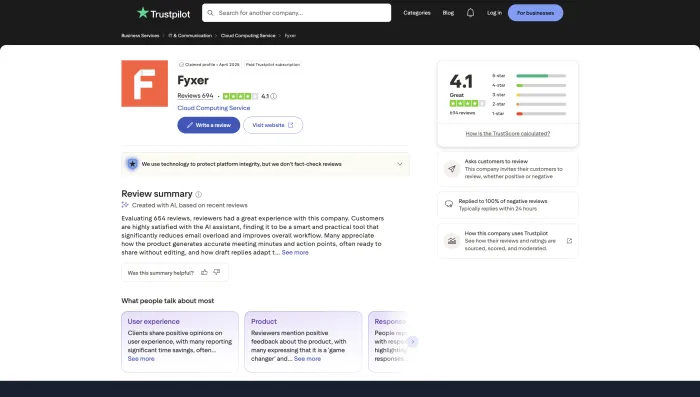
Fyxer holds a 4.1 out of 5 on G2, though from a thin sample of around 20 reviews, and a 4.1 out of 5 on Trustpilot across roughly 683 reviews. That is a solid, not spectacular, score.
The positive reviews are consistent: easy to set up, intuitive, saves hours a week, and the drafting learns your style well. The critical reviews are just as consistent, and they echo the limitations above: not enough control over categories, meeting recaps that could go deeper, and, most sharply, billing surprises. The harshest reviews describe unexpected charges, extra seats added without permission that multiplied a subscription fee, and slow support. Those are outliers rather than the norm, but the billing theme comes up too often to ignore.
Fyxer AI compared to the alternatives
The quickest way to place Fyxer is against the tools buyers weigh it against. The column that matters most is whether the tool actually sends mail for you or just drafts it.
| Tool | Type | Sends for you | Best for | From |
|---|---|---|---|---|
| Fyxer | Assistant (drafts) | No | Solo drafting plus meeting notes | $30/user/mo |
| Superhuman | AI-native client | No | Inbox speed | $30/mo |
| Gmelius | Gmail team assistant | Via chat command | Gmail shared inboxes plus automation | $19/user/mo |
| alfred_ | Agent | You still send | Triage plus a daily brief | $24.99/mo |
| Inboxaly | Agent | Yes | Handling high-volume business email | $49/mo |
Read across the tiers. If you want a faster inbox to work in yourself, Superhuman is quicker and more polished, with proper split inboxes, though it costs more. If you run a team on a shared inbox, Gmelius offers customizable automation and shared inboxes inside Gmail at a lower entry price, and Hiver or Front cover helpdesk-scale needs. If you want triage plus a daily brief and task extraction as an individual, alfred_ covers more of the workflow than Fyxer for less.
And if the real problem is email volume, the thing Fyxer explicitly does not fix, that is where an autonomous email agent is a different category. An agent reads incoming mail and actually replies, using your templates and rules, follows up on its own, and logs new leads, with you supervising rather than sending each message. That is what we build at Inboxaly: where Fyxer hands you a draft, an agent handles the routine 80% end to end. For high-volume business inboxes at agencies, sales teams, and founder-led companies, that distinction is the whole decision.
If you have already decided Fyxer is not for you, our guide to the best Fyxer AI alternatives covers the strongest options in depth. For the wider field tested side by side, see the best AI email assistants of 2026.
Fyxer AI login, trial, and how to cancel
You log in to Fyxer at fyxer.com using your Google or Microsoft account, so there is no separate password to manage. The assistant then runs through that connection, plus a browser extension and the optional desktop notetaker.
The trial is seven days and requires a card up front, and this is where people get caught. Access converts to a paid plan automatically when the trial ends, and reviewers report unexpected charges, some several hundred dollars when extra seats were involved. If you are only evaluating, cancel in your account settings before day seven, and check your seat count so you are not billed for users you did not add. If you want longer to test, sharing a referral link extends the trial by seven days per person.
Who should use Fyxer AI, and who should not
Use Fyxer if you are a solo executive, salesperson, or consultant on Gmail or Outlook, your main pain is drafting speed and meeting recaps, and you want a tool that works in a day with no setup. On that job, it delivers.
Look elsewhere if you need mail handled rather than drafted, you want to build your own categories and automations, you share an inbox as a team, you need tasks and multi-step workflows, or predictable pricing matters to your budget.
Frequently asked questions
Is Fyxer AI worth it? For a meeting-heavy solo professional who wants faster drafting with zero setup, yes. For anyone whose core problem is the sheer volume of email, it is an expensive way to get drafts you still have to send, and an autonomous agent is a better fit.
How does Fyxer AI work? It connects to your Gmail or Outlook account through a Google or Microsoft login, learns from your past emails, then works in the background to draft replies in your voice, sort your inbox, take meeting notes, and suggest meeting times. You review and send the drafts yourself.
Does Fyxer AI send emails automatically? No. Fyxer drafts replies in your voice, but you review and send every one. It does not send on your behalf, which is a key difference from autonomous email agents.
How much does Fyxer AI cost? Starter is $30 per user per month ($22.50 annually), Professional is $50 ($37.50 annually), and Enterprise is custom with a 50-seat minimum. There is a 7-day trial and no free tier, and overage fees apply if your email volume exceeds the plan allotment.
How do I cancel Fyxer AI before the trial charges me? Cancel in your account settings before the 7-day trial ends, since it converts to a paid plan automatically. Check your seat count too, as reviewers report being charged for extra seats. A referral link can extend the trial if you need more time.
Is there a free version of Fyxer AI? No. Fyxer offers only a 7-day free trial, which requires a card, and access ends when the trial does.
Does Fyxer AI work with Outlook? Yes. Fyxer works with both Gmail and Outlook. It does not support Apple Mail, and there is no dedicated mobile app.
What are the best Fyxer AI alternatives? Superhuman for inbox speed, Gmelius or Hiver for teams, alfred_ for individual triage and briefings, and an autonomous agent like Inboxaly if you want routine mail handled and sent rather than just drafted.
The verdict
Fyxer is a good tool doing a narrow job well. The tone-matching is strong, the notetaker is genuinely capable, and the setup is effortless, which is why 180,000 people use it. But it drafts rather than sends, its categories are rigid, and its pricing surprises people, so it is best understood as a drafting and meeting assistant, not the hands-off inbox manager its "AI executive assistant" marketing implies.
If you want to write faster, Fyxer is a reasonable, if pricey, choice. If you want to spend less time in email at all, the tool you are looking for is an agent that handles the routine work for you, not one that leaves the final click, and the volume, on your plate.