AI Auto Reply for Email: Smart Responses, Sent Automatically
Written by Viraj Pandit
The auto reply used to mean one thing: an out-of-office notice telling people you would get back to them later. It answered nobody's question. AI auto reply is a different idea entirely. Instead of a canned notice, it reads the actual message, drafts a real response in your voice, and, for routine mail, sends it, so the reply that used to wait for you goes out on its own.
This guide explains what AI auto reply is, how it works, how to set it up on Gmail or Outlook, and how to keep it safe so nothing wrong goes out under your name.
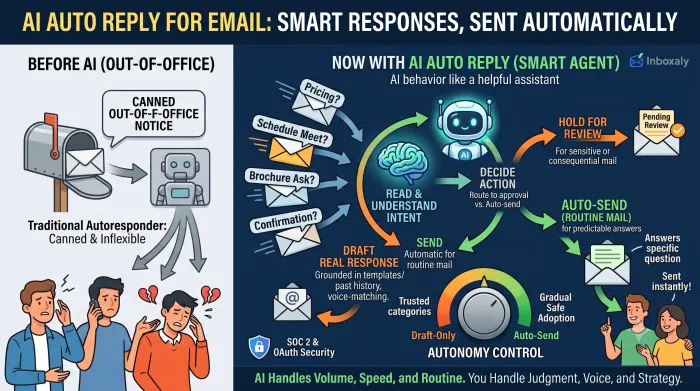
Auto reply, defined
A traditional autoresponder sends the same fixed message to everyone, regardless of what they wrote. It is useful for signaling that you are away, and useless for actually handling the email.
AI auto reply reads and responds. It understands what a message is asking, drafts a reply that addresses that specific request in your tone, and either presents it for your approval or sends it outright, depending on how you set it up. For the repetitive questions that make up most of an inbox, the ones with a known answer, it means the response happens without you writing it.
Inside AI auto reply
An AI auto-reply system runs the same steps on each incoming message. It reads the email and its thread for intent, drafts a response grounded in your templates and past replies so it sounds like you, and then, based on your rules, either sends it or holds it for review. When you edit a draft, it learns, so its replies get closer to how you would have written them.
The important control is autonomy. You decide what the system sends on its own, usually routine, low-risk mail with a predictable answer, and what it holds for you, anything sensitive or consequential. That line is yours to draw and to move as you build trust.
Traditional autoresponder versus AI
The difference is context. An autoresponder fires the same text at every sender because it never reads the message. AI reads every message and responds to it specifically, which is the difference between "I am away and will reply later" and an actual answer to the question that was asked.
For a business inbox, that gap is the whole point. A large share of inbound mail is repetitive, the same handful of questions, requests, and confirmations, and those are exactly the messages an AI can answer correctly without you.
Setting up AI auto reply
Setup is quick and the same across platforms. Connect the tool to Gmail or Outlook, give it your templates and the tone you use, and define which messages it should handle, usually by type, sender, or topic. Start in draft-only mode so it prepares replies but you press send, and watch its output on one category of mail for a week. Once you trust it there, let it send that category automatically while it holds everything else for you.
Give it that first week to calibrate. Early on it is learning your voice and your rules; after a week the drafts need little more than a glance.
Keeping AI auto reply safe
Handing over the send button raises a fair concern, and the answer is to move gradually. Begin with draft-only, so you approve everything. Turn on automatic sending only for a narrow category of routine, low-stakes mail, and expand it one category at a time as the replies prove themselves. Keep anything that carries a decision, a negotiation, or a sensitive relationship on manual review. Voice-matching matters too: replies that read like you rather than a generic assistant are what keep automated responses from feeling automated. Treated as a dial you turn up slowly, auto reply saves the time without the risk.
Data security matters as much as control, since you are connecting software to a sensitive account. The tools built for this take it seriously. Inboxaly, for example, connects through OAuth so you never hand over a password, encrypts your data in transit and at rest, automates handling with no one on its team reading your inbox, and is built around SOC 2 Type II and GDPR-aligned standards, so the automation runs inside real security boundaries.
Tools that do AI auto reply
Most assistants draft a reply but leave the sending to you, which is auto reply only up to the last step. To actually send routine replies on their own, you need an agent.
That is what Inboxaly does. As an autonomous email agent, it matches each message to your approved templates, personalizes the reply, and either sends it or prepares it as a draft, your choice per category, through an auto-send or draft-for-review toggle. It clears the repetitive high-volume mail, pricing questions, meeting requests, brochure asks, on its own, and it can even negotiate within pricing boundaries you set, an ideal price, a floor, and a walk-away point, escalating only when a deal turns strategic. You can A/B test templates and vary them over time, and update them yourself without a developer. If the goal is not just faster drafts but replies that actually go out without you, that is the category built for it. For the wider approach, see our guide to AI email management.
Frequently asked questions
What is AI auto reply for email? It is software that reads an incoming message, drafts a real response to it in your voice, and, for routine mail, sends it automatically. Unlike a traditional out-of-office autoresponder, it answers the specific message rather than sending the same fixed notice to everyone.
Can AI reply to emails automatically? Yes. An AI agent can send replies on your behalf based on templates and rules you set, usually for routine, low-risk mail, while holding anything sensitive for your review. Assistants draft replies but wait for you to send.
How do I set up an automatic email reply with AI? Connect the tool to Gmail or Outlook, give it your templates and tone, choose which messages it should handle, and start in draft-only mode. Enable automatic sending for one category of routine mail once you trust its output, then expand from there.
Is it safe to let AI send email replies? It is, if you control the autonomy. Start with draft-only, auto-send only routine low-stakes mail, keep consequential messages on manual review, and use a tool that learns your voice. You decide exactly what the AI is allowed to send.
The bottom line
AI auto reply replaces the useless out-of-office notice with responses that actually answer the message, drafted in your voice and, for routine mail, sent on their own. It turns the repetitive share of your inbox, the questions with known answers, into replies that happen without you.
The distinction that matters is sending. If you want drafts, most assistants provide them; if you want the routine replies to actually go out, that is an agent's job, and it is exactly what Inboxaly was built to do.