AI Follow-Up Emails: Automate the Nudge That Wins Deals
Written by Viraj Pandit
Most deals are not lost to a bad reply. They are lost to no reply, the thread that goes quiet after your first message and never gets picked back up, because you got busy and it slipped. Following up is the highest-leverage habit in sales and client work, and it is also the one people are worst at, because it depends on remembering. AI follow-up emails remove the remembering. The software tracks which of your messages never got an answer and sends the nudge on a schedule, so opportunities keep moving whether or not you had the time that week.
This guide explains what automated follow-up is, how AI handles it, how to build a follow-up sequence, and how to set it up on Gmail or Outlook.
Follow-up emails, defined
A follow-up email is the message you send when your first one goes unanswered: a gentle reminder, a new angle, or a stronger call to action. In sales and client work, most positive outcomes arrive after several of these rather than the first send, because timing and persistence matter as much as the words. The difficulty is operational. Following up reliably means tracking dozens of open threads and remembering to circle back on each at the right moment, which almost no one does consistently by hand.
Automated follow-up hands that tracking and timing to software, so the nudge happens on schedule instead of when you happen to remember.
Inside AI follow-up
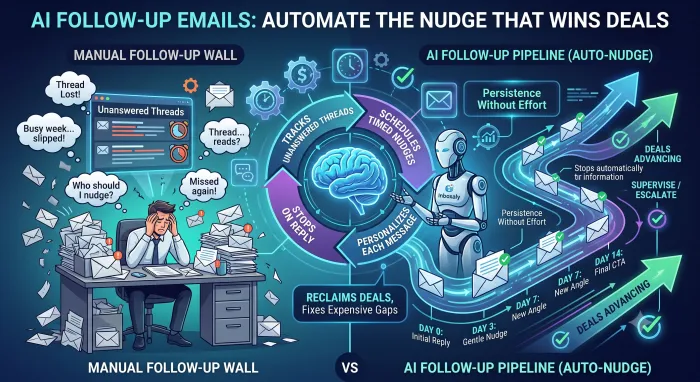
An AI follow-up system watches your sent mail for messages that have not received a reply. When a thread goes quiet, it drafts a follow-up grounded in the original conversation and your templates, then, depending on your settings, sends it or holds it for review. It repeats on a schedule you set, changing the message at each step, and it stops the moment the contact replies, so no one gets a reminder after they have already answered. Because it reads the thread, the nudge references the actual conversation rather than firing a generic "just checking in."
The result is persistence without effort: every open thread gets the follow-through it needs, and none fall through because a person forgot.
Manual follow-up versus automated
Saved templates and calendar reminders help, but they are still manual: you have to notice the reminder, find the thread, and send. That breaks down the moment you are busy, which is exactly when follow-ups get dropped.
Automated follow-up removes the human step. The system tracks the threads, times the sends, and either sends or drafts each nudge on its own. AI adds two things a simple autoresponder cannot: it personalizes each message to the specific conversation, and it knows when to stop, ending the sequence as soon as the contact responds.
Building a follow-up sequence
A good sequence has four parts, and defining them once is what makes the automation work.
- Timing. When each follow-up goes out. A common cadence is Day 0 for the first reply, then Day 3, Day 7, and Day 14.
- Steps. How many follow-ups before you stop or escalate. Three to four is typical.
- A message per step. A different template each time, usually with a lighter touch early and a clearer call to action later.
- A stop-or-escalate rule. What happens if the contact never replies: end the sequence, or route the thread to you for a personal decision.
Set those four, and the system runs the sequence for every thread automatically, adjusting as replies come in.
Setting up automated follow-up
The setup is short and consistent across tools. Connect the tool to Gmail or Outlook, define your sequence, timing, steps, templates, and stop rule, and choose an autonomy level: draft-only, where it prepares each nudge for your approval, or automatic, where it sends on schedule. Run it in draft-only for a week to see the messages it produces, then let it send once you trust them.
Cold email follow-up
Follow-up matters even more in cold outreach, where the first email rarely lands and most replies come from the second, third, or fourth touch. Automating the sequence means a prospect who ignored your opener still hears from you at the right intervals without you tracking each one by hand. The rule that keeps it working is relevance: each follow-up should add something or reference the thread, not just repeat "bumping this to the top of your inbox." AI follow-up handles the timing and the tracking so you can focus on making the message worth opening.
Tools that automate follow-up
Most assistants remind you to follow up or draft the message, then leave the sending to you, which is only half the job. To actually send and track follow-ups on their own, you need an agent.
Inboxaly is built around exactly this. It runs timed follow-up sequences, Day 0, 3, 7, and 14 by default, with a template for each step and an escalation rule if the contact never replies, and it tracks the follow-up count for every thread in its self-updating lead sheet. You decide whether each nudge sends automatically or waits as a draft. It connects to Gmail, Outlook, Microsoft 365, and most other providers, and is built around SOC 2 Type II and GDPR-aligned standards, so the automation runs inside real security boundaries. For the wider approach, see our guide to AI email management.
Frequently asked questions
What is an automated follow-up email? It is a follow-up message that software sends on your behalf when an earlier email goes unanswered, on a schedule you set, without you having to remember or send it manually. AI versions personalize each message to the thread and stop automatically once the contact replies.
Can AI send follow-up emails automatically? Yes. An AI agent can track unanswered threads and send timed follow-ups on its own, based on the sequence and rules you define, while holding anything sensitive for your review. Assistants typically draft or remind but leave the sending to you.
How many follow-ups should I send? Three to four across two weeks is a common cadence, for example an initial reply and follow-ups on days 3, 7, and 14. The right number depends on the context, but the sequence should stop as soon as the person responds.
What is the best follow-up email software? For follow-up as part of a system that also reads and replies to your inbox, an autonomous agent like Inboxaly runs full sequences with escalation and tracks each thread. Standalone tools handle sequences too, but an agent connects the follow-up to the rest of your inbox.
The bottom line
Automated follow-up fixes the most expensive gap in most inboxes: the deal that dies because nobody sent the next email. AI tracks your unanswered threads, sends the nudge on a schedule, personalizes it to the conversation, and stops when the contact replies, turning a habit that depends on memory into one that runs on its own.
The most value comes when follow-up is part of a system that also handles the reply and logs the outcome. If your inbox is mostly business mail and leads that need chasing, an agent that sends the sequences and tracks them is what keeps opportunities from slipping.