AI Email Triage: Auto-Prioritize Your Inbox
Written by Viraj Pandit
You open your inbox and someone else has already set your agenda. A client needs an answer, a vendor wants confirmation, a colleague turned a quick question into a twelve-message thread, and all of it is buried under newsletters and receipts. Email triage is the fix, and AI is what finally makes it automatic.
This guide explains what AI email triage is, how it works, how to set it up on Gmail or Outlook, and which tools do it well.
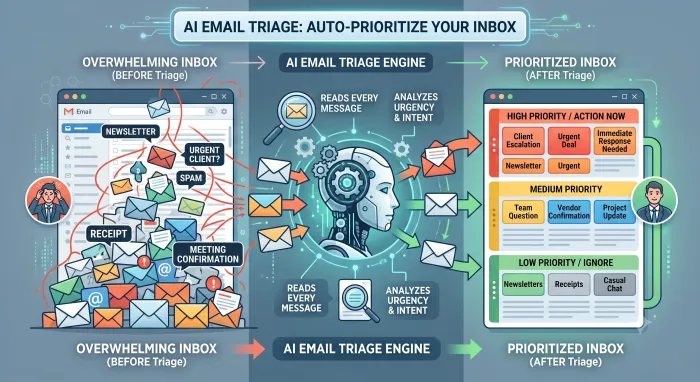
Email triage, defined
Triage means deciding what to deal with first. Applied to email, it is the act of separating the messages that need you now from the ones that can wait or be ignored. Most people do this manually, scanning subject lines and senders, which is slow and happens dozens of times a day.
AI email triage hands that judgment to software. Instead of sorting by a fixed rule, an AI reads each message and ranks it by urgency and intent, surfacing the deal that needs a reply and the client escalation while pushing the promotional mail down. The inbox stops being a junk drawer and starts behaving like a prioritized to-do list.
Inside AI email triage
An AI triage system reads far more than the subject line. It weighs the sender, the thread history, the content and tone of the message, attachments, and often your calendar, then predicts how important the message is to you and where it belongs.
The key difference from an old-fashioned filter is judgment. A filter follows rigid logic: if the sender is this, apply that label. It cannot tell an urgent client request from a routine update when both come from the same address, and it cannot recognize that two differently worded emails are both time-sensitive. AI reads for meaning, so it catches what a rule misses, and it improves as you correct it, learning which messages you actually treat as priorities.
Manual rules versus AI triage
Gmail filters and Outlook rules still have a place for simple, mechanical sorting, filing every statement from your bank in a folder, for instance. They break down the moment prioritization depends on meaning rather than a fixed field.
AI triage is the upgrade for exactly those cases. It does not replace your filters so much as add the judgment they never had. In practice, the best setup keeps a few simple rules for mechanical sorting and lets AI handle the priority calls.
Setting up AI email triage
Most tools connect and start working the same day. The path is consistent across platforms.
Connect the tool to Gmail or Outlook and grant it read access. Tell it what matters to you, key clients, deal-related mail, anything time-sensitive, so it knows your priorities. Let it triage for a few days and correct anything it ranks wrong, which is how it learns your preferences. Within about a week its judgment settles, and you open your inbox to a short list of what needs you rather than everything that arrived overnight.
Tools that do AI email triage
Triage shows up in a few kinds of tool. Filtering layers like SaneBox move unimportant mail out of your main inbox but do not read intent deeply. Assistants like Fyxer categorize your inbox into fixed groups. For triage as part of a system that also acts on the mail, an agent goes furthest: it not only ranks messages but replies, follows up, and logs the ones that matter.
That is where Inboxaly fits. As an autonomous email agent, its classification engine reads each message for who is writing (a lead, client, vendor, internal contact, or spam), what they want (a pricing question, a meeting, support, a partnership), and how urgent it is based on intent rather than keywords, then decides whether to reply, log, escalate, or archive it. It applies priority labels of urgent, medium, low, or ignore, routes your VIP contacts straight to you, and handles the routine messages with your approved templates, so triage leads directly into action rather than just a tidier list. For the wider approach, see our guide to AI email management.
Who needs AI email triage
Anyone whose inbox volume outpaces the time they have for it. Founders, salespeople, consultants, and support staff who receive a constant mix of critical and low-value mail get the most from it, because the cost of missing the important message is highest for them. If you receive only a handful of emails a day, manual triage is fine; past that, letting software make the first pass pays off quickly.
Frequently asked questions
What is AI email triage? It is software that reads every incoming message and ranks it by urgency and intent, so the mail that needs your attention surfaces first and low-priority mail drops down. Unlike a filter, it reads for meaning and improves as you correct it.
How is AI triage different from Gmail filters or Outlook rules? Filters follow fixed if-then logic and only sort mail. AI reads and understands each message, so it can tell an urgent request from a routine one even when they come from the same sender, which a rule cannot do.
Can AI prioritize my email automatically? Yes. Once connected to Gmail or Outlook, an AI triage tool ranks incoming mail on its own and gets more accurate as it learns which messages you treat as priorities.
What is the best tool for AI email triage? For triage alone, filtering tools and assistants handle it. For triage that leads into action, replying and following up on the mail it prioritizes, an autonomous agent like Inboxaly goes furthest.
The bottom line
AI email triage turns an inbox you dig through into a queue that is already ordered by what matters. It reads each message for urgency and intent, ranks it, and learns from your corrections, doing automatically what you would otherwise do by hand dozens of times a day.
The real gain comes when triage leads to action. If your inbox is mostly repetitive business mail, an agent that prioritizes and then handles the routine messages, rather than just labeling them, is what actually clears the load.