AI Email Parser: Extract Data From Emails Automatically
Written by Viraj Pandit
Your inbox is full of data you never get to use. A new lead's name and company, an order's details, a quote request's specifics, all of it arrives as plain text and then gets buried under the next fifty messages. An AI email parser reads that mail and pulls the details that matter into a spreadsheet or CRM, automatically, so the information works for you instead of sitting in a thread.
This guide explains what an AI email parser does, how it works, where it helps most, and how it improves on the rule-based parsers that came before it.
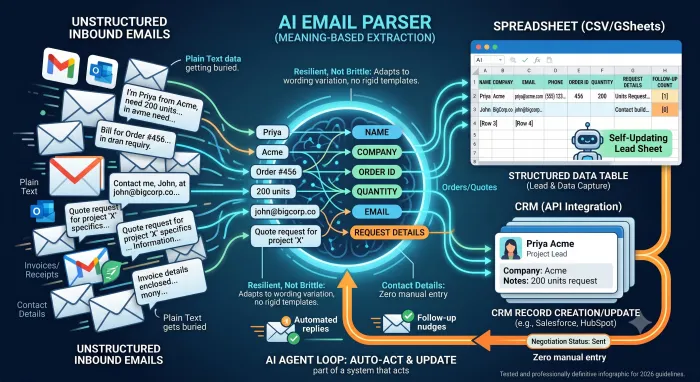
Email parsing, defined
Parsing an email means extracting structured information from an unstructured message. A human does it by reading an inquiry and copying the sender's name, company, and request into a form or sheet. An email parser automates that step.
An AI email parser goes further than older tools by reading for meaning rather than matching a fixed position in the text. It understands that "I'm Priya from Acme, we need 200 units by Friday" contains a name, a company, a quantity, and a deadline, and it can pull each into the right field even though the sentence follows no template. The output is clean, structured data, ready for a spreadsheet, a CRM, or the next step in a workflow.
Inside an AI email parser
An AI parser runs a simple pipeline on each message you point it at. It reads the email and any attachments, identifies the fields you care about, name, company, email, phone, order number, amount, request, extracts their values, and writes them to your chosen destination, a Google Sheet, an Excel file, or a CRM record.
Because it reads for meaning, it handles the variation that breaks older tools: a detail phrased three different ways across three emails still lands in the same field. And it can be told what to look for in plain language, so setting it up does not require building rigid extraction templates.
Common use cases
Anywhere the same kind of information arrives by email repeatedly, a parser earns its place.
- Lead capture: pull a new inquiry's name, company, and request into your sheet or CRM the moment it lands, so nothing slips.
- Orders and quotes: extract product, quantity, and delivery details from incoming requests into a structured list.
- Invoices and receipts: capture amounts, dates, and vendors for bookkeeping without manual entry.
- Contact details: build a clean contact list from the signatures and introductions in your inbound mail.
In each case the parser turns a stream of messages into a structured record you can sort, search, and act on.
Rule-based parsers versus AI
Traditional email parsers work by rules and templates: they look for a value in a fixed location, after a specific label or in a set position. They work until the format changes, and email formats change constantly. A new sender phrases things differently, a field moves, and the extraction breaks or grabs the wrong text.
An AI parser reads the whole message for meaning, so it adapts to wording it has never seen and does not shatter the first time an email does not match the template. For inboxes that receive mail in many shapes, which is most of them, that resilience is the difference between a parser you can trust and one you constantly fix.
Setting up an AI email parser
The setup is short. Connect the tool to Gmail or Outlook, tell it which emails to parse, usually by a label, sender, or subject pattern, and define the fields you want extracted in plain language. Point it at a destination, a spreadsheet or CRM, and run it on a few real emails to confirm the output. From there it works on incoming mail on its own.
Tools that parse email with AI
Standalone parsers handle extraction and hand the data to another tool. The more useful pattern, though, is a parser built into an agent that also acts on the mail, so a new lead is not just logged but also replied to and followed up.
That is how Inboxaly works. As an autonomous email agent, it reads inbound mail and maintains a lead sheet that updates itself, capturing the lead's name, email, company, and inquiry type, then tracking the reply it sent, the follow-up count, the negotiation status, and the final conversion outcome, columns most parsers never touch because they only extract, they do not follow the thread. It can send you a weekly summary of the pipeline on top of that. The parsing is one part of a system that turns your inbox into a live operational record rather than a place data goes to be forgotten, and because the same agent also replies and follows up, the lead it logs is the lead it works. For the broader picture, see our guide to AI email management.
Frequently asked questions
What is an AI email parser? It is software that reads incoming email and extracts structured information, names, companies, amounts, requests, into a spreadsheet, CRM, or workflow. Unlike a rule-based parser, it reads for meaning, so it handles messages that do not follow a fixed template.
Can AI extract data from emails to a spreadsheet? Yes. An AI email parser can read inbound mail and write the details you specify straight to a Google Sheet or Excel file, and many tools can send the same data to a CRM.
How is an AI parser better than a rule-based one? Rule-based parsers look for values in fixed positions and break when the email format changes. An AI parser reads the whole message for meaning, so it adapts to new wording and keeps working across the variety of mail a real inbox receives.
What can I use an AI email parser for? Common uses are capturing leads, orders, quotes, invoices, and contact details from inbound email into structured records, so the information is usable instead of buried in threads.
The bottom line
An AI email parser turns the data trapped in your inbox into structured records you can actually use, reading each message for meaning and writing the details that matter to a sheet or CRM, without the brittle templates older tools relied on.
The most value comes when parsing is part of a system that acts. If your inbound mail is mostly leads and requests, an agent that logs the details and handles the reply in one pass does more than a parser that only extracts and hands off.