What Is Yopmail?
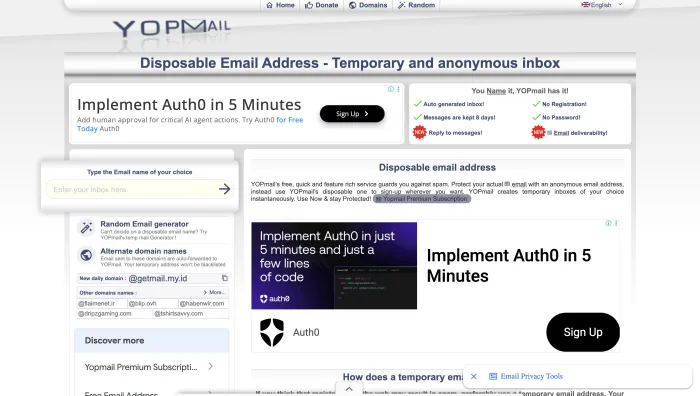
Yopmail is a disposable email service that lets users create temporary inboxes without registration, passwords, or personal information. Instead of signing up for a normal email account, you simply invent a username, add the yopmail.com domain, and use that address to receive emails. It has been running since 2004, which makes it one of the oldest services of its kind still operating.
The idea is simple. If a website asks for an email address and you do not want to share your real inbox, Yopmail gives you a quick throwaway option. You can use it to receive a verification code, download a file, test a signup flow, or avoid newsletter spam from low-risk websites.
Unlike Gmail, Outlook, Proton Mail, or Yahoo Mail, Yopmail is not built for long-term communication. It is not a private mailbox. It is a public, temporary inbox system designed for speed and convenience.
How Yopmail Works
Yopmail works differently from normal email services because there is no account creation. You do not claim an address permanently, and you do not create one either. Every possible mailbox name already exists on Yopmail's servers. You simply choose one and check it through the Yopmail website.
How to use Yopmail
- Go to yopmail.com.
- Type any username into the inbox search bar.
- Add the yopmail.com domain when using it as an email address.
- Use that address on a website that requires email verification.
- Return to Yopmail and search the same username to view incoming emails.
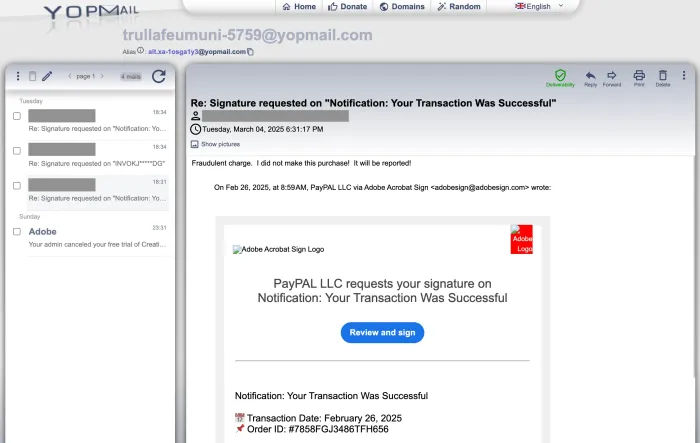
For example, if you type randomname123, your temporary email address becomes randomname123@yopmail.com. Any email sent to that address can be viewed by searching for the same inbox name on Yopmail.
Yopmail Ownership and Origins
Yopmail does not publish who owns it. There is no company name, no registered address, and no phone number anywhere on the site. The only contact route is a web form. For a service handling other people's inbound mail, that opacity is worth knowing about before you trust it with anything.
What can be established from the public record is more limited but still useful:
| Question | What the evidence shows |
|---|---|
| Who operates it | Not disclosed. No company name or legal entity is published on the site. |
| Where it comes from | French in origin. Yopmail runs a yopmail.fr domain alongside yopmail.com, and the service is hosted on OVH infrastructure in the Hauts-de-France region. |
| Operating since | 2004, making it one of the longest-running disposable email services still active. |
| Business model | Free to use, with a donation page inviting users to fund development. No paid tier is advertised. |
| Headquarters address | None published. |
| Phone number | None published. Contact is via web form only. |
| Languages served | Nine: English, French, Spanish, Italian, German, Polish, Russian, Ukrainian and Chinese. |
Longevity is a genuine signal here. A service that has run for over two decades without a data-sale scandal is more credible than a temporary email site that appeared last year. But longevity is not the same as accountability. If Yopmail mishandled your data, there is no named party to raise it with.
Yopmail Key Features
Yopmail is not a feature-heavy email platform, and it is often described as one that has never changed. That is out of date. It has added replies, per-inbox aliases, a rotating daily domain, and the ability to attach your own domain. The core is still simplicity, but the feature list is broader than most reviews suggest.
| Feature | What It Means | Why It Matters |
|---|---|---|
| No signup required | You do not need to register, verify identity, or create a password. | Useful when you need an inbox instantly. |
| Every inbox already exists | You are not creating a mailbox, you are opening one that was always there. | Nothing to set up, but also nothing you own or can lock. |
| Reply to messages | You can now respond to mail that lands in a Yopmail inbox. | Removes the old receive-only limit for simple back-and-forth. |
| Per-inbox alias | Every inbox gets a second, far less guessable address that forwards into it. | The most effective way to reduce the public-inbox risk. |
| Daily alternate domain | Yopmail publishes a new alternate domain every day, all forwarding to the same inbox. | Newer domains are less likely to sit on blocklists. |
| Add your own domain | You can point a domain you control at Yopmail and receive mail for it there. | Useful for testing teams who need addresses that do not look disposable. |
| Address generator | A one-click generator produces a random mailbox name. | Random names are much harder for strangers to guess than words. |
| Free to use | All of the above is free, funded by donations. | No paywall, but also no service guarantee. |
| 8-day message retention | Messages are deleted after roughly 8 days. Inboxes are not. | Good for short-term use, unusable for records. |
Is Yopmail Safe and Private?
Yopmail is safe only for low-risk, temporary use. It is not private in the same way as a password-protected email account. Anyone who knows or guesses the inbox name can open the same inbox and read the messages inside it.
This is the biggest thing users misunderstand about Yopmail. It protects your real email address from spam, but it does not protect the temporary inbox itself. There is no private login, no personal password, and no ownership of the mailbox name.
The practical consequence is that mailbox names are guessable. Common words, first names, and predictable patterns such as a brand name plus a number are effectively open inboxes. Treat anything you send to a short, memorable Yopmail address as public.
Yopmail is okay for
- Low-risk signup verification.
- Testing a website registration flow.
- Receiving a one-time code from a non-sensitive service.
- Avoiding newsletter spam from websites you do not fully trust.
- Checking how emails look during development or testing.
Yopmail is not okay for
- Banking, payments, or financial accounts.
- Government, legal, medical, or identity-related communication.
- Accounts you may need to recover later.
- Private documents, contracts, invoices, or personal information.
- Business communication or client communication.
Yopmail Aliases and Inbox Privacy
There is one built-in mitigation that almost every Yopmail review misses, and it materially changes the safety picture for casual use.
Every Yopmail inbox is issued an alias: a second, generated address that forwards into the same inbox but looks nothing like the mailbox name. You hand out the alias, and you check the real inbox. Someone who has only seen the alias cannot work backwards to the mailbox name and read your messages.
That is the difference between an inbox a stranger stumbles into and one they would have to target deliberately. It does not make Yopmail private, because the underlying inbox still has no password, but it closes the most common failure mode, which is picking a guessable name like test or john123 and finding someone else's mail in it.
Two habits get you most of the available protection:
- Generate a random mailbox name rather than typing a word you thought of.
- Give out the alias, not the raw address, whenever the form will accept it.
- Combine the alias with an alternate domain when a site blocks yopmail.com.
Is Yopmail Legit?
Yes. Yopmail is a legitimate, long-running disposable email service, not a scam or a phishing operation. It has operated openly since 2004 and does what it says it does: it gives you a free temporary inbox with no signup.
The confusion usually comes from the fact that a site blocked your Yopmail address, or that someone received an email from a Yopmail-linked address. Neither means the service is fraudulent. Blocking happens because disposable domains appear on standard blocklists. And because anyone can use Yopmail anonymously, scammers use it too, which is a property of every free anonymous inbox rather than a flaw unique to Yopmail.
The honest framing is that Yopmail is legitimate but not trustworthy in the security sense. It is a real service that stores your messages in public, run by an operator who has never identified itself.
Yopmail Message Retention and Inbox Lifespan
Yopmail messages are deleted after roughly 8 days. The inbox is not. This distinction trips up almost everyone, and getting it wrong is what leads people to use Yopmail for things it cannot support.
| What | How long it lasts | Practical meaning |
|---|---|---|
| Individual messages | Roughly 8 days, then automatic deletion. You can also delete them manually at any point. | Anything you might need to reread, save now. There is no archive and no recovery. |
| The inbox itself | Permanent. Yopmail states that all inboxes already exist and are never deleted. | The mailbox name will still work in a year, which is unusual for disposable email. It also means nobody can ever take it off the internet. |
| Your claim to the name | None, at any point. | Anyone else can open the same inbox at the same time. Permanence is not ownership. |
Most temporary email services do the opposite: they expire the whole inbox after ten minutes or an hour. Yopmail's permanent inboxes are more convenient for repeat testing, since you can come back to the same mailbox next week. They are also the reason the service can never be private.
Yopmail Limitations in 2026
Yopmail's biggest strength is also its biggest limitation. It is fast because it is simple, and that simplicity creates trade-offs that no feature update can remove.
| Limitation | What It Means | Impact on Users |
|---|---|---|
| Many websites block it | Yopmail domains are often included in disposable email blocklists. | It may not work on major platforms, ecommerce sites, financial services, or serious SaaS tools. |
| No password protection | Inboxes can be opened by anyone who knows the mailbox name. | The structural flaw. No feature release will fix it. |
| Outbound sending is restricted | You can reply to messages you receive, and you can email another Yopmail address. Sending anonymous mail to arbitrary outside addresses is prohibited. | Fine for a verification exchange, unusable as a general sending account. |
| No IMAP, SMTP, POP3, or API | Yopmail is web-interface based, with no documented public API. | Limited for developers who need automated inbox testing. |
| Fixed message deletion | Messages are deleted after roughly 8 days. | You cannot archive, extend retention, or use it for long-term records. |
| No identified operator | No company name, address, or phone number is published. | No accountable party if something goes wrong with your data. |
| Dated interface | The product feels old compared with newer temporary email tools. | Less polished on mobile and less convenient for modern workflows. |
Why websites reject Yopmail
Many websites reject Yopmail addresses because disposable email domains are often used for fake signups, coupon abuse, spam accounts, trial misuse, and fraud attempts. This does not mean Yopmail is broken. It usually means the website has chosen to block disposable email providers.
Yopmail Alternate Domains and the Daily Domain
When a site rejects your Yopmail address, the fix is usually an alternate domain rather than a different service.
Yopmail operates a rotating set of alternate domains that all forward into the same inbox, and it publishes a brand new one every single day. Because a domain registered yesterday has not yet made it onto the disposable-email blocklists that most signup forms check, an alternate domain frequently gets through where yopmail.com is rejected outright. The live list sits on Yopmail's alternate domains page.
Alongside the daily rotation, Yopmail has long-standing fixed domains including yopmail.fr and yopmail.net. These are older and therefore more widely blocked than the daily domain, but they are worth trying before you give up.
Two things worth knowing before you rely on this:
- The daily domain changes daily, so an address that worked last week may not be listed today. The inbox behind it still works.
- Alternate domains do nothing about the underlying privacy problem. The inbox is still public, still unpassworded, and still readable by anyone who guesses the name. Use an alias as well.
If you need addresses that never look disposable, Yopmail also lets you point your own domain at the service. That is the closest Yopmail comes to a professional testing setup.
Yopmail Not Working: Common Fixes
Most "Yopmail is not working" problems come down to four causes, and only one of them is actually Yopmail's fault.
| Symptom | Likely Cause | What To Do |
|---|---|---|
| The site rejects your address at signup | The site blocks disposable email domains. | Switch to that day's alternate domain from Yopmail's alternate domains page, since it is too new to be blocklisted. If every Yopmail domain fails, use a real alias service such as SimpleLogin. |
| The inbox is empty after signing up | The message has not arrived yet, or the sender was filtered. | Wait a minute and refresh the inbox. Confirm you typed the same mailbox name in both places, including any alternate domain. |
| An older message has disappeared | Yopmail deletes messages after roughly 8 days. | Nothing recovers it. The inbox still exists, but the message is gone permanently. |
| You see someone else's messages | You picked a common mailbox name that others are already using. | Switch to a generated random name. This is also a reminder that your own inbox is equally readable by strangers. |
| Your reply never arrives | You tried to send a new message rather than reply to a received one. | Yopmail permits replies and Yopmail-to-Yopmail mail, but blocks anonymous outbound email to other addresses. |
If the site you are signing up to blocks every disposable domain you try, that is a deliberate policy decision on their end and no temporary inbox will get past it. At that point you need a genuine alias rather than a throwaway.
Common Yopmail Use Cases
Yopmail still works well when the task is temporary, low-risk, and not tied to identity or money. The best use cases are short-lived situations where you only need to receive one email and then move on.
1. One-time signup verification
Yopmail is useful when a website asks for an email before showing a download, demo, article, coupon, or trial confirmation.
2. Avoiding newsletter spam
If you do not want a website to send marketing emails to your real inbox, Yopmail can act as a disposable buffer.
3. Website testing
Developers and marketers can use Yopmail to test signup forms, email confirmation flows, password reset emails, and welcome emails. Permanent inboxes help here: the same mailbox is still there when you rerun the test next month.
4. Low-risk email previews
It can help you quickly view whether an automated message is being delivered correctly without creating a new real email account.
5. Scambaiting communities
Some users rely on disposable inboxes for scambaiting or fraud-awareness activities. However, this should be handled carefully and never with your real identity or financial information.
Yopmail Pros and Cons
Yopmail Pros
- No registration required.
- Fast disposable inbox creation.
- Free to use, funded by donations.
- Replies to received messages are supported.
- A new alternate domain every day defeats most blocklists.
- Every inbox gets a hard-to-guess alias.
- Inboxes are permanent, so repeat testing is easy.
- You can attach your own domain.
- Running since 2004 with no known data scandal.
Yopmail Cons
- Inboxes are public and unpassworded.
- Permanent inboxes mean the exposure is permanent too.
- Outbound mail to normal addresses is prohibited.
- Blocked by many websites.
- No IMAP, SMTP, POP3, or documented API.
- Messages disappear after roughly 8 days.
- No published owner, address, or phone number.
- Not suitable for important accounts.
- Interface feels dated in 2026.
When You Should Not Use Yopmail
You should not use Yopmail for anything you cannot afford to lose. Since there is no password, no account ownership, and no long-term message storage, it is risky for serious accounts.
| Avoid Using Yopmail For | Reason |
|---|---|
| Banking and payments | Financial accounts need secure, recoverable, password-protected email access. |
| Work accounts | Business communication should never rely on a public temporary inbox. |
| Medical or legal accounts | These may involve sensitive personal information and private documents. |
| Shopping accounts you reuse | You may lose access to receipts, returns, delivery updates, or password resets. |
| Social media accounts | Account recovery becomes difficult, and the inbox may be accessible to others. |
| Anything linked to identity | Temporary public inboxes should not be used for identity verification or personal records. |
Best Yopmail Alternatives
The best Yopmail alternative depends on what you need. Some users want another public temporary inbox, some need proper sending, and some need developer-friendly testing tools.
| Alternative | Best For | Why Choose It Over Yopmail? |
|---|---|---|
| Mailinator | Developer testing and public inbox workflows. | Popular for QA teams and email-flow testing, and it offers real programmatic access, which Yopmail does not. |
| Guerrilla Mail | Temporary email with genuine outbound sending. | Useful if you need to send to normal addresses, which Yopmail prohibits. |
| Temp Mail | Fast disposable addresses with a modern interface. | Often easier for mobile users and casual temporary email needs. |
| 10 Minute Mail | Very short-term verification emails. | The inbox self-destructs, so nothing lingers publicly the way a Yopmail inbox does. |
| SimpleLogin / addy.io | Private aliases for serious email privacy. | Real privacy: aliases forward to your own inbox and nobody else can read them. |
Best for developers: Mailinator
Choose Mailinator if you are testing signup flows, email verification, and QA email delivery, and you need to hit it from a script.
Best for real sending: Guerrilla Mail
Choose Guerrilla Mail if you need to send outbound mail to ordinary addresses rather than only reply within the service.
Best for short use: 10 Minute Mail
Choose 10 Minute Mail when you only need a very short-lived inbox for a one-time verification and want it gone afterwards.
Best for real privacy: SimpleLogin
Choose SimpleLogin or addy.io (formerly AnonAddy) if you need private, controlled, longer-term email aliases nobody else can open.
Is Yopmail Worth Using in 2026?
Yopmail is still worth using for quick, low-stakes disposable email tasks. It is fast, free, simple, and does not ask for personal information. If all you need is a one-time inbox to receive a verification email, it can still do the job, and the daily alternate domain makes it more likely to get past signup forms than its reputation suggests.
However, Yopmail is not worth using for anything important. The inboxes are public and permanent, messages expire, outbound sending is restricted, and nobody has ever put their name to the service. That makes it useful as a temporary tool but risky as an email replacement.
For most users, the decision is simple:
- Use Yopmail for quick, low-risk, disposable inbox needs, with a generated name and its alias.
- Avoid Yopmail for private, financial, legal, business, or long-term accounts.
- Use Mailinator for developer testing that needs an API.
- Use Guerrilla Mail if you need to send outbound mail.
- Use SimpleLogin or addy.io if you want serious email alias privacy.
Yopmail Final Score
| Category | Score | Reason |
|---|---|---|
| Ease of Use | 9.4/10 | No signup, no password, and instant inbox access make it extremely easy to use. |
| Speed | 9.2/10 | Creating and checking an inbox takes only a few seconds. |
| Privacy | 5.8/10 | It hides your real email address, and the alias helps, but inboxes themselves remain public and permanent. |
| Security | 5.2/10 | No password-protected inbox ownership, and no identified operator to hold accountable. |
| Features | 7.4/10 | Better than its reputation: replies, aliases, a daily alternate domain, and custom domains. Still no API or normal outbound sending. |
| Long-Term Use | 3.8/10 | Messages expire, inboxes are public forever, and many websites block disposable email domains. |
| Overall | 6.8/10 | Useful for temporary email verification, but not private or reliable enough for important accounts. |
Every tool on this site is assessed against the same six criteria shown above: ease of use, speed, privacy, security, features, and long-term viability. Privacy and security are weighted most heavily, because a disposable inbox that leaks is worse than no inbox at all.
Scores reflect the product as it behaves for an ordinary user rather than the feature list on its marketing page. Where a limitation is structural, such as Yopmail's lack of password protection, we treat it as permanent rather than as a gap the vendor might close.
Claims are checked against the vendor's live site rather than against other reviews. This review was re-verified against yopmail.com on 8 September 2026, which is when we found that the widely repeated "receive-only" description had become inaccurate and corrected it here.
Disclosure: Inboxaly has no commercial relationship with Yopmail or with any alternative named on this page. There are no affiliate links in this review. Inboxaly sells an email agent product, which sits in a different category from disposable inboxes.
Yopmail remains one of the simplest disposable email tools in 2026, and after two decades it is still being maintained. It is fast, free, and useful when you need a throwaway inbox without creating an account.
Its biggest weakness is privacy, and it is structural rather than fixable. A Yopmail address protects your real inbox from spam, but the temporary inbox itself is public, unpassworded, and permanent. Anyone who guesses the name can read it, today or in five years. The alias feature narrows that risk and is worth using every time.
Our recommendation is clear: use Yopmail only for low-risk, short-term email verification, with a generated inbox name and its alias. Do not use it for banking, work, shopping accounts you care about, personal records, medical communication, legal documents, or anything you may need to recover later.
Yopmail FAQs
Yopmail is a disposable email service that lets users create temporary inboxes without registration, passwords, or personal information. It has operated since 2004.
Yopmail is safe for low-risk, temporary signups. It is not safe for sensitive accounts because inboxes are not password-protected and anyone who knows the mailbox name can read them.
Yes. Yopmail is a legitimate disposable email service that has operated publicly since 2004. It is not a scam, but it is a public inbox rather than a private mailbox, so it should only be used for low-risk temporary email.
Yopmail does not publish its corporate ownership. The service is French in origin, has run since 2004, operates a yopmail.fr domain alongside yopmail.com, is hosted on OVH infrastructure in the Hauts-de-France region, and is partly supported by donations. There is no published company address or phone number, and the only contact route is a web form.
You invent any mailbox name, add the yopmail.com domain to use it as an email address, then return to the Yopmail site and search that same name to read messages sent to it. There is no signup and no password. Every possible inbox already exists.
Yes. Yopmail added a reply function, so you can respond to messages that arrive in a Yopmail inbox. Sending fresh anonymous email from Yopmail to arbitrary outside addresses is prohibited, though you can email one Yopmail address from another.
Yopmail messages are automatically deleted after roughly 8 days, and you can also delete them manually. The inbox itself is not deleted. Yopmail states that all inboxes permanently exist, so the mailbox name stays available even after its messages are gone.
No. Unlike most temporary email services, Yopmail inboxes do not expire. Every mailbox name already exists and is never deleted. Only the messages inside it expire, after roughly 8 days.
Yopmail publishes a rotating set of alternate domains that forward to the same inbox, and adds a new one every day. Because these domains are newer, they are less likely to appear on disposable-email blocklists than yopmail.com itself. Longer-standing options include yopmail.fr and yopmail.net.
Every Yopmail inbox has an automatically generated alias, a different and far less guessable address that forwards into the same inbox. Giving out the alias instead of the real mailbox name is the single most effective way to reduce the risk that a stranger reads your messages.
Yopmail is mainly used for one-time signup verification, avoiding newsletter spam, and testing signup and confirmation email flows during website development.
Yes, Yopmail still works in 2026 and has added reply and deliverability features. Many websites still block Yopmail and other disposable email domains to reduce fake signups and abuse.
The most common cause is that the website you are signing up to blocks disposable email domains. Try one of Yopmail's alternate domains, which are newer and less often blocklisted. Other causes are searching a slightly different mailbox name, or looking for a message older than roughly 8 days.
Yopmail protects your real email address from exposure, but the Yopmail inbox itself is public. Anyone who knows or guesses the inbox name can open it. Using the inbox alias rather than the raw mailbox name reduces but does not remove this risk.
Yopmail does not offer a documented public API, and it does not support IMAP, SMTP, or POP3. Developers who need programmatic inbox access for automated testing typically use Mailinator instead.
Many websites block known disposable email domains, including Yopmail, to reduce spam accounts, fake signups, trial abuse, and fraud risk.
No. Yopmail is not a good choice for account recovery. Messages expire after 8 days and the inbox is public, so anyone who guesses the mailbox name could trigger and read a password reset.
Popular Yopmail alternatives include Mailinator, Guerrilla Mail, Temp Mail, 10 Minute Mail, SimpleLogin, and addy.io, depending on whether you need developer testing, real outbound sending, or private long-term aliases.
Yopmail is worth it for quick, low-risk, temporary email use. It is not worth using for important, private, financial, business, or long-term accounts.