What Is Duke Mail?
Duke Mail usually refers to Duke University’s electronic email system for students, faculty, and staff. In most cases, when someone searches for “Duke Mail,” they are trying to access their Duke email inbox, set it up on Outlook, fix a login issue, or understand how Duke email works after graduation.
Duke Email is built around Microsoft 365, which means your Duke inbox can usually be accessed through Duke’s official mail portal, Outlook on the web, Outlook desktop, Outlook mobile, and the wider Microsoft 365 web suite.
The key thing to remember is that Duke Mail uses your Duke NetID. This is the same login identity used across many Duke systems, so a password or multi-factor authentication issue can affect more than just your inbox.
Duke Email vs Campus Mail Services
“Duke Mail” can mean two different things, and this is where many users get confused. One meaning is Duke Email, which is the digital email account. The other is Duke Campus Mail Services, which handles physical mail and packages on campus.
| Service | What It Means | Use It For |
|---|---|---|
| Duke Email | Duke’s electronic mail system powered by Microsoft 365. | Checking your @duke.edu inbox, Outlook access, email setup, calendar, contacts, and Microsoft 365 tools. |
| Duke Campus Mail Services | Duke’s physical mail and package delivery service. | Campus mailbox questions, student packages, mail pickup, delivery locations, and postal services. |
This guide focuses on Duke Email because that is what most people mean when they search for Duke Mail login, Duke webmail, Duke Outlook, or Duke Microsoft 365 email access.
How to Log In to Duke Mail
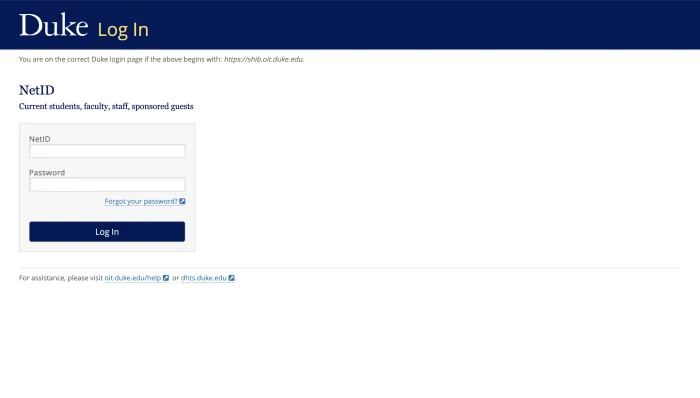
The quickest way to access your Duke Mail account is through Duke’s official email portal. You should always start from an official Duke page, especially if you are signing in from a new device or after receiving a suspicious email.
Duke Mail login steps
- Go to the official Duke Mail portal at mail.duke.edu.
- Enter your Duke NetID and password.
- Complete Duke’s multi-factor authentication step if prompted.
- Wait for the redirect into your Outlook-based Duke inbox.
- Confirm that you are signed into your Duke work or school account, not a personal Microsoft account.
If your NetID and password do not work, the issue is often related to an expired password, incorrect NetID entry, account lockout, or MFA device problem. Duke OIT is the correct support point for those issues.
Accessing Duke Email Through Outlook and Microsoft 365
Because Duke Email runs on Microsoft 365, you can access the same inbox through different Microsoft tools. These are not separate inboxes. They are simply different ways to reach the same Duke email account.
| Access Method | Best For | Important Note |
|---|---|---|
| Duke Mail portal | Fastest direct access to your Duke inbox. | Good starting point if Outlook login creates confusion. |
| Outlook Web Access | Checking Duke Mail through a browser. | Use your full @duke.edu email address and Duke work or school login. |
| Outlook desktop app | Daily email, calendar, contacts, and shared mailbox workflows. | Add the account as a Microsoft 365 work or school account. |
| Microsoft 365 web suite | Accessing email plus Word, Excel, Teams, OneDrive, and other Microsoft tools. | Your available tools may depend on your Duke role and license. |
Common Outlook confusion
Some users type Outlook or Microsoft into a search engine and end up on a personal Microsoft account login screen. That can create sign-in loops or show the wrong mailbox. If this happens, sign out of the personal Microsoft account and restart from Duke’s official login page.
Setting Up Duke Mail on Mobile
You can use Duke Mail on mobile through the Outlook app or a built-in mail app. For most users, the Outlook mobile app is the smoother option because it usually handles Microsoft 365 login, Duke authentication, calendar sync, and MFA prompts better than native phone mail apps.
How to add Duke Mail on a phone
- Install the Outlook app on iPhone or Android, or open your phone’s built-in Mail app.
- Choose Microsoft 365 or Exchange as the account type.
- Enter your full Duke email address.
- Sign in with your Duke NetID password when redirected.
- Approve the MFA prompt on your registered device.
- Allow email, calendar, and contact syncing if needed.
If your email works on your laptop but not on your phone, the issue is often account-type selection, old saved credentials, or an MFA device that needs to be reconnected.
Troubleshooting Duke Mail Login Issues
Duke Mail login problems usually fall into a few common categories. Before contacting support, it helps to identify which kind of issue you are facing.
| Problem | Likely Cause | What to Try |
|---|---|---|
| Password not accepted | Your Duke NetID password may be expired, mistyped, or locked after repeated attempts. | Reset or verify your password through Duke’s official NetID self-service options. |
| Stuck in MFA loop | Your authentication device may have changed, been reset, or lost its registration. | Re-register or update your MFA device through Duke’s official authentication management tools. |
| Wrong inbox opens | You may be signed into a personal Microsoft account on the same browser or device. | Sign out of Microsoft accounts, clear the browser session, and start again from Duke’s portal. |
| Email works on one device only | One device may have outdated credentials or incorrect account settings. | Remove and re-add the Duke account as a Microsoft 365 or Exchange account. |
| Cannot find forwarding settings | Some Duke mail settings are managed outside the Outlook inbox. | Use Duke OIT’s Mail Tools or official email settings resources. |
When to contact Duke OIT
Contact Duke OIT if you cannot reset your password, cannot complete MFA, believe your account is locked, suspect phishing, or still cannot access Duke Mail after trying the basic fixes. NetID and authentication problems usually need to be handled through Duke’s official support systems.
Duke Mail Tools and Forwarding
Some Duke Mail settings are not managed directly inside the Outlook inbox. For example, forwarding, distribution lists, away messages, and certain account-level email settings may be handled through Duke OIT’s Mail Tools or related official pages.
This is important because many users open Outlook settings and assume the option is missing. In reality, the setting may exist, but it may be managed through Duke’s own email administration tools rather than Microsoft’s standard Outlook menu.
Common Mail Tools tasks
- Setting or checking email forwarding.
- Managing distribution list-related settings.
- Configuring away messages or mailbox options.
- Checking Duke-specific email settings that do not appear inside Outlook.
Important: Duke Ending Lifetime Alumni Email Access in 2027
One of the most important Duke Mail updates is the planned end of lifetime alumni email access in 2027. For many years, alumni could continue using their Duke email address after graduation. That long-term alumni email access is now changing.
This matters because many alumni use their @duke.edu address for professional communication, account recovery, subscriptions, job applications, banking alerts, cloud services, and old personal records. Waiting until the final cutoff can create avoidable problems.
What alumni should do now
- Update recovery email addresses on important accounts.
- Move banking, job, subscription, and cloud service logins to a personal email address.
- Export important old emails and contacts.
- Back up files stored in Microsoft 365 tools connected to the Duke account.
- Watch for official Duke communication about exact deadlines and transition steps.
Current students, faculty, and staff should not confuse this with active Duke email access. The 2027 change is mainly about the lifetime continuation of alumni email access after leaving Duke.
Safe Duke Mail Login Tips
University email accounts are valuable targets because they can be connected to student records, research, payroll, internal documents, financial aid, job applications, and other sensitive information. Good login habits matter.
- Always start from Duke’s official website or mail.duke.edu.
- Use a strong, unique password for your Duke NetID.
- Keep your MFA device updated.
- Do not approve MFA prompts you did not request.
- Do not click Duke Mail login links from suspicious emails.
- Check that you are signing into a Duke work or school Microsoft account.
- Contact Duke OIT if you suspect your account has been compromised.
Duke Mail is Duke’s Microsoft 365-based email system, accessed through a Duke NetID and protected by Duke’s authentication process. For most users, mail.duke.edu is the safest starting point.
Students, faculty, and staff should treat Duke Mail as a university account, not a personal inbox. Alumni should pay special attention to the 2027 email access change and begin moving important accounts and files well before access ends.
If your issue is login-related, the most common fixes are password reset, MFA re-registration, signing out of personal Microsoft accounts, or contacting Duke OIT for account-level help.
Duke Mail FAQs
Yes, Duke Email is powered by Microsoft 365 and can be accessed through Outlook. The Duke Mail portal and Outlook web access are different entry points into the same Duke email system.
The common direct login route is mail.duke.edu. Users should start from Duke’s official pages rather than clicking unknown email links or third-party login results.
You use your Duke NetID and password. You may also need to complete Duke’s multi-factor authentication step before reaching your inbox.
Duke Mail usually means digital email. Campus Mail Services handles physical mail, packages, mailboxes, and campus delivery services.
Yes. The Outlook mobile app is usually the easiest option. Add your Duke account as a Microsoft 365 or Exchange account and complete the Duke authentication steps.
Your password may be expired, mistyped, locked after repeated attempts, or affected by a NetID issue. Use Duke’s official password reset or NetID support options.
This usually happens when your browser or app is already signed into a personal Microsoft account. Sign out, clear the session if needed, and restart from Duke’s official mail portal.
Forwarding and similar settings may be managed through Duke OIT’s Mail Tools or official email settings pages rather than the normal Outlook interface.
Duke has announced that lifetime alumni email access will end in 2027. Alumni should begin moving important accounts, files, and recovery addresses away from their Duke email.
Contact Duke OIT for issues involving NetID login, password reset, MFA, account lockout, suspicious access, or email problems that cannot be fixed through basic troubleshooting.