For years, Cutout.pro positioned itself as the ultimate convenience tool for everyday users, digital marketers, and e-commerce sellers. Promising one-click background removal, high-definition image upscaling, and a fully automated passport photo maker, it drew in a massive global audience looking to bypass the steep learning curves and high costs associated with professional software like Adobe Photoshop.
However, beneath the polished surface of this highly trafficked platform lies a deeply concerning operational reality. Following a string of catastrophic cybersecurity incidents, a flood of documented consumer complaints regarding broken features, and highly aggressive, unresponsive billing tactics, the Inboxaly Research Team decided it was time to conduct a comprehensive, uncompromising investigation.
Our team performed a deep-dive test into Cutout Pro’s actual functionality in 2026, analyzed its underlying billing infrastructure, and investigated the extensive data leaks directly associated with the platform's servers. What we uncovered was alarming.
If you are considering uploading a personal photo, entering your primary email address, or putting your credit card information into Cutout Pro, you must read this comprehensive review first. This is the complete truth about what happens to your data and your money when you use this platform.
The Initial Appeal: Why Millions Flocked to Cutout Pro
To understand the magnitude of the platform's current issues, one must first understand its massive reach. Cutout Pro operates as a cloud-based visual content generation suite. It utilizes advanced computer vision algorithms to automate tedious tasks that traditionally required hours of manual labor.
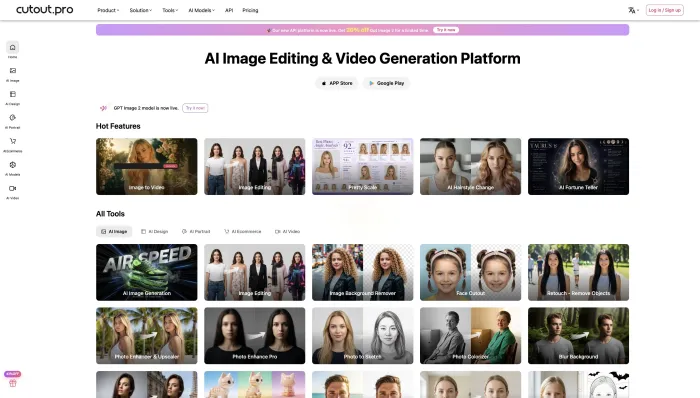
The platform markets a highly appealing all-in-one suite:
- Image Background Removal: Instantly isolating subjects from complex, cluttered backgrounds.
- Video Cutout: Removing backgrounds from moving MP4 video files without the need for a physical green screen.
- Passport Photo Maker: Automatically cropping, formatting, and aligning everyday selfies into official, government-compliant document photos.
- Photo Enhancer: Utilizing AI to upscale blurry, vintage, or low-resolution images into crisp, high-definition files.
Operating on a "freemium" model, users are encouraged to test these tools for free. However, accessing high-definition downloads or utilizing the video processing tools requires purchasing digital "credits" or committing to a recurring monthly subscription. While the premise is fantastic, the execution—particularly regarding user privacy and financial integrity—has completely collapsed.
The Cybersecurity Nightmare: A Timeline of Massive Data Breaches
Before we can even evaluate the quality of the photo editing tools, we must address the most critical issue: Cutout Pro has suffered catastrophic, platform-wide failures regarding user data privacy. The platform is currently dealing with the active fallout of multiple massive data leaks, rendering it a severe security risk.
Independent cybersecurity researchers, including Troy Hunt of the widely respected database Have I Been Pwned, alongside the threat intelligence team at Cybernews, have confirmed severe vulnerabilities and active breaches associated with Cutout Pro's servers.
The 2024 "KryptonZambie" Mega-Breach
The situation devolved from negligent to disastrous in February 2024. A hacker operating under the alias "KryptonZambie" posted a massive 5.93 GB database on popular Dark Web hacking forums (such as BreachForums). This breach contained the personal records of nearly 20 million Cutout Pro users (totaling over 41 million individual data records).
The stolen data was highly sensitive and easily exploitable. The leaked files included:
- Full user names and primary email addresses.
- Salted MD5 password hashes (a highly outdated and easily cracked form of cryptographic encryption).
- IP addresses, allowing malicious actors to geolocate users.
- Phone numbers and personal API keys.
The Real-World Impact: Dark Web Alerts and Geolocation Risks
During our research and monitoring of user experiences, we found a disturbing volume of everyday people who traced their compromised digital security directly back to this specific platform.
Users actively utilizing advanced antivirus software, like Malwarebytes, or monitoring their digital footprint via Google’s Dark Web monitoring tools, report receiving continuous, daily alerts. These alerts confirm that their credentials, IP addresses, and personal emails—specifically those associated with their Cutout Pro accounts—are actively circulating and being traded on illicit hacker forums.
For a platform that actively encourages users to upload clear, forward-facing portraits of themselves for "Passport" formatting, a data leak of this magnitude poses an unparalleled threat. Uploading personal imagery to a platform with a verified history of exposing user data opens the door to identity theft, highly targeted phishing scams, and the unauthorized use of personal likenesses for immoral or fraudulent purposes. When your email is leaked alongside your exact IP address, hackers can cross-reference your digital identity with your physical location.
Inboxaly’s Hands-On Testing: Broken Tech and Consumed Credits
Despite the glaring, undeniable security red flags, our team proceeded to test the actual functionality of the editing tools to see if the software at least lived up to its marketing claims. Unfortunately, the user experience is just as broken as the security infrastructure.
The Background Remover Failure
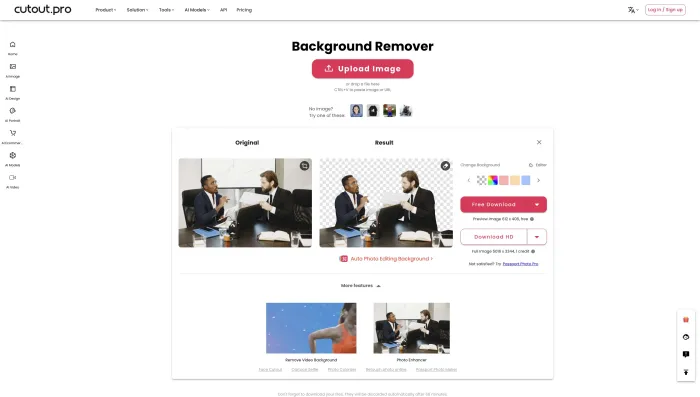
While Cutout Pro’s background remover once functioned decently in its early development stages, the current iteration in 2026 is highly unstable and fundamentally flawed. During our rigorous testing, the tool frequently threw unhelpful, generic error messages mid-process.
The most egregious issue? When the tool crashes and fails to process your image, it still permanently deducts your paid credits.
Furthermore, when the tool does manage to complete a cycle without crashing, the results are shockingly poor. Images are frequently plagued with harsh vertical and horizontal artifact lines, and massive portions of the original background are left completely intact. Free, open-source alternatives available today can perform this exact task flawlessly without charging you a cent, making Cutout Pro's paid background remover functionally obsolete.
The Passport Photo Disaster
The passport photo tool—one of the platform's most heavily advertised features—is actively harming users' real-world schedules and travel plans.
Official government documents require highly specific, unaltered biometric measurements. However, we found repeated instances where the Cutout Pro AI aggressively modified users' facial features without permission. The AI frequently attempts to "smooth" skin or alter lighting, resulting in blurry, unnatural, heavily filtered images that are entirely unacceptable for official government visas or passports.
In multiple documented cases, users attempting to format a photo for a time-sensitive, in-person passport appointment were left with unusable, AI-altered images. Because government agencies instantly reject digitally altered photos, users were forced to scramble for last-minute, expensive alternatives, risking the loss of their hard-to-get embassy or passport agency appointments entirely.
The "Free Trial" Video Bait-and-Switch
The platform utilizes a highly deceptive, arguably predatory onboarding funnel to acquire user data. Users are prompted to upload their videos or photos for enhancement under the guise of a completely free trial. The website allows you to upload a large file, wait for the processing bar to load, and view a watermarked preview.
However, once the AI finishes processing, the platform throws up a hard, unexpected paywall demanding you log in, create an account, and purchase a credit package to actually download your corrected file. It is a classic data-harvesting technique: they trick you into handing over your media and personal email address before revealing the true financial cost of the interaction. Once they have your email, users report an immediate influx of spam and phishing attempts.
The Financial Black Hole: Predatory Billing and Ghosted Refunds
Perhaps more frustrating than the broken tools and compromised data is how Cutout Pro handles its users' finances. The platform operates what can only be described as a financial black hole.
The Refund Mirage
If the software breaks, destroys your image, and eats your paid credits, do not expect to ever get your money back. The customer support infrastructure appears to be entirely abandoned or purposefully evasive.
Users who complain through official channels are met with complete silence. Those who do manage to finally get a response are subjected to a standardized delay tactic. For instance, users report receiving emails from "Kostja from the marketing department," who assures them that their complaint is valid and that the "finance department" will process a full refund within 14 days.
This is a mirage. The 14 days pass, and the money never arrives. Follow-up emails go completely ignored, and the company's social media pages are filled with ignored comments from angry customers demanding their money back. Because the company refuses to honor its own refund policies, countless users are forced into the time-consuming process of initiating formal chargebacks through PayPal or their credit card providers just to stop the theft.
Safe, Free Alternatives to Cloud-Based AI Editing
There is absolutely no logical reason to risk your personal data, your IP address, or your wallet on a broken, insecure platform. The AI landscape has evolved, and there are far superior, safer tools available today. If you need image editing tools, we highly recommend utilizing these secure alternatives:
- For Secure Background Removal (Local Processing): If you are tech-savvy, look into open-source GitHub tools like
rembgorbackgroundremover. These scripts run locally on your own laptop's hardware. Because the processing happens on your machine, your photos are never uploaded to a cloud server, ensuring 100% data privacy. - For Everyday Users: Mainstream, highly regulated applications like CapCut or the built-in iOS/Android native photo editors offer excellent, reliable background removal tools that do not rely on deceptive paywalls or unsecure cloud storage.
- For Image Upscaling: Tools like Upscayl (a free, open-source desktop application) utilize your local computer's GPU to hallucinate details and upscale images. Again, because it is local software, your private data remains completely in your control.
Damage Control: What to Do If You Have Used Cutout Pro
If you have already created a Cutout Pro account, downloaded the app, or paid for a subscription in the past, you must operate under the assumption that your data was involved in the 2024 KryptonZambie mega-breach. You must take immediate steps to protect your digital identity:
- Change Your Passwords Immediately: If you used the exact same password on Cutout Pro as you do for your primary Gmail, your banking apps, or your social media accounts, you must change those external passwords right now. Hackers use credential stuffing to test leaked passwords across multiple platforms.
- Monitor for Highly Targeted Phishing: Because your name and email are actively circulating, be highly suspicious of any emails asking for personal information, password resets, or urgent financial action. Hackers are actively using the leaked Cutout Pro email lists to send sophisticated spam.
- Check Your Exposure: Go to the website Have I Been Pwned and enter the email address you used for Cutout Pro to confirm the extent of your data exposure.
- Issue a Hard Stop on Billing: Do not trust the "Cancel Subscription" button on the Cutout Pro website. Call your bank or log into your credit card portal and issue a permanent merchant block against the company to prevent future unauthorized charges.
Pros and Cons Summary
✅ What Works (Barely)
- The platform hosts a wide, convenient variety of tools in one centralized web dashboard.
- A slim minority of users report occasional success with basic, low-resolution image upscaling when the servers are actually operational.
❌ The Dealbreakers
- Catastrophic Security Failures: Responsible for exposing nearly 20 million users' emails, IP addresses, full names, and passwords to the Dark Web.
- Predatory Billing Practices: Continues to charge users long after accounts are canceled and entirely refuses to issue refunds for broken tools.
- Unreliable, Broken Tech: The background remover frequently errors out, leaves visual artifact lines, yet still consumes paid user credits.
- Dangerous Passport Failures: Generates blurry, unauthorized AI-altered images that result in government rejections and missed passport appointments.
- Ghosted Support: Completely non-existent customer service that utilizes automated delay tactics to avoid returning stolen funds.
Final Verdict: Stay Far Away
The Inboxaly Research Team evaluates, tests, and reviews dozens of artificial intelligence tools every single month. Rarely do we encounter a platform with such a severe, unapologetic combination of technical failure, financial predation, and gross privacy negligence.
Our conclusion is absolute: Cutout Pro is not safe to use.
Between the massive Dark Web data leaks that left millions vulnerable, the deceptive "free trial" onboarding funnel, the fundamentally broken background removers that drain your wallet, and the predatory billing practices that ignore user cancellations, the platform has lost every shred of professional credibility.
Stay Far Away. Do not upload your personal photos, do not provide them with your primary email address, and under absolutely no circumstances should you trust them with your credit card information. Protect your digital identity and take your creative workflows elsewhere.