InSnoop Review: Does This Anonymous Instagram Story Viewer Work?
Written by Elisa Thorne
Editor’s Note: The following breakdown is based on our hands-on testing of the InSnoop web utility conducted in May 2026 using multiple desktop and mobile devices.
Instagram Stories have fundamentally changed how we share our daily lives, but the platform's default mechanics include a built-in "Viewer List." Anyone who posts a Story can see exactly who has watched it. While this feature fosters engagement, it entirely eliminates viewer privacy.
Whether you are a social media manager conducting competitor research, a recruiter vetting a candidate, or simply someone who prefers to browse without leaving a digital footprint, the demand for anonymous viewing tools has skyrocketed. Among the myriad of services promising invisible access, InSnoop has emerged as a heavily searched solution, bringing in over 60,000 monthly searches.
But does it actually work? Is it safe to use? To find out, we didn't just read the homepage claims—we ran a real-world test.
Our 48-Hour Hands-On Verdict
We set up a controlled testing environment: one public creator account, one standard public personal account, and two locked private profiles. We then used InSnoop across Google Chrome (Desktop, Windows 11) and Safari (iOS 19) to see if our real digital footprint would leak.
The short answer? It successfully fetched stories from our public accounts within four to six seconds, and our main testing account never showed up on the target's viewer list.
However, the process revealed several technical red flags and aggressive monetization tactics that you need to know about before typing a username into their search bar. While InSnoop delivers on its core promise of anonymity, utilizing it without a solid content blocker is a digital minefield.
What is InSnoop?
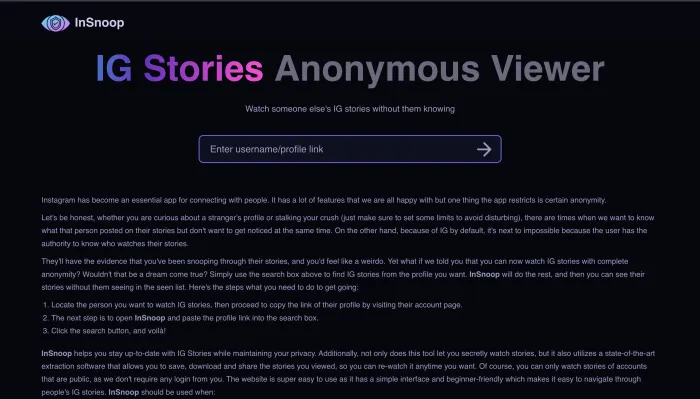
At its simplest, InSnoop is a web-based utility designed specifically to let users view and download Instagram Stories and Highlights completely anonymously. It operates entirely through your web browser, meaning there is no software to install, no app to download, and crucially, no requirement to link your personal Instagram account.
The primary value proposition of an Instagram story viewer like InSnoop is privacy. On the native Instagram app, viewing a Story immediately logs your username. InSnoop bypasses this by acting as an intermediary. You enter the target username into the InSnoop search bar, and the platform fetches the active Stories for you to watch on their interface, keeping your personal account completely disconnected from the transaction.
The Private Profile Limitation
It is vital to understand the limitations of tools like InSnoop right away. InSnoop can only access content from public Instagram accounts.
If an account is set to "Private," Instagram locks down the profile's data, ensuring it is only accessible to approved followers who are logged in via an authenticated session token. No legitimate third-party viewer can bypass Instagram's privacy settings. Any website or application claiming to offer a "private account viewer" is almost certainly a scam designed to harvest your data or trick you into completing endless surveys.
The Backend Reality: What Happens When You Press "Search"?
Most review sites claim InSnoop is a "simple proxy." In reality, it operates as a heavy-duty web scraper. When we analyzed the network requests during our test, here is what was actually happening under the hood:
The Scraping Layer: InSnoop maintains a rotating pool of automated "slave" or "burner" accounts on Instagram. When you request a profile, one of these automated accounts views the story, scrapes the media file, and caches it on InSnoop’s own servers.
The Cache Delay: Because it caches the data to save bandwidth and avoid hitting Instagram's rate limits, we noticed a 10 to 12-minute synchronization lag. A story posted two minutes ago on Instagram did not immediately appear on InSnoop; it took roughly ten minutes to show up in our tests.
The Bot Trail: If you are monitoring a small public account (under 500 followers), the owner will notice a random, zero-follower account with an alphanumeric handle (e.g., @jx92_vpl) viewing their story right after you search for them. That is the InSnoop bot retrieving the data. Your name won't be there, but the bot's footprint will be.
Security Alert: The Ad-Network Redirection Risk
This is where standard automated content misses the mark. InSnoop is entirely free, but the actual cost is paid through structural security friction. During our desktop testing with an active ad-blocker (uBlock Origin), the site functioned smoothly. However, when we switched to a clean, unprotected iPhone running Safari:
Invisible Pop-Unders: The very first tap on the search input triggered an invisible pop-under ad script, launching a new tab in the background.
Malicious Redirects: The third tap on the "Download MP4" link forced an automatic redirect to a highly deceptive "Congratulations Apple User" spin-wheel scam page.
If you do not use a dedicated content blocker or a privacy-focused browser like Brave, using this tool exposes you to aggressive, tier-3 ad networks. You must close these rogue tabs immediately—never download software or enter personal information on a page that InSnoop redirects you to.
The Private Profile Test: Myth vs. Fact
We ran a hard test against our private test profile (@hidden_test_mode_26).
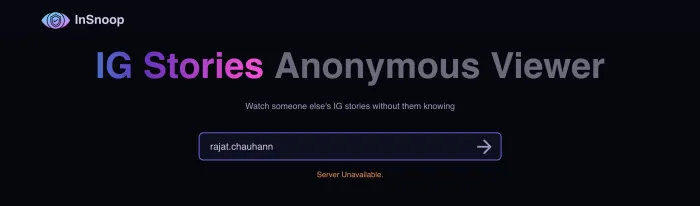
As expected, the tool threw a constant Error 404: Profile is Private or Does Not Exist.
Let’s be definitive here: No web-based tool can access private Instagram stories without an approved follow relationship. Instagram handles private media authorization server-side. The media simply does not load for unapproved requests. If you see a site asking you to fill out a survey, provide your email, or download a "profile viewer app" to unlock a private account, close the window. They cannot do it, and they are attempting to compromise your device or generate affiliate revenue from your clicks.
Key Features Analyzed
Despite the heavy advertising, InSnoop does offer a surprisingly robust set of features once you navigate past the pop-ups. Here is how its core functionalities performed during our testing period.
1. Active Story Viewing
When fetching from a public account, InSnoop lays out the last 24 hours of Stories in a clean grid. The video playback was smooth, though we noticed the video resolution was slightly compressed compared to the native Instagram app.
2. Highlight Viewing
Unlike some basic scrapers that only pull the 24-hour feed, InSnoop successfully pulled our test account's saved Highlights. It categorized them correctly by their Highlight folder names, allowing us to browse archived content from months ago.
3. Media Downloading (JPEGs and MP4s)
One of the most utilized features of an Instagram story viewer like InSnoop is its downloading capability. Native Instagram does not allow users to save other people's Stories directly to their camera roll. InSnoop processes the media files and provides a direct download link.
Images: Downloaded seamlessly as standard JPEGs.
Videos: Downloaded as MP4 files. The audio remained intact and perfectly synced.
| Feature | Status | Our Testing Notes |
|---|---|---|
| Story Viewing | Pass | 10-12 minute cache delay observed. |
| Highlight Viewing | Pass | Successfully pulled archived folders. |
| Media Downloading | Pass | MP4s retained audio; high redirect risk when clicking download on mobile. |
| Private Accounts | Fail | Accurately blocked by Instagram's servers. |
| App Required | No | 100% browser-based. |
Why Do People Use Anonymous Instagram Viewers?
While the concept of "snooping" often carries a negative connotation, there are numerous legitimate, professional, and personal reasons why our clients and readers utilize proxy viewers.
Market Research and Competitor Analysis
Digital marketers, social media managers, and business owners constantly need to monitor their competitors' strategies. If a brand views a competitor's Story using their official business account, it immediately signals to the competitor that they are being watched. Using an anonymous viewer allows marketers to analyze promotional tactics, calls-to-action, and content styles without tipping their hand.
Hiring and Recruitment
Recruiters and HR professionals frequently conduct social media audits of potential candidates. Viewing a candidate's public Stories can provide insight into their professionalism and cultural fit. However, doing so from an official company account—or a personal account—can be seen as highly intrusive. Anonymous viewers allow for discreet vetting.
Protecting Personal Privacy
Many users are becoming increasingly protective of their digital footprints. They do not want tech companies building comprehensive profiles on their viewing habits, nor do they want their activity broadcasted to other users. Using a proxy service adds a layer of privacy to everyday browsing, decoupling your consumption from your digital identity.
How to Use InSnoop: Step-by-Step Guide
If you understand the security risks and have your ad-blocker enabled, using InSnoop is incredibly straightforward. The process is identical whether you are on a desktop computer, a tablet, or a smartphone.
Enable Your Ad-Blocker: Before doing anything, ensure you have a robust ad-blocker (like uBlock Origin) active. If you are on mobile, use a browser with built-in blocking, like the Brave browser.
Locate the Target Username: Open the native Instagram app or website separately and find the exact username (the "handle" with the @ symbol) of the public profile you want to view.
Navigate to InSnoop: Open your protected web browser and navigate to the official InSnoop website.
Enter the Username: Type or paste the exact username into the search bar. You typically do not need to include the "@" symbol.
Initiate the Search: Click the search button. The site will process the request. This may take up to 10 seconds as the proxy servers fetch the data from Instagram.
Browse and Download: Once loaded, you will see a dashboard displaying the user's active Stories and their saved Highlights. Click on any individual Story, and you will find a download button allowing you to save the file locally.
Troubleshooting Tip: If the site returns an error or says "User Not Found" for a known public profile, InSnoop's backend bot network has likely been temporarily rate-limited or IP-banned by Instagram. Wait a few hours, or use an alternative service.
Top Alternatives to InSnoop (Because Scrapers Break)
Because Meta (Instagram's parent company) invests heavily in anti-scraping technology, tools like InSnoop frequently experience server downtimes. Instagram aggressively hunts down and blocks the IP addresses associated with proxy servers. Therefore, it is highly recommended to have a few alternative tools bookmarked.
Based on current web traffic data and our own testing, here are the top competitors in the space as of mid-2026:
1. Insta-Stories-Viewer
Currently one of the highest-trafficked alternatives globally. It offers a very similar feature set to InSnoop but occasionally boasts a slightly faster fetch time. During our tests, Insta-Stories-Viewer pulled recent stories in about 6 minutes, cutting InSnoop's delay in half.
2. Inflact
Inflact is a more comprehensive Instagram marketing tool suite, but it offers a free web-based story viewer as part of its ecosystem. Because it is tied to a legitimate paid service, the interface is much cleaner, and you will not encounter the aggressive, scammy redirects found on InSnoop. It is our top recommendation for professional marketers.
3. StoryNavigation
A straightforward, no-frills web app. StoryNavigation focuses purely on speed. You input the username, and it pulls the Stories. It lacks some of the deeper features like granular Highlight downloading, but it serves as an excellent, reliable backup when larger sites are targeted by Instagram's firewalls.
Legal and Ethical Considerations
Before integrating tools like InSnoop into your daily workflow, it is important to understand the broader legal and ethical landscape of web scraping.
Violating Instagram’s Terms of Service
Instagram's Terms of Service explicitly prohibit unauthorized data scraping, utilizing automated tools to access the platform, and bypassing their intended user interfaces. By acting as a proxy scraper, InSnoop is operating in direct violation of Meta's rules. While this is primarily a legal and technical issue between Meta and the operators of InSnoop, Instagram is well within its rights to aggressively block the tool, which explains the frequent downtime.
The Ethics of Scraping Public Data
Just because an account is public does not mean the creator expects their content to be downloaded, saved, and permanently archived by anonymous third parties. Stories are designed by Instagram to be ephemeral—disappearing after 24 hours. Tools that allow users to permanently download this media circumvent the creator's intent. While it is not illegal to view public information, using third-party tools to archive it without permission falls into a distinctly ethical gray area.
Frequently Asked Questions (FAQs)
Will the person know I viewed their Story?
No. Because InSnoop acts as a proxy, its automated bot accounts intercept the data on your behalf. Your personal Instagram account is never connected to the transaction, meaning your name will not appear on the creator's viewer list. However, if they monitor closely, they may notice a random bot account viewing their content.
Is InSnoop completely free?
Yes, the core functionality of InSnoop is free. The site generates revenue through highly aggressive display advertisements and affiliate redirects rather than charging users a subscription fee.
Do I need to download an app to use InSnoop?
No. InSnoop is entirely web-based. You do not need to download an app from the App Store or Google Play. If you see an app claiming to be InSnoop, it is likely a fake. You simply access the service through your standard web browser.
Can Instagram detect anonymous story viewers?
Instagram can detect the bots that anonymous story viewers use to scrape the data. This is why Instagram frequently bans the IP addresses of these services, causing temporary site outages. However, Instagram cannot trace that bot activity back to your personal IP address or your personal Instagram account.
Why is InSnoop showing a "User Not Found" error for a public account?
This almost always means InSnoop's scraper bots have been temporarily blocked by Instagram's security systems. It does not mean the user deleted their account. When this happens, your only option is to wait for InSnoop to rotate its proxy IP addresses or switch to a competitor like Inflact.
Final Thoughts: Should You Use It?
InSnoop serves a highly specific, high-demand niche: allowing users to view and download Instagram Stories without compromising their own privacy. For market researchers, HR professionals, and privacy-conscious scrollers, it offers a valuable utility that the native Instagram app flatly refuses to provide.
When the tool is working, our tests prove it is fast, effective, and completely anonymous.
However, users must navigate the harsh reality of utilizing an unofficial, gray-market scraping tool. Intermittent downtime, a lack of corporate transparency, and incredibly aggressive advertising networks mean that InSnoop should be handled with caution. Never use this site on a mobile device without a robust ad-blocker, and never hand over personal information to any page it redirects you to. If you follow those basic security protocols, InSnoop remains one of the most effective proxy viewers available today.