How to Write an Email Professionally: Guide with Examples
Written by Viraj Pandit
The average professional sends 40 emails per day. Most of those emails are forgettable. Some create confusion. A few damage relationships. The difference between an email that gets results and one that gets ignored usually comes down to three things: structure, tone, and clarity. None of these require writing talent. They require a framework. This guide provides that framework: how to build a professional email from scratch, how to calibrate tone for any situation, how to avoid the mistakes that make emails land badly, and how to use AI tools to draft faster without losing authenticity.
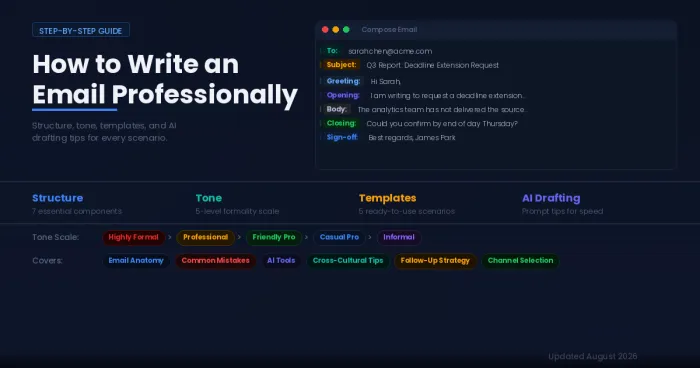
The Anatomy of a Professional Email
Every professional email follows the same architecture regardless of its content. Understanding each component prevents the structural errors that make emails confusing or unprofessional.
Professional Email Address
The email address itself is the first signal of credibility. A company domain ([email protected]) establishes legitimacy immediately. A personal address like [email protected] does not. For freelancers or independent professionals without a company domain, purchasing a personal domain and setting up a branded email address ([email protected]) costs a few dollars per month and eliminates a trust barrier before the recipient even opens the message.
Subject Line
The subject line determines whether an email gets opened, skimmed, or ignored. Effective subject lines are specific, concise (under 50 characters), and tell the recipient exactly what the email is about or what action is needed.
Strong subject lines: "Q3 budget approval needed by Friday," "Meeting reschedule: Thursday 2pm to 3pm," "Introduction: Sarah Chen, product lead at Acme"
Weak subject lines: "Quick question," "Hi," "FYI," "Important," "Follow up"
A subject line should answer one question: if the recipient only reads this line and nothing else, will they understand what the email is about?
Greeting
The greeting sets the tone for the entire email. Match it to the relationship and context.
Formal (first contact, senior leadership, external clients): "Dear Ms. Rodriguez," or "Dear Dr. Patel," or "Dear Hiring Manager,"
Standard professional (colleagues, known contacts, recurring correspondence): "Hi Sarah," or "Hello David," or "Good morning, team,"
Avoid: "Hey," "Yo," "To whom it may concern" (when the recipient's name is findable), and no greeting at all. Starting an email without any greeting reads as abrupt in most professional cultures.
When unsure, default to slightly more formal. A recipient who prefers informality will not be offended by a polite "Hello." A recipient who expects formality may be put off by a casual "Hey."
Opening Line
The opening line serves two purposes: it provides context and it signals relevance. The recipient should know within the first sentence why they are receiving this email.
Effective openers: "I am writing to request approval for the revised project timeline," or "Following our conversation on Tuesday, here are the next steps we discussed," or "My name is James Park, and I lead the partnerships team at Vertex. I am reaching out because..."
Overused openers to retire: "I hope this email finds you well" is not wrong, but it adds no information and has become so formulaic that most readers skip past it. If the relationship warrants a pleasantry, make it specific: "Congratulations on the product launch last week" or "I enjoyed your presentation at the conference."
Email Body
The body delivers the core message. Two principles govern effective email bodies: brevity and structure.
Keep paragraphs short. Three to four sentences maximum. Large blocks of text get skimmed or skipped entirely, especially on mobile devices where over 60% of professional emails are now read.
Lead with the main point. State the request, question, or information first. Provide supporting context after. Many writers do the opposite (context first, point last), which forces busy readers to dig for the actual message.
Use formatting for scanability. When an email covers multiple items, separate them with line breaks or a numbered list. When a single detail is critical (a deadline, a dollar amount, a decision), place it on its own line or use bold text to draw the eye.
One email, one topic. If an email covers two unrelated subjects, it creates confusion about how to respond. Send two separate emails instead.
Closing Line
The closing should tell the recipient what happens next. A clear call to action eliminates ambiguity and reduces the back-and-forth that wastes both parties' time.
Effective closings: "Could you confirm by end of day Thursday?" or "I will send the revised draft by Monday morning," or "Please let me know if you have any questions. Otherwise, I will proceed with the plan outlined above."
Vague closings to avoid: "Let me know your thoughts" (too open-ended), "Looking forward to hearing from you" (no clear action), "Thanks in advance" (can feel presumptuous depending on context).
Sign-Off and Signature
Match the sign-off to the tone of the email.
Formal: "Sincerely," or "Respectfully," or "Yours faithfully,"
Standard professional: "Best regards," or "Kind regards," or "Thank you,"
Lighter professional: "Best," or "Thanks," or "Talk soon,"
Every professional email should include a signature block with your full name, job title, company, and at least one contact method (phone number or LinkedIn). A well-structured signature eliminates the "who is this person?" friction that kills response rates on cold or first-contact emails.
The Tone Calibration Scale
Choosing the right level of formality is the part of email writing that causes the most anxiety. A simple five-level scale removes the guesswork.
Level 1: Highly formal. Used for job applications, complaints to organizations, legal correspondence, and first contact with senior executives. Full sentences, no contractions, formal greeting and sign-off. Example: "Dear Mr. Thompson, I am writing to formally request..."
Level 2: Professional formal. Used for client communications, cross-company correspondence, and emails to managers you do not know well. Polite and structured, but natural. Light contractions are acceptable. Example: "Hi Dr. Chen, I wanted to follow up on our discussion about..."
Level 3: Friendly professional. The default for most workplace emails. Colleagues, known clients, recurring collaborators. Warm but purposeful. Example: "Hi Sarah, quick update on the project timeline..."
Level 4: Casual professional. Close colleagues, team channels, internal updates where informality is the norm. Example: "Hey team, just a heads up that the deadline moved to Friday."
Level 5: Informal. Friends, family, personal contacts. Not appropriate for any professional context except team members with an established casual dynamic.
When in doubt, aim one level more formal than the situation seems to require. It is always easier to relax tone in subsequent exchanges than to recover from an email that landed as too casual.
Email vs Slack vs Meeting: When to Use What
Professional email does not exist in isolation anymore. Choosing the right channel is as important as writing the message well.
Use email when the message needs a written record, involves someone outside the organization, requires a thoughtful or detailed response, includes attachments, or will be referenced later.
Use Slack, Teams, or chat when the question is quick and low-stakes, the conversation is between close colleagues, the matter is time-sensitive and needs an immediate response, or the topic is conversational and does not need documentation.
Schedule a meeting when the topic requires discussion or debate, the email would be longer than three paragraphs, emotions are involved (feedback, conflict, sensitive news), or multiple people need to align on a decision.
A common mistake is using email for conversations that belong in chat (creating bloated inboxes) or using chat for information that should be searchable in email (creating institutional amnesia). Matching the channel to the message type reduces noise across all platforms.
10 Common Mistakes That Make Professional Emails Land Badly
Writing a novel. If an email exceeds five paragraphs, it probably needs to be a meeting, a document, or two separate emails.
Burying the request. Placing the ask in the fourth paragraph guarantees some readers will never see it. Lead with it.
Reply All by default. Responding to an entire distribution list when only the sender needs the response clutters inboxes and erodes trust.
Sending while frustrated. Emails written in frustration almost always read harsher than intended. Draft it, wait an hour, then reread before sending.
Vague subject lines. "Update" and "Quick question" tell the recipient nothing. Specific subject lines increase both open rates and response quality.
Forgetting the attachment. Mentioning "please see attached" without actually attaching the file is one of the most common email errors. Most email clients now flag this, but a manual check before sending is still worthwhile.
Over-apologizing. "Sorry to bother you" and "I apologize for the inconvenience" weaken the message when no apology is needed. Replace with direct language: "When you have a moment" or "I appreciate your time."
Using jargon with external recipients. Internal acronyms and shorthand confuse clients, partners, and vendors who do not share your organizational vocabulary.
Ignoring mobile formatting. Emails that look clean on a desktop monitor can become unreadable on a phone screen. Short paragraphs, line breaks, and minimal formatting translate well across devices.
Not proofreading. A single misspelled name or grammatical error in an otherwise strong email creates a disproportionately negative impression. Reading the email aloud before sending catches most issues.
Templates for Common Professional Scenarios
Introducing Yourself to a New Contact
Subject: Introduction from [Your Name], [Your Role] at [Company]
Hi [Name],
My name is [Your Name], and I lead [function] at [Company]. I came across your work on [specific reference] and wanted to reach out because [reason this is relevant to them].
I would love to learn more about [their area of expertise or a shared interest]. Would you be open to a brief call next week?
Thank you for your time.
Best regards,
[Full name and signature]
Following Up After No Response
Subject: Following up: [original subject line]
Hi [Name],
I wanted to circle back on the email I sent on [date] about [topic]. I understand things get busy, so I wanted to check whether this is still on your radar.
If the timing is not right, no problem at all. Just let me know and I can follow up at a better time.
Thank you,
[Name]
Declining a Request Politely
Subject: Re: [Original Subject]
Hi [Name],
Thank you for thinking of me for [request]. Unfortunately, I am not able to take this on right now due to [brief, honest reason: current workload, conflicting priorities, prior commitments].
I would be happy to [suggest an alternative: recommend someone else, revisit in a few weeks, help in a smaller way].
I appreciate your understanding.
Best,
[Name]
Pushing Back on a Deadline
Subject: Re: [Project Name] deadline
Hi [Name],
I want to make sure [project/deliverable] meets the quality standard we discussed, and the current timeline makes that challenging. Specifically, [brief explanation of the constraint].
Would it be possible to extend the deadline to [proposed date]? Alternatively, I could deliver [partial scope] by the original date and the remainder by [later date].
I am happy to discuss what works best for the team.
Thank you,
[Name]
Requesting a Meeting
Subject: Meeting request: [Topic], [Proposed Date]
Hi [Name],
I would like to schedule a 30-minute meeting to discuss [topic]. The goal is to [specific outcome: align on next steps, review the proposal, resolve the open question].
Would [date] at [time] work for you? I am also available on [alternative date/time] if that fits your schedule better.
Thank you,
[Name]
Using AI to Draft Professional Emails
AI tools like ChatGPT, Claude, and Gemini can generate complete email drafts from a short prompt. The key to getting usable output is providing enough context in the prompt.
A weak prompt: "Write a professional email."
A strong prompt: "Write a professional email to my manager requesting a deadline extension for the Q3 marketing report. The original deadline is Friday. I need until next Wednesday because the analytics team has not delivered the source data yet. Keep the tone respectful but direct. Two short paragraphs maximum."
The more specific the prompt (recipient, purpose, tone, length, key details), the closer the output will be to something sendable. AI drafts should always be reviewed for accuracy, tone, and personalization before sending. The goal is speed, not autopilot.
For high-stakes emails (job applications, client complaints, executive communications), AI can generate a solid first draft that saves 10 to 15 minutes, but the final version should reflect the sender's authentic voice.
Cross-Cultural Email Considerations
Professional email norms vary significantly across regions. A few patterns are worth knowing.
In some cultures, a direct opening ("I need the report by Friday") is efficient. In others, it reads as abrupt or rude, and a relationship-building preamble is expected. When emailing contacts in cultures that value relational warmth (much of Asia, the Middle East, Latin America, and parts of Southern Europe), a brief personal touch before the business content is appreciated.
Honorifics and titles carry different weight in different countries. Using a first name immediately is standard in the United States, Australia, and much of Northern Europe. In Japan, South Korea, Germany, and India, using titles (Dr., Professor, Mr./Ms.) until invited to do otherwise shows respect.
When in doubt about cultural norms, mirror the formality level of the recipient's most recent email. If they signed off with their first name, respond in kind. If they used a title, match it.
Verdict
Professional email writing is not about following a rigid formula. It is about clarity (does the reader know exactly what this email is about?), respect (does the tone match the relationship?), and action (does the reader know what to do next?). Every element of a well-written email serves one of those three purposes. Structure provides the clarity. Tone calibration provides the respect. A specific closing line provides the action. Get those three right, and the email works. Everything else is polish.
FAQ
How do you start a professional email?
Start with a greeting that matches the formality of the relationship ("Dear Ms. Rodriguez" for formal, "Hi Sarah" for standard professional), followed by an opening line that immediately states why you are writing. Avoid starting with "I hope this email finds you well" unless you genuinely have nothing more specific to say. A stronger opener references a shared context: "Following our meeting on Tuesday" or "I am reaching out about the open marketing analyst position."
How long should a professional email be?
Most professional emails should be under 200 words. If the content requires more, consider whether a meeting or a shared document would be more effective. When a longer email is necessary, use short paragraphs, line breaks, and bold text for key details so the recipient can scan rather than read word by word.
Is it OK to use AI to write professional emails?
Yes, with caveats. AI tools like ChatGPT and Claude generate strong first drafts when given specific prompts. However, every AI draft should be reviewed for accuracy, tone, and personalization before sending. AI is most useful for routine emails (meeting requests, follow-ups, status updates) and as a starting point for high-stakes messages that will be heavily edited.
What is the best sign-off for a professional email?
"Best regards" is the safest universal choice. "Thank you" works well when the email includes a request. "Sincerely" is appropriate for formal correspondence like job applications. "Best" is acceptable for lighter professional contexts. Avoid "Cheers" in formal or cross-cultural communication, as it can read as too casual.
How do you follow up on an email without being pushy?
Wait at least two to three business days before following up. Reference the original email by date and topic so the recipient can locate it quickly. Keep the follow-up shorter than the original message. Offer an out: "If the timing is not right, I am happy to revisit later" removes pressure while keeping the door open.